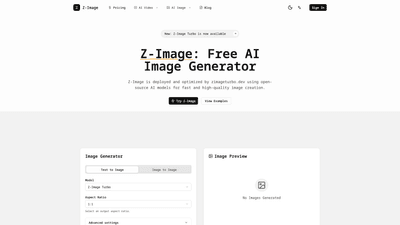
What is it
Z-Image Turbo is a practical, high-efficiency AI image generator designed for real-world creation workflows. Developed as part of Alibaba’s Tongyi Lab ecosystem and deployed by zimageturbo.dev, Z-Image Turbo combines enterprise-grade AI technology with a creator-friendly interface to deliver fast, studio-quality visuals. It’s built on open-source AI models, optimized for speed and cost performance, and enhanced to render legible text directly inside images in both English and Chinese. This makes it especially valuable for product shots, marketing visuals, posters, and social assets where typography, authentic Asian aesthetics, and quick iteration matter.
What sets Z-Image Turbo apart is its focus on speed, quality, and accessible pricing. The Turbo architecture enables ultra-fast image generation, producing 4K-level photorealism with precise details while keeping computing costs lower than traditional top-tier models. It also emphasizes native cultural intelligence, ensuring visuals align with Asian aesthetics and bilingual contexts, rather than generic, Western-centric outputs. In short: you get cinema-grade realism, reliable typography rendering, and cost-efficient production all in one tool.
Features
- Lightning-fast generation: Turbo-powered engine delivers near-instant results, enabling rapid creative iteration without long wait times.
- Flawless text rendering: Legible, correctly formed text in both Chinese and English directly in images, reducing post-processing time.
- 4K cinema-grade realism: High-resolution outputs with accurate lighting, skin textures, reflections, and depth suitable for product photography and marketing.
- Text-to-image and image-to-image modes: Flexible workflows for generating new visuals from prompts or editing existing images with reference-based refinement.
- Native Asian aesthetics and bilingual context: Deep understanding of Oriental aesthetics and cultural nuance for authentic visuals.
- Smart prompt enhancement: User-friendly prompts are expanded by a built-in reasoning engine to produce strong, professional results without prompt-engineering expertise.
- Natural language editing: Modify scenes with simple language (e.g., “make it rainy,” or “change the cat to a dog”) to iterate without complex tools.
- Simple four-step workflow: Describe → Pick mode and model → Generate and review → Download and ship, designed for fast, repeatable results.
- Aspect ratio flexibility: Supports output aspect ratios (e.g., 1:1) to match use-case requirements like social posts, banners, or product pages.
- Commercial-ready outputs: Optimized for real-world deployment in ads, product pages, and brand visuals.
- Open-source backbone with enterprise reliability: Built on open-source models while delivering stable performance and cloud-based scalability.
- Backend reliability and cloud integration: Backed by Alibaba Cloud infrastructure for stability and reach, with an independent service experience at zimageturbo.dev.
How to Use
- Describe your goal
- Define the subject, style, and intended use case (e.g., “4K photorealistic product shot of a skincare serum in a clean white background with bold typography in English and Chinese”).
- Pick mode and model
- Choose between text-to-image or image-to-image.
- Select the appropriate model and output size (and default to 1:1 aspect ratio if that matches your asset).
- Generate and review
- Run multiple variations to compare results.
- Refine prompts or reference images to improve alignment with your brief.
- Use the natural language editing feature to adjust composition, backgrounds, lighting, or objects.
- Download and ship
- Export the best image and place it directly on product pages, ads, or social posts.
- Sign in to save and manage your generated assets for ongoing campaigns.
Pricing (overview)
- Z-Image Turbo is positioned as a free AI image generator with paid options. A free tier provides access to basic generation capabilities, while a credit-based system enables higher volume and faster generation.
- Each render consumes credits (for example, typical requests may cost 2 credits per image, depending on configuration and output quality). Users can purchase credits via the pricing page to continue creating beyond the free quota.
- For exact pricing, credit costs, and available plans, view the official Pricing page on Z-Image.
Tips
- Start with simple prompts: If you’re new, a straightforward prompt like “a product shot of [item] in a clean studio with neutral lighting” can yield strong baselines that you can refine.
- Leverage smart prompt enhancement: Use the built-in prompt expansion to turn a simple idea into a detailed, professional brief without expert prompt-writing.
- Test variations: Generate several options in one go and pick the best, then iterate by adjusting prompts or references.
- Maintain consistency: Use a consistent aspect ratio and color grading across a campaign to achieve cohesive visuals.
- Use natural-language edits: If you need a different background, weather, or object, simply describe the change; the model will adjust accordingly.
- Embrace typography: Take advantage of Z-Image’s text rendering to incorporate readable multilingual text directly on posters, covers, or ads—no extra editing in Photoshop required.
- Validate realism and cultural fit: Rely on the native Asian context capabilities to ensure visuals look authentic and aligned with your audience’s expectations.
- Plan for reuse: Save preferred styles and prompts to reproduce consistent visuals across multiple assets or campaigns.
Frequently Asked Questions
-
What is Z-Image and who is it for? Z-Image is an AI image generator designed for creators, marketers, designers, and brands who need fast, high-quality visuals with authentic typography and cultural nuance. It’s suitable for ecommerce visuals, posters, social graphics, and brand visuals.
-
Can I use generated images commercially? Yes. Z-Image outputs are intended for commercial use, enabling you to deploy created assets in product pages, ads, and marketing materials. See the official Terms of Service for full licensing details.
-
How do credits and pricing work? The platform offers a free tier with limited credits and paid credits for higher usage. Each render consumes credits (typical examples show 2 credits per render). Credits are purchased via the Pricing page, and your balance updates accordingly.
-
What aspect ratios and formats are supported? The service supports common output formats and aspect ratios; 1:1 is available for square assets. Additional aspect ratios can be used to fit banners, posters, or other placements.
-
Can Z-Image generate text inside images? Yes. Z-Image features precise text rendering in both Chinese and English, enabling legible typography directly within generated visuals.
-
Do I need to be a prompt expert? No. Z-Image includes smart prompt enhancement and natural-language editing, allowing you to describe ideas in plain language and still obtain professional results.
-
How do I keep the style consistent across images? Establish a preferred set of prompts, reference images, and a consistent aspect ratio. Save successful prompts for reuse across campaigns to maintain visual coherence.
-
Is Z-Image Turbo affiliated with Alibaba? Zimageturbo.dev operates as an independent AI image-generation service. It is not affiliated with, endorsed by, or connected to Alibaba Group or its AI models. All references to Z-Image relate to the independent product and technology offered by Zimageturbo.dev.
Overall, Z-Image Turbo delivers a compelling combination of speed, typography accuracy, and culturally aware aesthetics at a compelling cost-performance ratio. It’s designed to empower creators to generate professional visuals quickly, iterate efficiently, and deploy ready-to-use imagery across marketing channels without heavy downstream editing. Whether you’re crafting product shots, social visuals, or ad creatives, Z-Image Turbo helps you write images that “look right” and communicate your message clearly—fast.