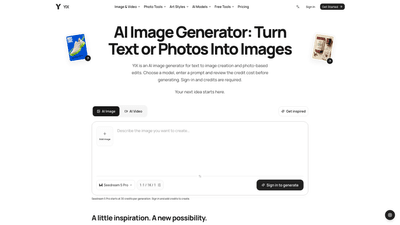
What is it
YIX is a comprehensive AI image and video generation platform designed for text-to-image creation and photo-based edits. Users can select from a range of AI models, input prompts or reference photos, and review the credit cost before generating. Sign-in is required and credits are the currency for production, making it a powerful tool for product photography, UGC ads, and professional visuals. Beyond simple image generation, YIX offers image-to-image editing, upscaling, photo restoration, and end-to-end workflows that turn product photos into ready-to-share visuals and short videos.
Features
- AI Image Generator: Create high-quality images from text prompts or reference photos. Choose a model, set aspect ratio and quality, review credits, then generate.
- Diverse AI Models: Access multiple advanced models (including Seedream 5 Pro, Seedream 5 Lite, Nano Banana variants, FLUX series, and more) to customize style, detail, and output aesthetics.
- Image to Image Editing and Prompt Lab: Load an exact prompt from a loaded image or use Prompt Lab to explore and reuse prompts for consistent results.
- UGC Ad Generator and Product Workflows: Generate product photos, catalog scenes, short videos, and UGC-style ads tailored for social and ecommerce.
- Photo Restoration and Upscaling: Restore faded colors, reduce dust, and upscale images by 2× or 4× while preserving quality.
- Video Capabilities: Produce short product clips (e.g., 5 seconds) with vertical formats suitable for social campaigns.
- One-Project Workflows: End-to-end tasks organized in a simple workflow—upload, generate, and create a share-ready asset (image and video) from a single project.
- Credit-Based Pricing: All generation is credit-driven, with flexible one-time packs and expiration timelines designed for budget planning.
- Preview and Compare: Drag sliders to compare original vs. edited images, ensuring you achieve the desired result before finalizing.
How to Use
- Sign in and choose a model: Access YIX by signing in, select the AI model that fits your style, choose aspect ratio, quality, and image count.
- Create with prompts or photos: Describe the image you want or upload a reference photo. Review the anticipated credit cost before generating.
- Generate and download: Generate the image or video and download. For edits, you can download the result and re-upload to the Image to Image flow for further generations (each generation costs credits).
- Edit and upscale: Use image restoration and upscaling options to enhance visuals. If you need higher resolution, select 2× or 4× upscaling.
- Use Prompt Lab: Load exact prompts from existing images or experiment with prompts to refine style and output. Save successful prompts for future use.
- End-to-end product workflows: Start with a product photo, generate a refined product image, and then create a short 5-second video to showcase the product in a campaign.
- Pricing and credits: Be mindful that image and video generation requires purchased credits. Browsing examples and prompts is free, but actual generation consumes credits.
Pricing (high-level overview)
- Credit-based system: Sign-in is required to generate, and credits are purchased; signing up does not grant free credits.
- One-time credit packs: Available with a 365-day validity. Example packs include 230 credits per product task, 320 credits for UGC Ad Generator tasks, and 40 credits for photo restoration tasks. Prices shown are illustrative (e.g., around $4.90 for 400 credits in a typical one-time pack).
- No mandatory subscription: You can plan and purchase credits as needed; existing credits apply across tasks as you work through different workflows.
- Task-based budgeting: Pricing varies by model, output size, and task type (e.g., product photos, UGC ads, restoration). Plan your credits before starting a task to avoid shortfalls.
Tips
- Plan credits before you buy: Use the free browsing of examples and prompts to craft a plan, then purchase the appropriate credits for your workflow.
- Start from your product: For ecommerce and product shots, upload a clear product photo to jump-start the generation and accelerate the workflow.
- Use Seeds and models for consistency: Different models produce distinct looks; select a model that aligns with your brand’s aesthetic and keep it consistent across campaigns.
- Leverage Prompt Lab: Load prompts from successful generations to reproduce or tweak results quickly.
- Preview before generating: Always review the credit total and expected results to ensure the planned output meets your expectations.
- Check labeling and packaging: When creating product videos or packaging visuals, verify that any on-label elements are accurate before finalizing assets.
Frequently Asked Questions
- Do I need to sign in, and do I get free generations?
- Yes, signing in is required to generate images or videos, and purchases of credits are necessary. Browsing examples and prompts is free, but sign-up does not automatically provide free credits.
- Will my image have a watermark?
- Watermark policies are not specified here; output quality can vary by model and settings. Check your generated result in the studio before download.
- How long does generation take?
- Generation time varies by model, prompt complexity, and the chosen quality. Typical results appear after processing, with differences across tasks.
- What can I create and in what sizes/formats can I download?
- You can create AI-generated images from prompts or reference photos, restore and upscale photos, and generate short videos for ads. Output options include standard image formats and video clips (e.g., 5-second clips in vertical formats for social use). Upscaling supports 2× and 4×. Exact download formats depend on the chosen model and task.
- When is this tool a poor fit?
- If you require guaranteed free credits, complex long-form video editing, or very specific watermark-free licensing, you may need to evaluate other solutions. YIX emphasizes a credit-based, model-driven approach with end-to-end product workflows, which may be more suitable for rapid visual content creation and social-ready assets.
- Is this suitable for professional product photography and marketing teams?
- Yes. YIX provides end-to-end workflows for product photography, UGC ads, and short video content, along with image restoration, upscaling, and prompt-driven customization. It’s designed to streamline asset creation for ecommerce, campaigns, and brand visuals, provided you manage credits and model selection effectively.
This overview highlights YIX as a versatile AI-powered solution for image and video generation, offering text-to-image capabilities, image editing, and practical workflows tailored to product visuals, UGC advertising, and social-ready content. It emphasizes a credit-based model, diverse AI models, and end-to-end workflows to deliver scalable, high-quality visuals for teams and creators.