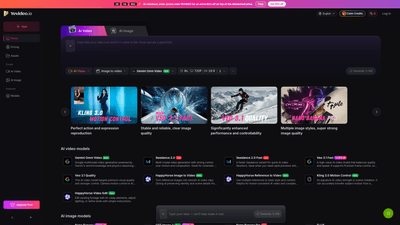
What is it
Yevideo is an all-in-one AI video and AI image studio that brings your ideas to life through a diverse suite of integrated models. Whether you want to transform prompts into cinematic AI video, convert still images into dynamic clips, or edit existing footage with AI-assisted precision, Yevideo provides end-to-end capabilities in a single platform. The service supports face uploads, multi-format outputs, and a range of AI models tailored for different styles—from quick iterations to cinema-quality production. With Yevideo, you can describe your vision and watch it materialize as high-quality AI-generated video or image outputs.
Features
- All-in-one AI video and AI image workspace
- Text to image, image to video, text to video, and video to video workflows
- AI video editor to fine-tune scenes, lighting, objects, or environments
- Face upload support for personalized outputs and consistent character identity
- Extensive AI video models (varying strengths for quality, speed, and control)
- Gemini Omni Video: Google multimodal-style capabilities with world knowledge and physics-aware reasoning for high-quality results
- Seedance 2.0 and Seedance 2.0 Fast: strong control over motion and composition; cinematic potential
- Veo 3.1 Fast and Veo 3.1 Quality: balanced speed or premium visual quality; first/last-frame control; native audio and solid character consistency
- Kling 3.0 Motion Control and Kling 2.6/2.0 variants: motion imitation, multi-aspect-ratio support, reliable native audio
- Wan 2.5 and Wan 2.7: robust image-to-video transfer of acting, motion paths, camera movement, and rhythm; reference-to-video capabilities
- HappyHorse family (Image to Video, Reference to Video): preserves identity and scene details; multi-reference guidance for brand consistency
- HappyHorse Video Edit, Wan 2.7 Video Edit: AI-assisted editing to swap elements, adjust lighting, or switch environments
- 8s/720P 16:9 presets and other aspect ratios for flexible outputs
- AI image models (fast, affordable, and production-ready)
- Nano Banana and Nano Banana Pro: daily image creation with design-grade quality and multilingual text rendering
- GPT Image 2: strong prompt adherence and polished visuals for everyday imagery
- GPT-4o Image: advanced instruction-following and precise element placement
- FLUX: affordable, multi-image-consistent outputs suitable for posters, slides, and product visuals
- Flexible usage across multiple creative scenarios
- Text-to-video, image-to-video, and video-to-video pipelines
- Reference-driven generation for brand consistency and complex visual directions
- Instruction-based AI video editing for precise element removal, substitution, or environmental changes
- Output versatility and control
- First/last-frame control for consistent style across fast iterations
- Native audio support and high motion fidelity for cinematic results
- Multi-gesture motion control (push/pull/pan/tilt) and motion mirroring from reference sources
How to Use
- Sign in or create an account
- Access Yevideo’s AI video and image studio from your dashboard and choose whether you want to work on AI Video or AI Image projects.
- Pick a workflow and model
- For video projects, choose from Veo 3.1 (Fast or Quality), Seedance variants, Kling, Wan, HappyHorse, or other supported models depending on your needs (speed, motion control, identity preservation, or quality).
- For image projects, select Nano Banana, Nano Banana Pro, GPT Image 2, GPT-4o Image, or FLUX based on your desired balance of speed, fidelity, and multilingual text rendering.
- Prepare inputs
- Text prompts to generate images or videos
- Reference images or video clips (for style, identity, or motion guidance)
- Face uploads for personalized avatars or character consistency
- Configure outputs
- Set aspect ratios (including common 16:9, vertical formats, or other ratios)
- Enable first/last-frame control for consistent styling
- Choose output quality and resolution (e.g., standard to high fidelity)
- If working with video, use the AI video editor to adjust lighting, swap elements, or alter environments
- Generate, preview, and refine
- Run the generation, review the result, and iterate by adjusting prompts, references, or model settings
- Use reference-to-video or multiple reference inputs to steer style and content precisely
- Export and usage
- Export finalized AI video or AI image outputs in your chosen formats
- Leverage multiple model outputs in a single project for complex campaigns, branding, or multi-format content
- Pricing and promotions
- Yevideo offers tiered pricing with both free and paid options. Promotional opportunities are available, such as entering the YEVIDEO promo code at checkout to receive an extra 50% off on top of the already discounted price.
Pricing
- Yevideo maintains a tiered pricing structure to accommodate hobbyists, professionals, and studios. While exact price points may vary, new users typically have access to credits or trial options, and paid plans unlock higher generation limits, faster processing, and access to premium models. For the most current details, review the official Pricing page and consider taking advantage of promotional offers (for example, applying the YEVIDEO code at checkout for an extra 50% discount on top of the discounted price).
Tips
- Start with Veo 3.1 Fast for quick previews and iterative testing; switch to Veo 3.1 Quality or Seedance for higher fidelity and cinematic control.
- Use Kling 3.0 Motion Control when you need accurate motion transfer from a reference video or precise camera movement in your AI video.
- Leverage Wan 2.5/2.7 for strong audio-visual sync and reference-to-video workflows to reproduce acting, movement, and rhythm.
- When brand consistency matters, rely on HappyHorse Reference to Video or multiple references to steer style and content across outputs.
- For consistent identity across frames, utilize first/last-frame control and native audio features to minimize post-production work.
- For image-heavy campaigns (posters, product visuals, posters), consider Nano Banana Pro or GPT Image 2 to balance design quality with multilingual text rendering.
- Always test with free credits or trial tiers if available, and monitor usage to optimize the cost per output—especially when using premium models or high-resolution exports.
- If you plan commercial usage, review the platform’s licensing guidance and ensure outputs comply with usage rights and model-specific terms.
Frequently Asked Questions
- How do I choose the right model on Yevideo?
- Match your goal to the model’s strengths: Veo 3.1 for high-quality video with motion control, Seedance for cinematic motion and composition, Kling for motion transfer and multi-aspect-ratio outputs, Wan for robust audio-visual sync and reference-driven work, Nano Banana family for fast image creation, and GPT Image 2 / GPT-4o Image for strong text-to-image results.
- What can I do end-to-end on Yevideo?
- You can generate AI images, transform them into AI videos, edit existing footage with AI, and export final outputs—all within a single platform, using a combination of text prompts, references, and editing tools.
- Can I turn a generated AI image into a video?
- Yes. Use image-to-video workflows or apply reference-to-video techniques to expand a still image into a motion-enabled sequence, preserving identity and key scene details.
- How does pricing work? What does the estimated cost mean?
- Pricing is tiered with various models and output resolutions. The platform may offer free credits or trials, with paid plans unlocking higher quotas and premium models. An estimated cost reflects model selection, input complexity, and output resolution; actual charges are calculated at checkout, and promotional codes can reduce the final price.
- How can I get more free credits?
- Review the platform’s promotions, onboarding offers, or referral programs if available. Free credits are often provided to new users or during limited-time campaigns.
- Can I use outputs commercially? What should I watch for?
- Outputs are typically intended for commercial use, but always review licensing terms for each model and the platform’s policy on commercial rights, attribution, and any model-specific restrictions.
- What outputs and formats are supported?
- Outputs include AI-generated videos and images in common formats suitable for web and marketing use. Exact file formats and resolutions vary by model and plan—check the current specifications in your project settings.
- Are there any limitations or safety considerations?
- Generative AI outputs may be subject to content policies and platform safeguards. Ensure prompts comply with guidelines, respect privacy (especially with face uploads), and avoid prohibited content.
This comprehensive overview highlights Yevideo as a versatile, model-rich studio for AI video and image creation. By combining multiple specialized models under one roof—with flexible workflows, robust editing capabilities, and promotional pricing—Yevideo offers a practical, scalable solution for creators, marketers, and studios seeking fast, high-quality AI-generated visual content.