What is it
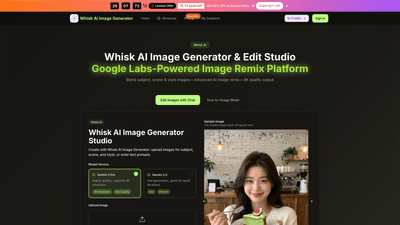
Whisk AI Image Generator & Edit Studio is a Google Labs–powered image remix platform that lets you blend subject, scene, and style inputs to create professional 4K artwork in seconds. It combines advanced image blending, image-to-image generation, and text-to-image prompts to produce high-quality visuals for concept art, product visualization, marketing assets, and more. The tool supports uploading images (subject, scene, style) or describing your vision with prompts, then automatically analyzes and remixes them into cohesive, publication-ready artwork. It’s designed for creators, designers, marketers, and agencies who need fast, premium 4K results with commercial use rights.
Features
- Image blending with three inputs: subject, scene, and style
- Automatic analysis and remixing for cohesive results
- Image-to-image generation
- 15-30 second generation times
- 4K high-resolution output
- Text-to-image mode with enhanced prompts
- AI prompt engineering adds lighting, composition, and professional terminology
- Style transfer and creative remix
- Apply distinct artistic styles, environments, or treatments
- Multi-input and flexible workflows
- Upload subject, scene, and style images or enter prompts; also mix both
- Output quality and readiness
- 4K professional quality suitable for marketing, product visuals, or campaigns
- No watermark and commercial use license
- Ready for client work and commercial publication
- Background tools
- Background removal and background swap for quick composition changes
- Additional capabilities
- Photo restoration, avatar creator, virtual try-on, and more
- Fast, scalable generation
- Consistent results in seconds with rapid iteration
- Plans and payment options
- Free trial with credits, plus tiered yearly plans
- User-friendly workflow
- Simple upload, generate, preview, and download with refinement options
Core inputs and formats
- Input formats: JPG, PNG, WEBP (up to 10MB per image)
- Outputs: 4K images suitable for professional use
- Flexible input methods: images, prompts, or a combination
How to Use
- Start with Whisk AI Image Generator or Whisk AI Studio
- Choose the Whisk AI image generator to access the integrated AI editor and remix tools.
- Upload or describe
- Upload a subject image, a scene reference, and a style reference, or enter descriptive prompts to guide the generation.
- Generate and preview
- Click generate to produce 4K artwork in seconds. Preview the result and download if satisfied.
- Refine and finalize
- Use advanced editing features to adjust colors, lighting, composition, and other details for professional-grade results.
Practical steps you can take
- For best results, be specific about colors, lighting, mood, and composition.
- Include references to art styles (photorealistic, anime, oil painting) and quality terms (high resolution, detailed).
- Experiment with different subject-scene-style combinations to explore variations quickly.
- Leverage prompt engineering to add professional terminology and lighting cues.
How it works (quick overview)
- Input: Subject, scene, and style images or text prompts
- Processing: AI analyzes inputs and blends them into a cohesive 4K image
- Output: High-quality, watermark-free artwork ready for use
Pricing (annual plans and offers)
- Flash Sale: Limited-time 50% off on Annual Plans (32 spots left)
- Free trial: Free credits to try the tool before subscribing
- Annual billing: Cancel anytime
Plans (annual billing)
- Basic
- Price: $4.9/month (billed annually)
- Credits: 6,000 credits/year
- Images: Up to 50 images/month
- Includes: Seedream 5.0 AI generation, Seedream 5.0 downloads, 6,000 credits/year, commercial use license, no watermark, priority support, background tools, and more
- Professional
- Price: $9.9/month (billed annually)
- Credits: 24,000 credits/year
- Images: Up to 200 images/month
- Includes: All Basic features plus enhanced capabilities and priority support
- Enterprise
- Price: $19.9/month (billed annually)
- Credits: 72,000 credits/year
- Images: Up to 600 images/month
- Includes: All Professional features plus advanced enterprise options and priority queues
Notes
- All plans come with a commercial use license and permanent Whisk AI Image Generator history
- Commercial video generation and certain seeds/models may be included on specific plans
- No watermark on images
- Free trial offers a risk-free way to test features before upgrading
Tips
- Be explicit with prompts: describe colors, lighting, mood, and composition
- Use reference images for subject, scene, and style to improve accuracy
- Combine multiple inputs for more complex concepts (e.g., product + lifestyle scene + art style)
- Take advantage of 4K output for marketing, product visuals, and print-ready assets
- Use the background removal and swap tools to optimize compositions
- Save and reuse successful prompts and styles to maintain brand consistency
- Consider the commercial license if you’re creating client work or agency assets
Frequently Asked Questions
- What is Whisk AI Image Generator?
- A Google Labs–powered tool that blends subject, scene, and style inputs to produce 4K artwork quickly, with options for image-to-image and text-to-image generation.
- What can I create with it?
- Concept art, product visuals, e-commerce imagery, photo restoration, avatars, virtual try-ons, background swaps, and more.
- How fast is generation?
- Generations typically take 15-30 seconds for 4K results.
- What formats are supported?
- Uploads: JPG, PNG, WEBP (max 10MB per image). Outputs: 4K images suitable for professional use.
- Is there a watermark?
- No, images are watermark-free.
- Is there a commercial license?
- Yes, commercial use is included with plans.
- What are the pricing options?
- Annual plans with Basic, Professional, and Enterprise tiers; plus a free trial with credits. Flash sale offers 50% off annual plans for a limited time.
- Can I try it for free?
- Yes, there are free credits available to try the tool before subscribing.
- Can I upload my own images for editing?
- Yes. You can upload subject, scene, and style images or use prompts to guide generation.
- Can I use Whisk AI images for client work?
- Yes, commercial licenses are included with plans.
- How do I upgrade or cancel?
- Upgrade or cancel options are available; for subscription changes or cancellations, follow the platform’s support instructions.
This Whisk AI Image Generator overview highlights the tool’s core value: fast, high-quality 4K AI-generated visuals created through innovative three-input image blending, with flexible pricing, a free trial, and a robust set of features tailored for creators and teams seeking professional AI-assisted image production.