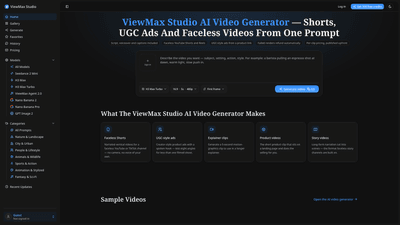
What is it
ViewMax Studio is an AI-powered video generator designed for short-form content, UGC ads, and faceless videos tailored for platforms like YouTube Shorts, TikTok, and Reels. You describe a video with a prompt or paste a script, and ViewMax Agent 2.0 plans its own shot list, renders multiple scenes, records narration, and burns in captions—all in one pass. The result is a ready-to-post MP4 optimized for vertical video (9:16) or wide formats, with commercial rights included on every paid plan. No camera, no editing timeline, no post-production studio required. It’s built for solo creators, marketers, and small businesses who need fast, scalable video production without learning complex editing software.
Features
- All-in-one AI video production
- Script, voiceover, and captions generated in a single pass
- ViewMax Agent 2.0 can plan shot lists, render scenes, and layer narration and on-screen text
- Output includes vertical 9:16 videos for Shorts, Reels, and TikTok, or wide formats for YouTube ads
- Flexible AI models and pricing
- Multiple AI models available (Seedance 2 Mini, Kling, H3, and more) with per-clip pricing shown before rendering
- One-button render; the cost is displayed on the render button before you start
- Faceless and UGC-friendly formats
- Faceless YouTube Shorts and Reels that require no camera or personal voice
- UGC-style product ads with spoken hooks and burned-in captions
- Short-form-ready with platform awareness
- Vertical framing, captions burned in by default, and shots designed for mobile viewing
- Exports are ready-to-publish without additional editing or watermark
- Commercial rights and licensing
- Commercial rights included with all paid plans and credit packages
- No per-project license or attribution required
- Access and integration
- Browser-based—no installation needed
- API and MCP server available for integration with other workflows
- All finished videos are stored in your history for easy download
- Trial and pricing structure
- New accounts start with 100 free credits to test the output
- Credits are charged per clip, with upfront visibility of cost
- One-time credit packages available (credits never expire), alongside recurring monthly plans
- Reliability and refunds
- Failed renders refund credits automatically
- Clear pricing and no watermark even on free credits
- Use-case breadth
- Product explainer clips, landing-page videos, educational clips, internal comms, onboarding, and marketing campaigns
- Story/narration sequences where ViewMax Agent 2.0 cuts between scenes
How to Use
- Describe or script
- Describe the video in plain English (up to 5,000 characters) or paste your script
- You can also let ViewMax Agent 2.0 generate a shot list and render autonomously
- Choose model and format
- Pick an AI model (from the available options) and select vertical (Shorts, Reels, TikTok) or wide formats
- View the credit cost on the render button before starting
- Render and review
- Start the render; the system renders the selected scenes, adds narration, and burns in captions
- Finished MP4 lands in your history for download
- Commercial rights are included with paid plans
- Publish
- Exported videos are ready for posting to your chosen platform, with platform-appropriate sizing and captions
- Pricing and trials
- New accounts receive 100 free credits on signup
- After the free credits, choose a plan or one-time credits package to continue
- Plans (monthly and yearly)
- Basic: $19.50/month or $234/year — ~5,000 credits/month (~200 clips)
- Pro: $34.50/month or $414/year — ~10,000 credits/month (~400 clips)
- Max: $59.50/month or $714/year — ~20,000 credits/month (~800 clips)
- Yearly billing halves the monthly price; credits are charged per clip and shown before render
- Accessibility and support
- Browser-based operation; no software installation
- Commercial license included; priority support available on higher tiers
- API and MCP endpoints available for developers and advanced workflows
Pricing
- Month-to-month and annual plans
- Basic: $19.50/month or $234/year (approx. 5,000 credits/month; ~200 clips)
- Pro: $34.50/month or $414/year (10,000 credits/month; ~400 clips)
- Max: $59.50/month or $714/year (20,000 credits/month; ~800 clips)
- Credits and usage
- Credits are charged per clip; the exact cost of each render is shown before you begin
- 100 free credits are provided at signup to test initial outputs
- One-time credit bundles available (e.g., $29 for 2,000 credits up to $249 for 30,000 credits)
- Credits from one-time packages do not expire; monthly credits expire at renewal
- Licensing
- Commercial rights are included with every paid plan and credit package
- No watermark, no attribution required, and no per-project license
Tips
- Start with clear briefs
- Write concise briefs or scripts to maximize the quality of the first render; the more precise your brief, the fewer revisions needed
- Use ViewMax Agent 2.0 for efficiency
- Let Agent 2.0 plan shot lists and cuts to get a cohesive multi-scene sequence in one pass
- Test multiple angles
- For UGC-style ads, describe the product and angle(s) you want to test; the system can generate eight variations more affordably than filming
- Optimize for vertical first
- Prioritize vertical framing 9:16 to ensure captions and on-screen text are legible on mobile devices
- Monitor costs
- Check the credit cost on the render button before starting; failed renders automatically refund credits
- Leverage automation for scale
- Use the API/MCP for batch rendering or automation pipelines if you produce content at higher volume
- Respect platform guidelines
- Disclose AI use when platforms ask and avoid using real testimonials or real employees unless you have proper permissions
Frequently Asked Questions
- What is ViewMax Studio?
- An AI video generator for short-form content. Describe a shot or give a script; it renders narration, captions, and visuals in one pass, optimized for vertical video on Shorts, Reels, and TikTok.
- Is ViewMax Studio free?
- New accounts receive 100 free credits to test outputs. After that, you purchase credits or subscribe to a plan.
- How much does it cost?
- Plans start at $19.50/month (Basic) with 5,000 credits/month; Pro is $34.50/month and Max is $59.50/month. Yearly billing reduces the monthly cost. One-time credit packages are also available.
- Do videos have a watermark?
- No. All exports are clean—no watermark, no logo, and no attribution required.
- How do I cancel or refund?
- Cancel from the billing portal in account settings; failed renders refund credits automatically. For unspent credits, contact support within 7 days of payment.
- Is there a lifetime deal?
- No lifetime plan. The closest option is one-time credit packages; credits never expire on those, but monthly credits expire at renewal.
- Do credits roll over?
- One-time package credits do not expire; monthly credits expire at renewal.
- Can I make faceless videos for YouTube Shorts?
- Yes. Provide a topic or script, and the AI generates narration, visuals, and captions with vertical output for Shorts/Reels/TikTok.
- Can I make UGC-style ads?
- Yes. Describe the creator, product, and angle; Agent 2.0 plans the shots and delivers a finished cut with the hook in one pass.
- Does it add voiceover and captions?
- ViewMax Agent 2.0 provides narration and captions in the same pass; other models may render audio separately, but captions are provided by the system.
- Do I need coding skills to use the API?
- No coding is required for the standard use; API/MCP are available for developers who want to integrate rendering into their workflows.
- When should I not use ViewMax Studio?
- When the video requires real-world verification, genuine testimonials, or real on-camera talent. AI is best for scalable, vertical formats and rapid testing rather than authentic in-person footage.
- Which AI models are available?
- Seedance, Kling, H3, and ViewMax Agent for multi-shot sequences. The current live list shows credit costs for each model in the generator.
This detailed overview highlights ViewMax Studio’s unique value: a complete, cost-aware, browser-based AI video production tool that delivers ready-to-publish short-form videos with narration, captions, and platform-optimized formatting—all in one pass. It’s particularly valuable for solo creators, marketers, and small businesses seeking scalable, camera-free video production with commercial rights included.