What is it
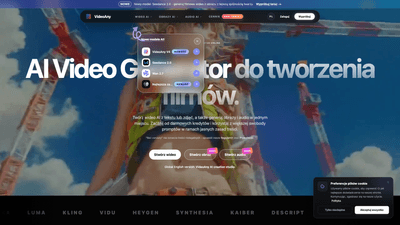
VideoAny is an all-in-one AI creation studio that brings together video, image, and audio generation in one online platform. You can create AI-powered videos from text or photos, generate high-quality AI images from prompts, and craft audio elements — all within a single workflow. The platform emphasizes versatility for social media content, teasers, ads, and creative projects, while offering avatar generation, character edits, and various effects to elevate your visuals. With multiple AI models (including Seedance 2.0, Wan 2.7, and GPT Image 2), VideoAny is designed to deliver fluid storytelling through seamless integration of video, imagery, and sound. Free credits kick things off, and paid plans unlock higher limits, faster queues, better quality, and more generations.
Features
- AI video generator from text or image: turn ideas into engaging video clips quickly.
- Image-to-video and no-censorship options: transform still visuals into motion with enhanced face continuity and smoother movement, depending on the model.
- Uncensored image generation: create AI images, variants, and edits with expanded prompt freedom (subject to platform rules).
- Avatar creation and editing: build and customize characters or avatars for videos.
- Audio capabilities: convert text to music, clone voices, and add sound effects tailored for video projects.
- All-in-one editor: generate, edit, and refine video, images, and audio within a single studio.
- Multiple AI models: Seedance 2.0, Wan 2.7, GPT Image 2, and more to choose from for different styles and outputs.
- Fast generation times: images typically render in seconds, audio in under a minute, and video in a few minutes (depending on model, length, queue, and plan).
- Free starter credits: start with complimentary credits to explore core features.
- Flexible pricing plans: paid plans provide higher limits, faster processing, and more generation capacity.
- Privacy and security: data is protected in transit; users control what they save, publish, or share under the platform’s privacy policy.
How to Use
- Sign up and claim free credits: Begin by creating an account to receive initial free credits and access to core features.
- Choose your output: decide whether you want to create video from text, create a video from an image, or generate images or audio to accompany your video.
- Select a model: pick from Seedance 2.0, Wan 2.7, GPT Image 2, or other available models depending on your desired output. Use “no censorship” mode where available for more flexible prompts, while respecting content rules.
- Craft your prompts: provide clear, descriptive prompts for video, image, or audio generation. For video, you can incorporate text, scenes, and transitions; for images, specify style, composition, and variations.
- Generate assets: render images in seconds, audio in under a minute, and videos in minutes. Monitor queue times and adjust prompts if needed.
- Edit and refine: use the integrated tools to adjust visuals, swap faces, tweak avatars, or modify audio effects to align with your creative vision.
- Export and publish: download your final video, image, or audio files and publish them to social platforms or other channels. Ensure you have the rights to any input materials and comply with platform policies.
- Upgrade as needed: as your project scales, switch to a paid plan to access higher limits, faster queues, higher quality outputs, and more generations.
Pricing
- Free credits to start: VideoAny offers complimentary credits with basic features to explore the platform.
- Paid plans: unlock higher usage limits, improved output quality, faster queue times, and additional generations. Pricing tiers are designed to accommodate individual creators, small teams, and professional workflows.
- What you get by plan: increased quotas for videos, images, and audio; priority processing; access to more AI models; extended customization options; and additional content rights depending on input materials and terms of use.
- Commercial use: commercial rights depend on the chosen plan, input material rights, and the platform’s terms. Review the license and policy to ensure proper usage when publishing or monetizing content.
Tips
- Start with concise prompts: for better control, begin with clear, specific prompts and gradually introduce style or motion instructions.
- Leverage model strengths: Seedance 2.0 excels at facial consistency in video; Wan 2.7 offers smoother motion and stronger prompt adherence; GPT Image 2 emphasizes high-quality image generation — choose based on your priority.
- Use avatars strategically: create reusable characters or avatars to maintain brand consistency across videos and social posts.
- Combine video, image, and audio: synchronize visuals with tailored audio and SFX to boost engagement, especially for short-form content.
- Mind the rights: ensure you have permission to use all input assets (photos, voices, faces) and review terms for commercial use.
- Monitor queue and plan ahead: if production timelines matter, select a plan with higher limits and faster processing to meet deadlines.
- Test and iterate: generate multiple variants of scenes or visuals to identify the most compelling option for your audience.
Frequently Asked Questions
- What is VideoAny? VideoAny is an AI creation studio that combines video generation from text or images, AI image generation, and audio production in one online platform. It supports avatars, character edits, and a streamlined workflow for social media videos, teasers, ads, and creative projects.
- Is VideoAny free to use? Yes, VideoAny offers free starter credits to try core features. Paid plans provide higher limits, faster queues, better quality, and more generation capacity.
- Can I use generated content commercially? Commercial usage depends on your plan, input rights, and platform terms. Always verify you have rights to any images, voices, faces, or prompts before publishing or monetizing.
- How fast is generation? Image generation typically takes seconds, audio under a minute, and video production in a few minutes, depending on model choice, video length, queue, and plan.
- Which models support the “no censorship” mode? Some VideoAny models offer reduced censorship for more flexible prompts. External models may have their own content policies. VideoAny still prohibits illegal, underage, prohibited content, or content created without consent.
- How is my data protected? Data is encrypted in transit, and processing policies are described in the privacy policy. Users control what they save, publish, or share within the platform.
- Can I edit videos after generation? Yes, you can edit visuals, avatars, and audio within the integrated studio to refine and tailor outputs to your needs.
- What types of outputs can I create with VideoAny? You can create AI-generated videos from text and images, AI-generated images, avatar-based content, and audio (music, voice cloning, and SFX) for social media and other uses.
- Are there usage restrictions I should know? Respect platform rules and licensing for input content, model usage, and outputs. Check the terms and guidelines for specifics on allowed content and commercial distribution.
- How do I get started today? Sign up for an account, claim your free credits, choose your desired creation (video, image, or audio), select a model, and begin generating your AI-powered media.
VideoAny brings together the power of AI video generation, AI image creation, and audio tooling in a single, user-friendly studio. Whether you’re crafting short-form social clips, branded visuals, or creative experiments, VideoAny offers accessible entry with free credits and scalable paid plans to support growth and complex production needs.