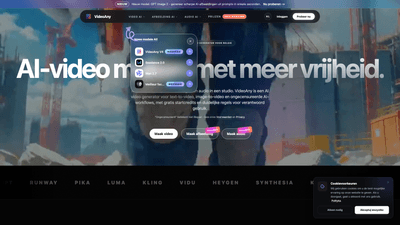
What is it
VideoAny is an AI-powered studio designed to transform text and images into immersive video content, generate AI images, create avatars, and craft AI-driven audio all in one platform. It supports text-to-video and image-to-video workflows, plus an uncensored AI image generator and audio tools, enabling creators to produce short social videos, teasers, ads, character scenes, and more. Started with free credits and a clear policy for responsible use, VideoAny emphasizes freedom within safe, legal boundaries, offering access to multiple advanced models and a streamlined dashboard for building complex AI-native workflows.
Key value: one platform to replace multiple tools, delivering coherent visuals, motion, and sound from prompts or references, while giving you control over rights, safety, and distribution.
Features
- AI video generator for text-to-video and image-to-video
- Convert prompts into flowing AI videos tailored for social posts, promos, and character storytelling.
- Animate or morph still images into motion with improved facial consistency using Seedance 2.0.
- Achieve smoother motion and higher prompt fidelity with Wan 2.7 for image-to-video projects.
- Uncensored AI images
- Generate characters, styles, reference images, and advanced concepts with expanded prompt flexibility.
- Strong prompt control and clearly defined safety boundaries to guide content creation.
- AI audio for video
- Create music, voices, and sound effects that fit your video without juggling separate tools.
- Seamlessly synchronize audio with visuals to enhance mood and storytelling.
- AI image generation
- Rapidly generate sharp AI images from prompts (GPT Image 2) to seed scenes, concepts, or references.
- Avatars and character workflows
- Build AI avatars and character-driven scenes for storytelling, marketing, or experiential media.
- Seamless workflows in a single studio
- Text-to-video, image-to-video, image generation, and audio composition are all accessible from one dashboard.
- Responsible use and privacy
- Transparent terms of service and privacy policy guide acceptable use, data handling, and rights management.
- Free starter credits to explore capabilities before committing to a paid plan.
- Model variety and accessibility
- Access multiple AI models (Seedance 2.0, Wan 2.7, GPT Image 2, among others) to optimize for facial consistency, movement, and image quality.
- Fast generation and scalable outputs
- Image renders in seconds, audio in minutes, and video production within minutes, depending on length, resolution, model, and queue times.
- Commercial considerations
- Usage rights depend on plan, inputs, and face/voice/image rights. Review licenses and permissions before publishing or monetizing.
How to Use
- Sign up and start with free starter credits to explore core capabilities. 2) Choose your workflow:
- Text-to-video: provide a script or ideas, select an appropriate model (Seedance 2.0 for facial continuity, Wan 2.7 for smooth motion), and set video length, style, and resolution. 3) Or image-to-video: upload or reference images, apply motion style, and refine prompts for realistic movement. 4) Generate AI images and avatars using GPT Image 2 to populate scenes or character designs. 5) Add AI audio: compose music, generate voices, and insert sound effects that match the mood. 6) Review, tweak prompts, and iterate until the result meets your vision. 7) Export or publish: download video assets, share to social platforms, or integrate into your broader content pipeline.
- Models you may encounter:
- Seedance 2.0: excels at cinematic image-to-video with better facial consistency.
- Wan 2.7: emphasizes smoother motion and higher fidelity from image prompts.
- GPT Image 2: rapid generation of sharp AI images from prompts.
- Practical considerations:
- Generation speed varies by model, length, resolution, and queue status; expect seconds for images, minutes for audio, and minutes for video depending on settings.
- You can construct complex workflows by combining text-to-video, image-to-video, image generation, and audio in a single project.
- Always verify rights for faces, voices, and derived assets, especially for commercial use.
- Accessibility and pricing:
- VideoAny offers free starter credits to test features, with paid plans delivering more credits, higher quality, faster queues, and broader model access.
Pricing
- Free starter tier: access essential features and initial credits to explore video, image, and audio generation.
- Paid plans: more credits, enhanced output quality, reduced wait times, and expanded access to premium models and features.
- Discounts: a notable 50% discount is available for NL (Netherlands) users, highlighting regional promotions and accessibility.
- Commercial rights: licensing for generated content depends on your plan and inputs; always review rights and permissions for faces, voices, images, and prompts before publishing or selling outcomes.
- Plan selection: choose based on your volume needs, desired quality, and timeline for production—higher tiers typically offer faster processing and greater creative freedom.
Tips
- Start with short clips to test prompts and model behavior, then scale up to longer formats.
- Use Seedance 2.0 for projects requiring strong facial consistency (e.g., recurring characters or talking avatars).
- Leverage Wan 2.7 when motion smoothness and faithful image-to-video translation matter most (e.g., storytelling sequences).
- Use GPT Image 2 to quickly bootstrap visual concepts before refining with other models.
- Pair AI video with AI audio early in the workflow to ensure tone, tempo, and ambiance align with the visuals.
- Plan your rights and permissions early to avoid downstream licensing issues; document input sources and consent where applicable.
- Explore “uncensored” image prompts within the platform’s safety boundaries to push creative boundaries responsibly.
- Save and organize projects in the dashboard to build repeatable workflows for social video series, ads, or character-driven content.
- Take advantage of tutorials, guides, and support resources to accelerate mastery of prompts and model choices.
Frequently Asked Questions
- What is VideoAny?
- VideoAny is an AI studio that combines AI video generation, image-to-video, text-to-video, uncensored AI images, and AI audio in one platform, with free starter credits and a clear framework for responsible use.
- Is VideoAny free to use?
- Yes, there is a free starter tier with basic features and credits. Paid plans provide more credits, higher quality outputs, faster queues, and broader access to models.
- Can I use generated content commercially?
- Commercial rights depend on your plan, input sources, and the rights associated with faces, voices, images, and prompts. Always verify permissions and licensing for any public or commercial use.
- How secure are my data and uploads?
- VideoAny protects data during transfer, and the privacy policy explains data handling. You control which projects you save, share, or publish.
- How fast is generation?
- Image generation is typically seconds, audio in minutes, and video in minutes, influenced by model choice, video length, resolution, and queue status.
- What does “uncensored AI video” or “uncensored AI images” mean?
- It means more flexible creative prompts within the platform’s safety and legality guidelines, allowing broader experimentation for adult, artistic, and experimental content. Content involving minors, lack of consent, exploitation, fraud, illegal activities, or harm remains prohibited.
- Can I build long-running workflows or pipelines with VideoAny?
- Yes. VideoAny is designed to support multi-step workflows—from prompt-driven image and video creation to audio pairing and asset export—within a single studio environment.
- How do I get help or learn more?
- VideoAny offers support resources, guides, and a helpdesk to answer questions and assist with onboarding or troubleshooting.
If you’re seeking a powerful, flexible AI video solution that unifies text-to-video, image-to-video, AI image generation, and audio production under one roof, VideoAny presents a compelling option. It blends advanced models (Seedance 2.0, Wan 2.7, GPT Image 2) with practical, rights-aware workflows, making it suitable for creators, marketers, and studios aiming to accelerate content production while maintaining control over quality and compliance. Ready to explore? Start for free and build your AI-powered video pipeline today.