What is it
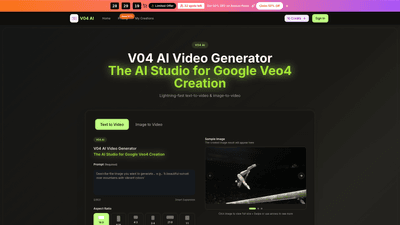
V04 AI Video Generator is an AI-powered video studio designed to accelerate video creation workflows. Powered by Flow V04 AI and Google Gemini, it enables lightning-fast text-to-video and image-to-video production with a single, cohesive interface. Key benefits include 4K-ready output, multi-model access, synchronous audio, and a streamlined pipeline that goes from idea to client-ready video in hours or minutes. It supports both short-form and long-form needs, with built-in editing, motion control, and a commercial-use license.
Features
- Multi-Model Access: Switch between V04 AI Model and Flow V04 AI sessions within the same video pipeline for optimal results per scene.
- 4K-Ready Quality: Produce professional, high-resolution videos suitable for marketing, social, and client delivery.
- Text-to-Video & Image-to-Video: Generate videos directly from prompts or guide motion and style from reference images.
- Native Audio Generation: Create synchronized dialogue, ambience, and effects without external audio tools.
- Fast Generation Speed: Preview results in seconds and render higher quality outputs as you finalize.
- Commercial Usage Rights: Outputs come with a commercial-use license for ads, campaigns, and monetization.
- Flexible Workflow Tools: Batch generation, scene splitting, prompt helpers, and share-ready pages streamline production.
- 16:9, 9:16, 4:3, and other aspect ratios: Support for multiple aspect ratios to fit various platforms and formats.
- Motion & Scene Control: Fine-tune camera moves, transitions, and timing to maintain narrative flow and continuity.
- Character Consistency: Flow V04 AI helps maintain consistent characters and visual style across scenes.
- Google Gemini Integration: Leverages Google Gemini capabilities for richer, context-aware video generation.
- Credit-Based System: Manage usage with credits that cover video generation, downloads, and related outputs.
- No Watermark (with annual plans): Paid annual plans offer watermark-free exports for professional use.
How to Use
Follow these straightforward steps to generate, edit, and refine videos in a single, video-first workflow:
- Step 1: Choose V04 AI Video Generator
- Start with the V04 AI video generator. The integrated editor lets you set style, aspect ratio, and motion to produce a polished, 4K-ready output.
- Step 2: Upload Footage or Enter Your Description
- Upload a reference clip or type a text prompt. V04 AI supports text-to-video and image-to-video, allowing you to guide motion, style, and pacing with Flow V04 AI.
- Step 3: Generate and Download
- Click generate to produce your video in seconds. Preview the result, then download instantly for campaigns, social, or client delivery.
- Step 4: Refine and Perfect Your Video
- Use built-in editing tools to tweak motion, color, and audio, then export a final cut powered by Google Gemini V04 AI.
What you get in practice:
- A single, streamlined workflow that combines generation, editing, and export.
- Pro-grade output with options to adjust tone, pacing, and mood to fit your brand.
- Ready-to-publish assets for social, ads, explainers, and campaigns.
Pricing
Limited-time offer: Save 50% on Annual Plans (flash sale). You can choose monthly or annual billing, with annual plans offering the best value and several benefits (including watermark-free exports and priority support).
-
Basic (Yearly)
- Price: Approximately $15.90 per month (billed annually) after the 50% flash-sale discount; standard monthly pricing shown as $19.80/month without discount.
- Credits: 12,000 credits/year (1,000 credits per month)
- Images: Up to 100 images per month
- Video generation: Unlimited downloads
- Additional: Permanent V04 AI Image history, Commercial Use License, Seedream model, AI video enhancer, AI video background remover, priority generation queue, no watermark (yearly), priority customer support
- Models available: Veo 3 model, Sora 2 model, Seedance model, Wan 2.5 model
- Ideal for: Hobbyists and beginners
-
Professional (Yearly)
- Price: Approximately $25.90 per month (billed annually) after the flash-sale discount; standard monthly pricing shown as $31.80/month without discount.
- Credits: 24,000 credits/year
- Images: Up to 200 images per month
- Video generation: Unlimited downloads
- Includes all Basic features plus additional professional capabilities
- Additional: Priority generation queue, no watermark (yearly), priority customer support
- Models available: Veo 3 model, Sora 2 model, Seedance model, Wan 2.5 model
-
Enterprise (Yearly)
- Price: Approximately $49.90 per month (billed annually) after the flash-sale discount; standard monthly pricing shown as $99.80/month without discount.
- Credits: 72,000 credits/year
- Images: Up to 600 images per month
- Video generation: Unlimited downloads
- Includes all Professional features plus higher usage caps
- Additional: Priority generation queue, no watermark (yearly), priority customer support
- Models available: Veo 3 model, Sora 2 model, Seedance model, Wan 2.5 model
Notes:
- All annual plans offer steep savings (50% off) and frontline benefits like no watermark, commercial-use license, and expedited support.
- A free-credits option is available to kick off experimentation.
- Plans are cancel-anytime, with yearly plans billed upfront and monthly options otherwise.
Tips
- Leverage multi-model access: Use the most suitable model for each scene to optimize style and accuracy without leaving the pipeline.
- Plan with aspect ratios: Choose the right aspect ratio early to minimize re-edits and ensure all assets fit platform requirements (e.g., social feeds vs. widescreen campaigns).
- Use text prompts for rapid iteration: Describe narrative beats, camera moves, and mood in plain language to let the AI assemble the sequence.
- Integrate audio at the source: Enable native audio generation to synchronize dialogue and ambience with visuals, reducing back-and-forth editing.
- Batch generate for variations: Create multiple versions in a single session to compare pacing, tone, and visuals, then refine the best option.
- Maintain brand consistency: Use prompts that align with your brand style and leverage character continuity across scenes.
- Export watermark-free to clients: Ensure you’re on an annual plan to deliver client-ready, watermark-free videos.
- Consider long-term value: For teams and agencies, Enterprise plans provide higher image caps and priority support, which can significantly speed up production timelines.
Frequently Asked Questions
-
What is V04 AI Video Generator?
- A comprehensive AI-driven video studio that turns text or images into polished video content, with built-in editing, motion control, and a commercial-use license.
-
What can I create with it?
- Text-to-video and image-to-video outputs, 4K-ready renders, multi-scene storytelling, social clips, ads, explainers, and campaign assets.
-
Are there free credits or a free plan?
- A free-credits option is available to get started. Paid plans unlock unlimited downloads, higher image caps, and watermark-free exports.
-
Can I use the outputs commercially?
- Yes. All paid plans include a commercial-use license for business, ads, and client-ready content.
-
Do I need to know complex video editing?
- No. The platform provides a user-friendly, video-first workflow with prompts, presets, and an integrated editor to minimize manual editing.
-
Is there a watermark on exports?
- Watermarks are typically removed on annual plans. Monthly plans may include watermarks; annual plans offer watermark-free exports.
-
How do I cancel or upgrade my plan?
- Plans are cancel-anytime. You can upgrade or downgrade within your account settings. For subscription changes, contact support as needed.
-
What devices or platforms does this support?
- The tool focuses on a web-based, all-in-one workflow designed for creators and teams; outputs are compatible with standard video publishing pipelines.
-
Which models are included?
- The platform supports multiple models (V04 AI Model, Flow V04 AI, and Google Gemini-backed configurations such as Veo 3, Sora 2, Seedance, Wan 2.5) to optimize results per project.
-
Can I control motion and pacing?
- Yes. The tool provides motion control, transitions, timing adjustments, and scene-level controls to shape the narrative and cadence.
-
How quickly can I get results?
- You can preview in seconds and render higher-quality outputs as you finalize. The system is designed for rapid iteration and client-ready delivery.
If you’d like, I can tailor this product intro further for a specific audience (creators, marketing teams, or agencies) or optimize it for a particular platform (website, landing page, or product brochure).