What is it
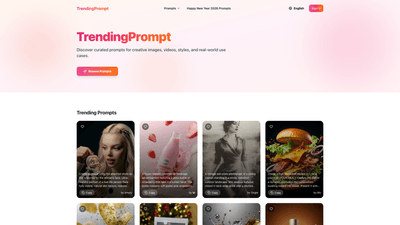
TrendingPrompt is an AI-powered prompts platform that curates and showcases prompts for creative images, videos, styles, and real-world use cases. It helps artists, marketers, and AI enthusiasts discover high-quality, ready-to-use prompts to drive photorealistic visuals, engaging scenes, and cinematic concepts. The library emphasizes diverse genres—from ultra-realistic portraits and luxury product photography to festive New Year visuals and fashion-forward campaigns—all designed to inspire immediate results with AI image generation tools. Core keywords you’ll encounter include curated prompts, AI prompts, image prompts, video prompts, and real-world use cases.
Key takeaways:
- Central repository of curated prompts for image and video generation
- Focus on high-quality, cinema-grade concepts (8K realism, macro shots, fashion scenes, product photography)
- Prompts cover a wide range of styles, moods, and settings
- Guidance on how to adapt prompts for different creative goals
Features
- Curated prompt library: Access a broad collection of prompts across categories such as portraiture, fashion, product advertising, vintage aesthetics, and festive campaigns.
- Realism and quality emphasis: Prompts frequently specify ultra-photorealistic details, 8K resolution, hyper-detailed textures, and cinematic lighting to achieve professional results.
- Reference and face preservation: Some prompts support using attached reference images or preserving facial features for accurate likenesses.
- Multi-format prompts: Create still images, posters, ads, macro shots, and portrait formats (9:16, 1:1, 3:4, etc.) tailored to various output needs.
- Creative prompts for marketing and branding: Examples include luxury perfume campaigns, premium beverage photography, and high-fashion New Year visuals.
- Copy-ready prompts: Each prompt is designed to be copied directly into AI image generators, with optional parameters and scene details clearly outlined.
- Negative prompts guidance: Some prompts include negative prompts to help avoid artifacts and undesired elements, improving output quality.
Core capabilities you’ll leverage:
- Detailed scene briefs that specify lighting, textures, composition, and styling
- Aspect ratio and resolution guidance (e.g., 9:16 portrait, 1:1 square, 3:4, 8K realism)
- Style and material cues (glass reflections, skin texture, fabric drape, and cinematic lighting)
- Real-world use case prompts for advertising, fashion, photography, and film concepts
How to Use
- Browse and select prompts: Explore the curated prompts library to find concepts that fit your project, whether you’re creating portraits, product ads, or fashion editorials.
- Copy and customize: Use the provided prompts as-is or tailor them to your AI generator. Adjust aspect ratio, resolution, lighting, and subject details to match your needs.
- Leverage reference content: For prompts that call for face likeness or reference imagery, attach or reference the image to guide the output.
- Experiment with formats: Apply prompts to different output formats (e.g., ultra-realistic 8K posters, 9:16 social media portraits, or 1:1 poster art).
- Practical examples you’ll encounter include:
- Ultra-realistic portrait of a real person with a tiny 3D cartoon version, dramatic lighting, and 8K detail
- Hyper-photorealistic product ads featuring glass bottles, labels, and dynamic motion
- Vintage-style monochrome photographs with film grain and distressed textures
- Exploded-view food posters and macro product visuals with explicit texture cues
- Glamorous fashion/editorial scenes with 8K fidelity and cinematic polish
- Pricing: Pricing details are not publicly specified on the provided content. Expect typical options such as free access to a range of prompts and potential paid or premium plans for expanded access. For exact pricing, check the platform’s Pricing page or contact support.
Pricing
- The available information does not specify exact pricing tiers. Common models for similar AI prompt platforms include:
- Free tier: Access to a subset of prompts and community-curated content
- Pro/Premium tier: Access to a larger prompt library, advanced filters, and higher-priority support
- Enterprise options: Custom pricing for teams and organizations
- To get precise pricing, consult the Pricing page on the TrendingPrompt site or request a quote.
Tips
- Use reference faces for accuracy: When prompts mention face preservation or reference faces, pair with a reference image to keep facial features consistent.
- Pair prompts with high-quality AI settings: For the best results, apply prompts that specify 8K realism, photorealistic textures, and cinematic lighting, and pair them with appropriate aspect ratios (e.g., 9:16 for vertical social media, 1:1 for posters).
- Combine multiple prompts for complex scenes: Merge prompts that describe different elements (e.g., product shot, background environment, and lighting) to build rich, multi-layered outputs.
- Leverage negative prompts: If your generator supports negative prompts, include them to avoid artifacts such as oversmoothing, watermarks, or unrealistic textures.
- Focus on storytelling: Choose prompts that convey a clear mood or narrative (e.g., festive New Year 2026 celebrations, luxury campaigns) to create compelling visuals.
- Optimize for output format: Tailor prompts to your target format (macro, full-body, close-up) to ensure the composition aligns with your intended use.
Frequently Asked Questions
- What is TrendingPrompt?
- A platform featuring curated AI prompts for generating creative images, videos, and stylistic concepts. It serves as a source of inspiration and ready-to-use prompts for AI art and marketing visuals.
- Can I copy prompts directly into my AI generator?
- Yes. The prompts are designed to be copy-ready and ready for use with compatible AI image generation tools.
- Do I need a reference image?
- Some prompts mention using a reference face or image to guide the output. Attaching or referencing an image can improve likeness and accuracy.
- Is there a free version?
- The exact pricing and free vs. paid tiers are not specified in the provided content. Most platforms offer a mix of free access and premium plans; check the site for current details.
- What kinds of outputs can I create?
- Outputs include ultra-realistic portraits, photorealistic product ads, fashion/editorial looks, vintage-style photography, and high-impact posters and posters with 8K resolution and cinematic lighting.
- Can prompts be used for both images and videos?
- The platform mentions prompts for images, videos, and real-world use cases, suggesting multi-format applicability.
- How can I maximize quality with these prompts?
- Use high-resolution descriptors (e.g., 8K realism), specify lighting and textures, choose appropriate aspect ratios, and consider negative prompts to reduce artifacts. Pair prompts with reference images when needed.
- Are there guidelines for fashion and product photography prompts?
- Prompts often include detailed wardrobe, lighting, and material cues (e.g., glass reflections, fabric textures, color palettes) to achieve a premium, editorial aesthetic.
This product introduction highlights TrendingPrompt as a comprehensive, SEO-friendly resource for AI-generated visuals, emphasizing curated prompts, high-fidelity outputs, and practical usage across creative and marketing contexts. If you need deeper optimization for a specific audience (e.g., photographers, marketers, or AI developers), I can tailor the sections further with targeted keywords and case studies.