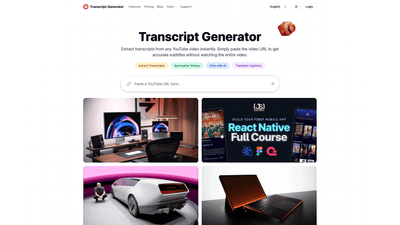
What is it
The YouTube Transcript Generator is a web-based tool that converts any YouTube video into accurate, readable transcripts instantly by simply pasting the video URL. Beyond just producing transcripts, it offers powerful AI-powered capabilities to help you extract insights, summarize lengthy videos, translate captions into multiple languages, and interact with the content through AI conversations. With flexible download formats and optional paid plans, it’s designed for content creators, students, researchers, educators, marketers, and everyday information seekers who need fast, reliable access to spoken content from videos.
Features
- Extract Transcripts: Convert a YouTube video into a complete, readable transcript within seconds.
- Translate Captions: Turn captions into multiple languages for global accessibility and understanding.
- Video Summaries: Get concise summaries that capture the key points and takeaways from long videos.
- AI Conversations: Ask questions and receive insights directly from the video content, turning transcripts into actionable knowledge.
- Download Formats: Save transcripts in TXT, DOCX, SRT, or VTT formats for easy integration with other workflows.
- Transcribe Videos Without Captions: Generate accurate transcripts even when the video lacks existing captions.
- Transcripts Search: Quickly locate specific words or phrases within a transcript.
- Engaging Output for Content Reuse: Reuse quotes and ideas for blogs, social posts, scripts, and study materials.
- Mobile-Ready Access: Fully responsive web experience designed to work on desktop, tablet, or mobile.
- No Registration Required for casual use: You can start with the free features and upgrade as needed.
- Flexible Credits Model: Paid plans provide a monthly allotment of transcription credits with different usage caps.
Core benefits include saving time, enabling faster research, enabling content repurposing, and making video content accessible to a wider audience through translations and searchable transcripts.
How to Use
- Step 1: Copy Video URL
- Open YouTube, find your desired video, and copy the URL from the address bar.
- Step 2: Generate Transcript
- Paste the video link into the input box on the Transcript Generator page and click the transcript button. The tool will extract the complete transcript in seconds.
- Step 3: Review and Utilize
- Review the produced transcript, use the built-in search to find specific terms, and choose your preferred output format.
- Step 4: Download or Share
- Save the transcript as TXT, DOCX, SRT, or VTT, or share a link to the generated transcript with colleagues or collaborators.
- Step 5: Leverage Additional Features
- Use Translate Captions to render multilingual versions, view a concise Video Summary, and engage with AI Conversations to extract insights or create content briefs.
Pricing details (as seen in the platform’s plans) are clearly presented in both Free and paid tiers, and you can toggle between Monthly and Yearly billing. Free users receive a basic set of features with a weekly credit allowance, while paid plans unlock higher transcription limits and extended video duration handling.
- Free (0/month): 10 credits per week; Download Transcripts; Translate Transcripts; Video Summaries; AI Chat with Videos; Transcribe videos without transcripts; Priority Support.
- Lite (about 6.99/month): 700 credits per month; Transcribe up to 30 minutes per video; Download Transcripts; Translate Transcripts; Video Summaries; AI Chat With Videos; Transcribe Videos Without Captions; Priority Support.
- Standard (about 9.99/month): 1500 credits per month; Transcribe up to 1.5 hours per video; Download Transcripts; Translate Transcripts; Video Summaries; AI Chat With Videos; Transcribe Videos Without Captions; Priority Support.
- Professional (about 24.99/month): Unlimited credits per month; Transcribe up to 3 hours per video; Download Transcripts; Translate Transcripts; Video Summaries; AI Chat With Videos; Transcribe Videos Without Captions; Priority Support.
Note: The exact pricing may vary with monthly/yearly options and regional availability, but the structure typically includes a free tier and escalating paid tiers tailored to casual viewers, researchers, and power users.
Use Cases and Benefits
- Content Creation: Extract quotes and ideas from videos to fuel blogs, social posts, scripts, and tutorials, accelerating the content production workflow.
- Study and Research: Students and researchers can quickly capture spoken information, turn lectures into notes, and reference specific timestamps for deeper study.
- Teaching and Accessibility: Educators convert video lessons into accessible text materials, including translations, to reach a broader student base.
- Market and Competitive Analysis: Analysts turn industry videos into searchable text documents for trend spotting and reference.
- Knowledge Harvesting: Professionals can quickly locate exact moments or statements in long recordings without watching the entire video.
- Global Audiences: Translate captions to multiple languages to broaden reach and comprehension for non-native speakers.
Advantages and Unique Value
- Speed and Accuracy: Instantly converts video dialogue into accurate transcripts, reducing manual transcription time dramatically.
- AI-Driven Insights: AI Conversations and summaries unlock actionable knowledge from long-form video content.
- Multilingual Accessibility: Translate captions to multiple languages, enabling global learning and outreach.
- Flexible Output: Multiple download formats ensure compatibility with your existing workflows (TXT, DOCX, SRT, VTT).
- User-Friendly Experience: Copy-paste URL workflow, quick review, and robust search features make it accessible to beginners and power users alike.
- No Barriers to Entry: A free tier lets users test essential features before committing to a paid plan.
- Scalable for Teams: Paid plans provide higher usage, longer per-video durations, and priority support for team-based collaboration.
Frequently Asked Questions (condensed)
- Is it free to use? Yes, a free tier is available; advanced features like video summaries, AI chat, and bulk downloads require a paid plan.
- Are there usage limits? No fixed usage limits on transcripts per se, but paid plans offer different credit allocations and per-video duration caps.
- Is it mobile-friendly? Yes, the tool is fully responsive and works well on desktop, tablet, and mobile browsers.
- How can I share transcripts? Generate a transcript and share the URL; recipients can view the same transcript via the link.
- What formats are available for download? TXT, DOCX, SRT, and VTT formats are supported.
- How do I search within a transcript? Use the built-in search feature to highlight all occurrences of a word or phrase.
- Do I need an account? Casual use for a few videos may not require an account; creating an account is recommended for regular use and to prevent abuse.
- How can I get support? For issues or suggestions, contact support at the provided support email; responses are typically within 24 hours.
This YouTube Transcript Generator delivers a comprehensive, fast, and scalable solution for turning video content into structured, searchable, and usable text. Whether for content creation, study, research, or accessibility, it provides practical tools that save time and extend the value of video content across languages and platforms.