What is it
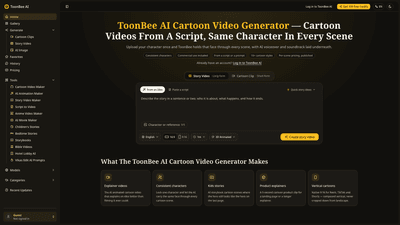
ToonBee AI is an AI-powered Cartoon Video Generator designed to turn scripts or prompts into fully finished animated videos. It creates consistent characters across all scenes by locking a character image (either uploaded as a reference or generated by ToonBee) so the same face, outfit, and proportions stay constant from the first frame to the last. The tool automatically handles scene breakdown, animation, AI voiceover, and soundtrack, delivering a professional cartoon video in minutes. It’s built for non-artists and teams who need clear storytelling without learning animation software, and it includes commercial rights for client work, paid ads, courses, and monetized channels.
Features
- Consistent characters across scenes: upload a reference image or generate one and pin it; the same character appears in every scene.
- Script-to-video workflow: paste a script or idea; ToonBee breaks it into scenes and renders an animated video around your narration.
- Multiple cartoon styles: choose from 2D, modern flat, 3D, anime, storybook, watercolor, painting, pixel art, and more; a single video uses one cohesive style.
- Per-scene pricing shown before render: credits are allocated per scene, so you always see the cost upfront.
- AI voiceover and soundtrack: narration and music are generated in the same pass as the visuals.
- Short and long-form formats: from quick explainer clips to longer story videos; supports vertical 9:16 for social formats like Reels, TikTok, and Shorts.
- Commercial rights included: no per-project license; you can use outputs for client work, ads, courses, and monetized channels.
- Browser-based, no installation: runs in your browser on Mac, Windows, or Linux; no GPU or animation software required.
- Access to advanced AI models: built on frontier video models (Kling, Seedance, MiniMax, Wan) and refined with user data.
- Flexible pricing: monthly and yearly plans with credits; one-time credit packs are available.
How to Use
- Sign up and start with free credits to try the output before committing.
- Provide a script or a topic. You can paste a finished script or let ToonBee draft a scene breakdown from a topic or prompt.
- Edit the scene breakdown if needed. This is where you guide the structure before rendering.
- Lock your character: upload a reference image (anchor) or generate one and pin it so the same character appears in every scene.
- Pick a cartoon style that matches your goal, knowing it will apply across the whole video.
- Render scenes: the tool shows per-scene costs before rendering; you can choose which scenes to render and in what order.
- Download the finished HD video with voiceover and soundtrack included. Commercial rights are included with every output.
- Publish or use the video across platforms, ads, courses, or client work without extra licensing hurdles.
Notes on length and formats:
- Base models render 4 to 30 seconds per scene; ToonBee 1.0 can render any length you specify.
- Narration and music are included in the render; you don’t need separate tools.
Pricing
- Basic: $19.50 per month (billed yearly at $234); includes 5,000 credits per month and access to all generation models; commercial license included.
- Pro: $34.50 per month (billed yearly at $414); includes 10,000 credits per month, all generation models, commercial license, and priority support.
- Max: $59.50 per month (billed yearly at $714); includes 20,000 credits per month, all models plus new releases, commercial license, priority support.
- One-time credit packs start at $9.90 for sporadic use.
- Pricing is per scene, with the cost and model clearly shown before rendering. Credits can be used for varied lengths and resolutions, and there are no hidden fees or per-project licenses.
Tips
- Start with a clear, well-lit reference image for your character to ensure consistency across all scenes.
- Use a single cohesive style for the whole video to maintain visual consistency.
- For social formats, prefer vertical 9:16 output to optimize for Reels, TikTok, and Shorts.
- Test render a single scene in two different styles to compare results before committing the full project.
- If a scene looks off, regenerate only that scene using the same reference to preserve continuity.
- If you want a script-based approach, you can let ToonBee draft a script and breakdown first, then you edit the outline to your preference before rendering.
- Remember that outputs are commercially usable on every plan, so you can deploy for client work, marketing, or education without additional licensing.
Frequently Asked Questions
-
Can I upload my own character and keep it consistent across scenes? Yes. Upload a reference image and it anchors every scene so the same face, outfit, and proportions stay the entire video.
-
How much does one cartoon video cost? A five-second scene can cost between 65 and 200 credits depending on model and size; a three-scene video runs roughly 200–600 credits, and five scenes around 325–1,000 credits. The cost for each scene is shown before rendering.
-
How much does a story video cost? A story video is charged per component: narration voice (~0.11 credits per second of speech), each scene image (~15 credits), and a music track (30 credits; ready tracks may be free). Animating a scene adds approximately 20 credits per second of clip. A typical 30-second story may use around 924 credits with full animation, or fewer if you keep still images for some scenes.
-
Are cartoon videos commercially usable? Yes. Commercial rights are included on every plan and credit package, enabling client work, monetized channels, paid ads, and sold courses or products.
-
What if a character drifts between scenes? Regenerate just that scene using the same reference. Consistency is anchored per scene to prevent drift from affecting other scenes.
-
Is ToonBee AI free? Yes. New accounts receive free credits to generate a character and render a short scene end-to-end so you can evaluate quality before purchasing.
-
How many styles are available? Dozens. Users can preview and compare multiple styles (2D, 3D, anime, watercolor, storybook, etc.) before selecting one for the entire video.
-
How long can a cartoon video be? Base models render 4–30 seconds per scene; ToonBee 1.0 can render longer outputs as needed.
-
Does ToonBee add voiceover and music automatically? Yes. Voiceover narration and soundtrack are generated in the same pass as the visuals.
-
Is there an app or download? There is no standalone app. ToonBee AI runs in your browser across supported desktop platforms; no local installation required.
-
When is an AI cartoon video the right tool? It’s ideal for explaining ideas, storytelling, training, marketing explainers, and anything that benefits from a consistent animated cast—especially when real footage is impractical or costly.
-
What should I consider when choosing a style? Match the job, not just taste. Flat 2D works well for product and training, storybook for children’s narratives, 3D for brand pieces, and comic book for short-form content. If unsure, render one scene in two styles and compare.
-
What AI technology powers ToonBee? ToonBee AI leverages frontier video models (Kling, Seedance, MiniMax, Wan) and is fine-tuned on user-created scenes to deliver high-quality results.
-
Do I need to write the script myself? Not required, but you’ll have more control if you do. You can provide a topic and let ToonBee draft a script and scene breakdown to edit before rendering.
-
How do I start? Sign up, explore plans and pricing, use the free credits to test, and begin creating with ToonBee AI. The output is a ready-to-download, commercially usable cartoon video.