What is it
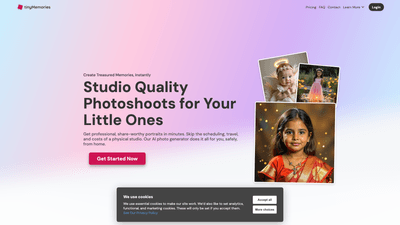
TinyMemories is an AI-powered at-home photoshoot platform designed for newborns, babies, and kids. Instead of booking a traditional studio, you upload your child’s photos, and the system trains a personalized AI model tailored to your child’s features. In a few hours, you can browse a gallery of imaginative, studio-quality photoshoots and download your favorites. The service delivers professional, share-worthy portraits from the comfort of home, with a strong emphasis on safety, privacy, and affordability. Each themed photoshoot yields a curated set of high-resolution images you can print, create photo books, calendars, or share online. The solution is designed to be kid-friendly, secure, and accessible, eliminating scheduling hassles, travel costs, and long waits for edits.
Features
- Infinite themes and styles: Choose from a wide range of imaginative scenes, from fairytale backdrops to sporty adventures, with new themes added regularly. You can update themes anytime to keep memories fresh.
- Kid-friendly and safe: The AI model is designed specifically for children’s images, with strict privacy and safety standards to protect your child’s data.
- Lightning-fast results: Receive polished, ready-to-share portraits within hours rather than weeks.
- Affordable, flexible pricing: Studio-quality results without the high studio fees, with bundles and add-ons to fit different budgets.
- Four-step workflow: A simple, user-friendly process from upload to download, with no photography skills required.
- Ownership and reuse: Generated high-resolution portraits are yours to keep, print, or use commercially for personal projects.
- Secure payments and data handling: Payments powered by Stripe; original photos are deleted after training; strict data security and prompt moderation for prompts.
How to Use
- Upload Your Child’s Photos: Provide clear, candid snapshots to help the system learn your child’s distinctive features. No special equipment needed.
- Train Your Model: The platform trains a custom model tailored to your child in a few hours, automatically handling the heavy lifting.
- Choose Your Photoshoot: Browse a gallery of scenes, outfits, and lighting options. Pick favorites or try multiple looks; each scenario is crafted to look hyper-realistic.
- Download & Create: Preview and download your preferred images. Print them, share them online, or use them to design calendars, photo books, or other keepsakes.
Pricing appears in bundles and credits, with a focus on cost efficiency and value. Start Creating to begin generating personalized AI portraits in minutes.
Pricing
- Bundle Deals
- 1 Model + 2 Photoshoot Credits — $24.99
- Ideal for one child and a single set of themes
- Train 1 unique model
- Generate 2 thematic AI photoshoots
- Realistic, lifelike results within hours
- 2 Models + 5 Photoshoot Credits — $39.99
- Great for siblings or close friends
- Train 2 separate models
- Generate 5 thematic photoshoots
- Fast, flexible, cost-effective
- 1 Model + 2 Photoshoot Credits — $24.99
- Extra Photoshoot Credits
- 1 Photoshoot Credit — $2.49
- 3 Photoshoot Credits — $4.99
- 7 Photoshoot Credits — $9.99
- Notes
- Each themed photoshoot yields 20 high-resolution images
- Credits can be used across any model
- Flexible plan options to accommodate frequent updates or special occasions
Tips
- Upload a diverse set of images: Include close-ups, full-body shots, and different angles to help the AI capture your child’s features accurately.
- Use multiple themes for variety: Experiment with heroes, fantasy, nature, and seasonal scenes to build a rich collection.
- Plan for updates: If your child grows or changes, consider training an additional model to reflect evolving looks and personalities.
- Prioritize safety and privacy: Understand how data is used, how training works, and how long images are stored. Take advantage of the platform’s data deletion guarantees.
- Leverage prints and keepsakes: Use the 20-image per shoot policy to design calendars, photo books, mugs, and other personalized products.
Frequently Asked Questions
- What kind of photos should I upload?
- Upload a variety of images, including close-ups, full-body shots, and different angles. Diversity helps the AI capture your child’s features accurately, whether it’s a playful headshot or a candid pose.
- How do you handle the photos I upload?
- Photos are used solely to train a secure AI model. After training, the original images are deleted to protect privacy and safety.
- Is it safe to upload kids’ photos? Are prompts moderated?
- Yes. The service employs strict child-safety protocols and automatically blocks inappropriate prompts. Uploaded images are stored securely.
- What happens to the generated AI photos?
- Generated portraits belong to you. You can keep them on the platform, download them, or delete them at any time.
- How many images do I get per photoshoot?
- Each themed photoshoot yields 20 high-resolution images. You can download, print, or share your favorites.
- What photo shoot themes are available?
- A wide array of themes, from Superhero and Princess to Nature Adventure and Fairyland, with new scenarios added over time.
- How long does AI training take?
- Training takes a few hours to ensure realistic, detailed results. The process prioritizes quality and natural-looking portraits over speed.
- Can I use the images for personal or commercial products?
- Yes. The high-resolution AI portraits are suitable for personal keepsakes and commercial uses like calendars, photo books, mugs, and social media content.
- How secure is the payment process?
- Payments are processed through Stripe, a trusted provider with strong security standards. Payment data is not stored on TinyMemories servers.
- Do you use cookies?
- The site uses essential cookies to operate, with optional cookies for analytics, functionality, and marketing if you accept them.
This product overview highlights TinyMemories’ unique value: a safe, affordable, and flexible AI-driven at-home solution for creating studio-quality portraits of children, with a fast turnaround, diverse themes, and user-friendly workflows. It’s ideal for families seeking convenient, high-quality keepsakes without the hassle of traditional photo sessions.