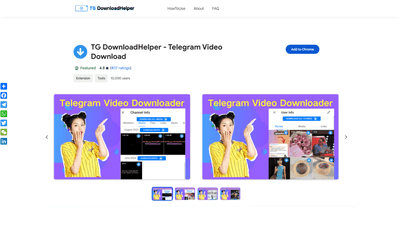
What is it
TG DownloadHelper is a Telegram Video Downloader extension that lets you easily pull media from Telegram without leaving your browser. Designed to work with Telegram Web, it enables one-click downloads of private videos, photos, music, and stories from groups, channels, and personal chats. The tool emphasizes safety, speed, and convenience: no password or API login is required, no watermark on downloaded media, and users can choose between free and premium (unlimited) usage. With millions of users globally and a track record of reliability, TG DownloadHelper positions itself as a practical solution for quickly capturing Telegram media content you have access to.
Core value propositions:
- Simple, one-click media extraction from Telegram Web
- Download across private groups, channels, and stories
- No watermark and high-quality media downloads
- Free tier with usage quotas and a premium tier with unlimited access
- Strong focus on privacy: no data collection from users
Key metrics and social proof (from the ecosystem):
- 160+ countries, 17k+ users
- 99.9% uptime
- 600 million+ files downloaded so far
Features
- One-click downloads: Save videos, photos, music, and audio instantly from Telegram media
- Multi-select batch and single downloads: Download multiple items in a batch or single media with ease
- Private group and channel support: Grab media from restricted or private Telegram spaces you’re authorized to access
- Stories and user media: Download all stories or individual media items from user profiles
- No password or API login required: Easy setup without exposing credentials
- No watermark: Media remains unwatermarked for clean use
- High-quality downloads: Preserve the original quality of videos and audio
- Telegram Web integration: Works directly through the web version of Telegram, leveraging its media delivery
- Safe and private: The tool emphasizes safe usage without collecting user data
- Cross-media support: Videos, photos, music, and audio can be saved from various Telegram sections
- Global reach and reliability: Large user base with extensive uptime and fast performance
Practical capabilities include:
- Download large media files efficiently
- Batch-download entire media sets from groups or channels
- Save videos and audio from restricted channels (where you’re permitted)
- Quick access via pinned extension and toolbar
How to Use
-
Install and pin the extension
- Click the Extension button next to your avatar, select TG DownloadHelper, and pin it to your browser toolbar for quick access.
-
Download from groups or channels (batch or single)
- When you view a Telegram video or image, click the download button beneath the media to start immediately.
- Use the multi-select option to queue several files for batch download.
-
Telegram media download from user profiles
- Open the UserInfo panel and choose Download all stories or Download to grab available media quickly.
-
Telegram story downloads
- Navigate to the group or channel information, then select Download all media or Download to capture everything in one action.
-
Optional: Free vs. paid usage
- Free users have daily usage quotas (the exact daily limit can vary as updates occur). Premium subscribers enjoy unlimited daily usage.
Pricing
- Free tier: Access to essential downloading features with daily quotas
- Premium/Subscriber tier: Unlimited downloads and no daily quota restrictions
- Exact pricing, plan names, and renewal terms are provided within the official product page and app store listing; please refer to those sources for the latest figures
Tips
- Ensure you are authorized to access the media in private groups or channels; respect copyright and terms of service
- Keep the extension updated to benefit from the latest performance improvements and compatibility with Telegram Web
- Use batch downloads for large collections to save time
- Combine with Telegram’s own privacy controls to manage what you are allowed to download
- Regularly back up downloaded media to your preferred storage location
- If you encounter slow downloads, check your internet connection and Telegram Web stability
Frequently Asked Questions
-
What is TG DownloadHelper? TG DownloadHelper is a Telegram Video Downloader extension that enables easy, one-click downloads of private videos, photos, and stories from Telegram groups, channels, and personal chats via Telegram Web.
-
How does it work? It integrates with Telegram Web to fetch media that you have permission to access, then saves the files to your device without requiring a password or API login.
-
How long does a video take to download? Download speed depends on the file size and your internet connection. Larger videos may take longer, but the tool is designed to be fast and reliable.
-
Can I batch download Telegram media? Yes. TG DownloadHelper supports batch downloads as well as single-file downloads, making it easy to collect multiple items at once.
-
Are there unlimited downloads? Free users have daily quotas; subscribers enjoy unlimited daily usage. Exact quotas may vary and are subject to updates.
-
Is it legal to download Telegram videos? The tool adheres to the principle of legal use. We strongly recommend avoiding downloads of unauthorized copyrighted content and ensuring you have rights or permission to save media.
-
Do I need a password or API login? No. The extension does not require passwords or API credentials to operate.
-
Will downloaded media have watermarks? No watermark is added to downloaded videos or images.
-
Which platforms and media types are supported? TG DownloadHelper supports videos, photos, music, and audio from Telegram groups, channels, and stories, accessed through Telegram Web.
-
Is my data safe with TG DownloadHelper? The product emphasizes privacy and safety, with a commitment not to collect user data during use.
-
How can I get started? Install the extension, pin it to your browser toolbar, and start downloading media from Telegram Web with a single click.
This detailed product introduction highlights TG DownloadHelper as a robust, user-friendly Telegram media downloader designed to save time, preserve media quality, and streamline access to private Telegram content. It emphasizes practical use, clear pricing tiers, and actionable steps to maximize value for users seeking efficient AI-assisted media extraction from Telegram.