What is it
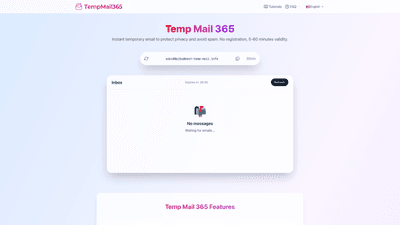
Temp Mail 365 is an instant, disposable email service designed to protect your privacy and minimize spam. It provides temporary email addresses without requiring any registration or personal information. Users can generate an email address in seconds, choose how long the address remains active (ranging from 5 to 60 minutes), and receive incoming messages in real time. Once the selected expiration time passes, the temporary mailbox is automatically destroyed, helping to prevent leakage of personal data and reduce unsolicited emails to your primary inbox. This makes Temp Mail 365 an ideal tool for website registrations, software downloads, trials, events, and any situation where you want to keep your real email private.
Features
- Privacy protection: Use a temporary email instead of your real address to prevent personal information leaks and stay anonymous.
- Instant availability: No registration or personal data required—simply visit the site to obtain a temporary email address.
- Spam prevention: Avoid spam and marketing emails; the temporary mailbox is automatically destroyed after the chosen time.
- Real-time inbox: Receive emails as soon as they arrive, with a straightforward interface for quick access.
- Customizable expiration: Choose from several expiration options (5 minutes, 10 minutes, 30 minutes, or 60 minutes) to suit your use case.
- Clean, modern interface: An intuitive design that makes it easy to copy the address, view messages, and manage the mailbox.
- No account required: Start using Temp Mail 365 immediately without providing personal details.
- Simple workflow for registrations and downloads: Ideal for signups, resource downloads, trials, and event registrations where you don’t want to expose your real email.
Note: The information above reflects the features described for Temp Mail 365 based on the provided content. Always verify with the official site for the latest capabilities and limitations.
How to Use
- Open Temp Mail 365: Navigate to the Temp Mail 365 website to access an instant temporary email address. 2) Pick expiration: Select your preferred mailbox lifetime (5, 10, 30, or 60 minutes). 3) Copy the address: Copy the temporary email address shown on the screen. 4) Use it for signups: Paste the address into registrations, download forms, trials, or event sign-ups. 5) Monitor in real time: Check the inbox on Temp Mail 365 to see incoming messages as they arrive. 6) Act before expiration: Use verification codes, download links, or receipts before the mailbox expires. 7) Auto-expiration: After the selected time elapses, the mailbox is automatically destroyed, and the inbox clears out.
Pricing
- Pricing information is not explicitly provided in the available content. The service is described as instant and no-registration, suggesting a free-to-use model. Since no paid tiers or subscription details are stated, the Pricing section reflects the lack of publicly advertised pricing information on the source page. If you need exact pricing or potential premium options, please check the official Temp Mail 365 site or contact support for the most up-to-date details.
Tips
- Use for non-critical signups: Temp Mail 365 is excellent for website registrations, downloads, and trials where you don’t want to reveal your real email.
- Optimize expiration times: For quick signups or one-time verifications, choose shorter lifetimes. If you anticipate needing more time to complete a task, set a longer duration (30–60 minutes).
- Protect personal data: Avoid using temporary email addresses for accounts that you value long-term access to or that require recovery options beyond email.
- Manage phishing and spam risk: Even with a temporary address, practice safe clicking and avoid sharing sensitive information on sites you don’t trust.
- Copy and share carefully: Ensure you copy the correct temporary address before performing registrations, and paste it exactly where required.
- Check for required domains: When a temporary address is provided, confirm whether the site accepts the address and whether any verification steps are needed.
- Don’t rely on it for security-sensitive activities: For banking, critical work accounts, or services with strong identity verification, use a real, protected email instead.
Benefits and distinct value
- Privacy-first approach: By keeping your real email private, Temp Mail 365 reduces the risk of data breaches and marketing emails infiltrating your main inbox.
- Speed and convenience: No registration, no setup, and instant access—perfect for rapid testing, development workflows, and on-the-go use.
- Spam reduction for testers and developers: Especially helpful for testers who frequently sign up for beta programs, trials, and demos without cluttering their primary mailbox.
- Clear, real-time visibility: The interface emphasizes timely delivery and straightforward inbox management, which is especially valuable for time-sensitive verifications.
Who Should Use Temp Mail 365
- Website testers and developers who need quick, disposable addresses for registrations and verifications.
- Freelancers and professionals who want to protect their personal inbox from marketing emails and data exposure.
- Event participants and contest entrants who want to sign up without sharing their real email.
- Anyone seeking a privacy-friendly, lightweight solution to reduce spam and data leakage in online signups.
Frequently Asked Questions
-
What is Temp Mail 365? Temp Mail 365 is an instant disposable email service that provides temporary email addresses without registration to protect privacy and prevent spam. It supports real-time inbox access and automatic expiration.
-
Do I need to register to use Temp Mail 365? No. The service is designed for instant use with no registration or personal information required.
-
How long do temporary emails stay active? You can choose an expiration time of 5, 10, 30, or 60 minutes. After the selected period, the mailbox is automatically destroyed.
-
Can I customize the expiration time? Yes, you can select from predefined expiration options (5/10/30/60 minutes) before using the temporary email.
-
Is Temp Mail 365 secure for sensitive tasks? Temp Mail 365 is intended for privacy protection and spam reduction, not for high-security tasks or accounts. Do not use temporary emails for banking, critical account recovery, or services requiring strong identity verification.
-
Will I receive emails with attachments? The service supports receiving emails; whether attachments are delivered depends on the sender and the message content. Access the inbox to view any attachments included in incoming messages.
-
What happens after the expiration time? The mailbox and its contents are automatically destroyed, helping prevent any residual data from persisting.
-
How can I access my temporary inbox? Access is provided directly on the Temp Mail 365 site—your temporary email address appears on screen, and incoming messages are displayed in real time.
-
Are there limitations or risks to consider? While temporary email services offer privacy benefits, some sites may block or disallow signups from disposable addresses. Use responsibly and avoid sharing sensitive or irreversible information via temporary emails.
-
Is there a paid version or premium features? The available information does not specify any paid tiers. If you need details on potential premium features or plans, consult the official Temp Mail 365 site or support.
This product overview highlights Temp Mail 365 as a fast, privacy-focused disposable email solution with instant, no-registration access and configurable expiration. It’s well-suited for developers, designers, freelancers, and privacy-conscious users who want to protect their main inbox from spam and data leakage during online registrations, trials, downloads, and events. For the latest capabilities, pricing, and any changes to features, refer to the official Temp Mail 365 resources.