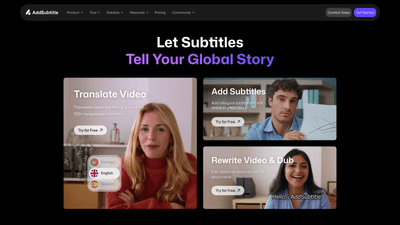
What is it
Add Subtitle (powered by AddSubtitle.ai) is an online AI-powered video editor that enables fast, accurate subtitle generation, translation, and video rewriting. With capabilities to translate subtitles and voice into 100+ languages, it helps creators and businesses reach a global audience with minimal effort. The platform emphasizes speed, accuracy, and ease of use—from adding bilingual subtitles to rewriting dialogue and dubbing videos in multiple languages. Trusted by 10,000+ creators and businesses, Add Subtitle positions itself as a comprehensive solution for multilingual video content, social media campaigns, online courses, and global marketing. Users can try it for free, upload their videos, and begin editing with AI-powered tools in a browser-based workflow.
Features
-
Translate Video
- Generate subtitles in 100+ languages and translate the spoken content automatically.
- Auto-adapted translations for global audiences and diverse content, from meetings to Netflix-style media.
-
Add Subtitles
- Create and edit bilingual subtitles online in a few clicks.
- Accurate AI captioning with a focus on readability and synchronization with the video.
-
Subtitles Styling
- Customizable subtitle styles, fonts, colors, and layouts.
- 100+ language support to ensure legibility and visual appeal across platforms like vlogs and viral videos.
-
Video Rewrite
- Transform the audio and visuals by editing the script. The tool adjusts the voice and lip-sync to match the new script, turning any video into a fresh, humorous or alternative version.
-
Translate Subtitles and Voiceover/Dub Video
- Translate subtitles and generate voiceovers for multiple languages.
- Dub videos so the same content can be spoken in various languages while maintaining voice style.
-
Upload, Edit with AI, Download
- Fast-track video creation with a straightforward, document-like editing flow.
- Upload your video, select the desired feature, edit with AI, and download or share the result.
-
Output and Sharing
- Download edited videos instantly or share via a simple link, enabling quick distribution to social channels or clients.
-
Community and Support
- Access real-time tips, early features, and support via the AddSubtitle Discord community.
-
Platform Relevance
- Optimized for social media and content creators across TikTok, YouTube, Instagram, e-learning, marketing, and more.
Core capabilities focus on turning a single video into globally accessible content with multilingual subtitles, voiceovers, and creative rewrites—all while preserving readability, timing, and voice consistency.
How to Use
- Sign up and access the dashboard.
- Upload your video and choose the feature you want to use (Add Subtitles, Translate Video, Rewrite Video, etc.).
- Configure language, style, and formatting options for subtitles or voiceover.
- Edit with AI-powered tools to refine timing, transcript accuracy, and lip-sync for any language.
- Preview the result, make final adjustments, then download or share via link.
- If you want ongoing updates or tips, join the AddSubtitle community on Discord for early features and support.
Pricing information is available on the official pricing page, with a free trial to explore core capabilities before selecting a paid plan. The platform emphasizes a low-friction entry point with a "Try for Free" option and scalable tiers for creators and businesses.
Pricing
Add Subtitle offers a free trial so you can test core features without commitment. For ongoing use, there are paid plans with additional benefits and higher usage limits. Exact pricing, plan tiers, and feature access vary by plan and can be found on the official pricing page. The pricing model is designed to accommodate individuals, social creators, course developers, e-commerce teams, sales agencies, and studios, with the option to upgrade as needs grow.
Tips
- Prepare clean source material: higher quality audio and clear speech improve translation accuracy and lip-sync results.
- Use language-specific subtitles: for languages with complex scripts, adjust font, size, and background contrast for readability.
- Proofread translations: the built-in text editor helps catch errors; review before final export to avoid embarrassing mistakes.
- Use the Video Rewrite feature thoughtfully: rewriting dialogue can dramatically change timing—recheck lip-sync after edits.
- Leverage one-click multilingual subtitles to quickly reach global audiences on platforms like TikTok, YouTube, and Instagram.
- Start with the free trial to gauge how well the tool fits your workflow, then select a plan that matches your video volume and language needs.
- Join the Discord community for tips, early access to features, and real-time support.
Frequently Asked Questions
-
What is Add Subtitle?
- Add Subtitle is an online AI video editor that creates accurate subtitles, translates them into 100+ languages, and offers features to rewrite or dub videos for global audiences.
-
How many languages does it support?
- Subtitles and translations cover 100+ languages, enabling wide international reach.
-
Is there a free option?
- A free trial is available to explore core features before selecting a paid plan.
-
Can I edit subtitles and proofread translations?
- Yes. The platform includes a text editor for proofreading translations and adjusting subtitles for accuracy and tone.
-
Can I translate subtitles and create voiceovers in other languages?
- Yes. You can translate subtitles and generate voiceovers or dubbed audio across multiple languages.
-
How does Video Rewrite work?
- Video Rewrite lets you edit the script, and the system updates the voice and lip-sync to align with the new script, producing a fresh version of the video.
-
Can I export and share the final video easily?
- Yes. You can download the edited video or share it via a simple link.
-
Is it suitable for social media creators?
- Absolutely. The tool is designed for social media content across TikTok, YouTube, Instagram, and other platforms, with easy export and styling options.
-
How do I get support or feature updates?
- You can access real-time support and tips through the AddSubtitle Discord community, where early features and guidance are shared.
-
Is my content secure?
- Data security and privacy are important; consult Add Subtitle’s privacy policy and terms for details on data handling and protection.
-
Who is this tool best suited for?
- Content creators, course developers, social media teams, e-commerce marketers, sales agencies, filmmakers, and students aiming to reach a global audience with multilingual video content.
This comprehensive overview highlights Add Subtitle’s core value: turning video into globally accessible content quickly and accurately through AI-powered subtitles, multilingual translation, and creative video rewriting, all within a streamlined, browser-based workflow.