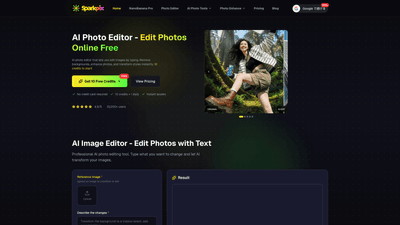
What is it
SparkPix AI Photo Editor is a free online AI-powered image editor that lets you edit photos by typing. Designed for both individuals and professionals, it enables powerful transformations without traditional editing skills. Upload an image, describe the changes you want in natural language, and the AI applies background removal, object removal, style transfers, enhancements, and a wide range of other edits automatically. The platform emphasizes accessibility (instant access, no credit card required for trial) and professional output, with paid plans granting full commercial rights and no watermarks.
Key value points:
- Type-to-edit AI that handles complex tasks like background removal, restoration, and style transfer.
- Free starter credits (10 credits) with daily usage; paid plans remove watermarks and unlock commercial rights.
- A broad toolkit for editing, retouching, colorizing, upscaling, and creative transformations.
Features
- Text-to-image editing: Describe the exact changes you want (e.g., remove background, change background to a forest, adjust lighting, apply a painting style) and the AI generates the result.
- Background removal and replacement: Precise AI-driven background removal, with options to replace or adjust the backdrop.
- Object removal (content-aware erasing): Remove unwanted objects or people, with natural fill to maintain realism.
- Photo enhancement: Automatic improvements to lighting, color, contrast, clarity, and detail.
- Style transfer: Apply artistic styles and moods (e.g., painting styles, vintage looks, or modern aesthetics) via prompts.
- Colorization: Colorize black-and-white or grayscale photos for vivid memories.
- Passport/ID and professional photo generation: Create compliant passport or headshots with appropriate backgrounds.
- Photo restoration: Fix scratches, tears, fading, and other damage to old photos.
- 2D to 3D and product mockups: Convert 2D images into isometric/3D-style renders and generate product mockups for ecommerce.
- Wide range of AI-powered transformations: From color edits and restoration to artistic renderings and creative edits.
- Output rights: Paid plans include full commercial usage rights and no watermarks.
- Credits-based pricing: Generate images or edits by spending credits; 5 credits per generation on typical tasks.
- Free trial and accessible pricing: 10 free credits at signup with 1 daily usage, plus affordable paid packages.
All of these capabilities are designed to deliver professional-quality results suitable for marketing, ecommerce, social media, and creative projects, while remaining accessible to non-technical users.
How to Use
- Sign in or start with the Free Trial
- Get 10 free credits plus 1 daily and instant access. No credit card required for the trial.
- Upload your image
- Start with a high-quality photo to maximize results.
- Describe the changes
- Use natural language to specify edits (e.g., “change the background to a primeval forest,” “remove the watermark,” “colorize this photo,” “apply Van Gogh style”).
- Generate and review
- The AI outputs a result based on your description. Compare with the original and refine prompts if needed.
- Download or refine
- Save the best result. If you need more edits or higher volume, upgrade to a paid plan.
- Plan and licensing
- Paid plans grant commercial usage rights and remove watermarks; choose the package that fits your needs (see pricing below).
Pricing (credits-based)
- Free Trial: 10 free credits + 1 daily; trial generations include watermarks.
- Basic Package: $9.99
- 350 credits (~70 images)
- No watermarks
- Commercial use allowed
- Standard processing speed
- Pro Package: $29.99
- 1,200 credits (~240 images)
- No watermarks
- Commercial use allowed
- Priority processing
- Best value per credit
- Premium Package: $59.99
- 3,000 credits (~600 images)
- No watermarks
- Commercial use allowed
- Priority processing
- Bulk generation support
- All paid plans unlock full commercial rights and remove watermarks, making outputs suitable for marketing, ecommerce, and other professional uses.
Use-case tips
- Be specific in prompts to guide the AI (e.g., “change background to a primeval forest with soft morning light”).
- Use a high-quality reference image when possible to guide style and composition.
- Start with simple edits to establish behavior, then iterate with more detailed prompts.
- Take advantage of the free credits to evaluate whether the workflow meets your professional needs before purchasing.
Tips
- Craft precise prompts: Describe colors, lighting, mood, and background details to improve result fidelity.
- Leverage the reference image: If the tool supports you uploading a reference, it can help align style and features with your target look.
- Plan for commercial use: If you intend to monetize, opt for a paid plan to obtain full commercial rights and remove watermarks.
- Batch and bulk efficiently: For large projects, use the Premium plan’s bulk generation capabilities to accelerate production.
- Review and iterate: Generate multiple variations from different prompts to select the best version for final use.
- Protect originals: Always keep an untouched copy of the input image to test new prompts without overwriting assets.
Frequently Asked Questions
- How does AI photo editing with text work?
- The platform uses text-to-image transformation to modify photos based on natural language prompts. Upload your image, describe the changes (background, style, restoration, etc.), and the AI applies edits while preserving the subject.
- What types of image transformations and photo enhancements are available?
- Background removal, object removal, photo restoration, style transfer, image colorization, sharpening, upscaling, and various creative edits driven by text prompts.
- Can I remove backgrounds and objects from photos using AI?
- Yes. The AI detects and removes backgrounds or unwanted objects, then fills the area to maintain a natural look.
- Is this suitable for professional photo editing and commercial use?
- Yes. Paid plans include full commercial usage rights; outputs are designed for marketing, ecommerce, and other professional contexts.
- How does pricing and credits work?
- Edits generate by spending credits (typically 5 credits per generation). Free trials offer limited usage, and paid plans provide more credits and higher output capacity.
- Is there a watermark on outputs?
- The Free Trial includes watermarks on generated results. Paid plans remove watermarks.
- Do I own the rights to the generated images?
- Paid plans include commercial rights, allowing you to use the outputs in commercial contexts.
- Do I need to install software to use this tool?
- No. SparkPix AI Photo Editor operates online in your browser, no installation required.
- Can I convert 2D images to 3D or create product mockups?
- Yes. The platform offers 2D-to-3D style conversions and product mockup generation among other advanced capabilities.
- How many images can I generate with each plan?
- Each plan provides a fixed credit allotment corresponding to roughly a set number of images (e.g., Basic ~70 images, Pro ~240, Premium ~600). The exact counts depend on prompt complexity and edits.
This comprehensive overview highlights SparkPix AI Photo Editor’s main value: an accessible, text-driven AI editing solution that can transform images end-to-end—from background changes and object removal to advanced style transfers and professional photo restoration—while offering clear, scalable pricing and strong commercial-use rights for creators and brands.