What is it
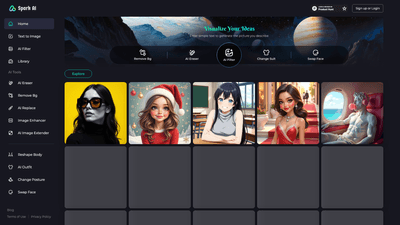
A cutting-edge Text-to-Image AI platform equipped with a comprehensive AI Tools library tailored for generation and editing of visuals. Users describe their desired image with simple text prompts, and the system generates high-quality images that can be refined with an array of specialized editors. The toolkit includes Remove Bg (background removal), AI Eraser, AI Filter, Change Suit, Swap Face, Image Enhancer, Image Extender, Reshape Body, Outfit, Change Posture, and more. This blend of generation and post-edit capabilities enables rapid creation of portraits, fashion visuals, product images, and scene composites without requiring advanced design software. The platform supports straightforward onboarding with Sign up or Login and seeks to deliver professional, studio-grade results suitable for social media, marketing, e-commerce, and creative projects.
Features
- Text-to-Image generation: Create visuals from simple, natural-language prompts, enabling rapid concept visualization and iteration.
- AI Tools library: A cohesive suite of editors designed to customize every aspect of an image—from background to details of appearance.
- Remove Bg: Efficient background removal to prep assets for composite work or new scene creation.
- AI Eraser: Precise element erasing to fine-tune composition without starting over.
- AI Filter: Apply artistic or stylistic effects to achieve the desired mood, color palette, or finish.
- Change Suit and Outfit: Modify clothing to test different fashion looks or branding aesthetics.
- Swap Face: Face swapping capabilities for alternate appearances while preserving lighting and expression.
- Change Posture: Adjust pose to enhance storytelling, balance, or dynamic feel.
- Reshape Body: Subtle body reshaping for proportional tweaks or stylized silhouettes.
- Image Extender: Extend canvases or scenes to accommodate wide formats and expanded compositions.
- Image Enhancer: Improve sharpness, color accuracy, and overall image quality for a polished result.
- High-resolution outputs: Generate and export images suitable for professional use, with attention to detail and fidelity.
- User-friendly workflow: Sign up or login, intuitive prompts, and iterative preview to accelerate production timelines.
- Realistic to stylized versatility: A broad spectrum of looks—from hyper-realistic portraits to fashion-forward, dramatic visuals.
Keywords: text-to-image AI, AI tools, background removal, image enhancer, image extender, swap face, change posture, outfit, reshap(e) body, AI eraser, AI filter, sign up, high-resolution, visual generation.
How to Use
- Sign up or login to access the full toolset and manage your projects.
- Start a new project and enter a simple, descriptive text prompt that captures the subject, setting, lighting, and style you want.
- Leverage the AI Tools library to tailor the image:
- Remove Bg if you need a clean foreground or a new backdrop.
- Use AI Eraser to remove unwanted elements or refine details.
- Apply AI Filter to establish a particular mood or artistic treatment.
- Change Outfit, Change Posture, or Swap Face to experiment with appearances and storytelling.
- Reshape Body or Image Extender to adjust proportions or extend the scene.
- Use Image Enhancer to sharpen details and harmonize colors.
- Preview your results in real time, refine prompts or tool settings, and iterate until the image meets your requirements.
- Save or export the final image in the desired resolution and format. Depending on your plan, you can access higher resolutions and additional features.
- Pricing and tiers (free/paid) are available to suit different needs. Free access typically provides limited credits or features, while paid plans unlock the full library of tools and higher output limits. Check the official pricing page for current details.
Pricing
- Free tier: Entry-level access with limited credits or feature restrictions to try core capabilities.
- Paid tiers: Expanded access to all AI Tools, higher-resolution exports, and increased quotas. Plans are designed to accommodate individuals, teams, and enterprises with scalable usage.
- Note: Exact pricing, credits, and feature availability may vary; consult the official site for the latest options and terms of use.
Tips
- Start with a clear, concise prompt: define the subject, setting, pose, lighting, and style before applying edits.
- Layer prompts and tools: generate a base image first, then apply Remove Bg, Outfit changes, or Swap Face to test alternatives without losing the original concept.
- Be specific with details: color, texture, fabric, and mood help the AI reproduce your vision more accurately.
- Use the Edit pipeline strategically: use Image Extender for wider canvases and Reshape Body for subtle adjustments; sequence tools in a logical order to preserve lighting and cohesion.
- Leverage the Preview workflow: iterate with quick previews to converge on the desired look before final export.
- Consider consistency: when swapping faces or outfits across a series, keep lighting, shadows, and color grading consistent to maintain realism.
- Ethical and legal use: ensure you have rights to any faces, outfits, or trademarks depicted and comply with platform policies and local regulations.
Frequently Asked Questions
- Is there a free plan available? Yes. A Free tier typically provides limited credits or access to core features to explore the platform before upgrading.
- Can I swap faces or change outfits? Yes. The platform includes Swap Face and Change Outfit tools designed for flexible experimentation.
- What about background removal? Remove Bg is available to separate subjects from their backgrounds, facilitating clean composites.
- What formats and resolutions are supported? The tool supports high-resolution exports suitable for professional use; exact formats and resolution caps depend on the chosen plan.
- Are generated images royalty-free? Generated content is intended for user projects in line with the platform’s Terms of Use. Review licensing terms for commercial use, attribution, and redistribution rights.
- Can I integrate with other workflows or APIs? Advanced or enterprise plans may offer API access or integration options. Check the pricing and plan details for availability.
- How do I ensure safe and appropriate content? The platform provides content guidelines and safety policies to govern capable use and prevent misuse.
This comprehensive Text-to-Image AI solution combines intuitive generation with a powerful suite of editing tools. It’s designed for creative professionals, marketers, designers, and enthusiasts who want rapid concept-to-visual realization, experimentation with style and composition, and efficient workflow with minimal software complexity. By focusing on core capabilities like Remove Bg, AI Eraser, AI Filter, Swap Face, Change Outfit, and Image Enhancer, the platform delivers a versatile, scalable path from text prompt to publish-ready imagery.