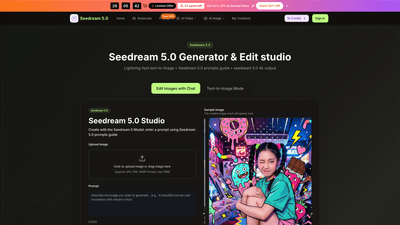
What is it
Seedream 5.0 is a professional AI image generation and editing studio powered by ByteDance. It turns text prompts into high-quality 4K visuals in seconds and also lets you edit existing images with natural language. With Seedream 5.0, you can create consistent characters, produce print-ready 4K assets, and refine visuals through a streamlined, prompt-driven workflow. The platform combines the Seedream 5 Model and Seedream V5 with advanced features like image editing, background removal, background swaps, multi-image fusion, and more, all designed for creators, brands, and teams seeking rapid, premium AI visuals.
Key branding and technology notes:
- Built on Seedream 5 Model and Seedream V5 (powered by ByteDance)
- 4K native output with optional one-click upscaling to 4K
- Fast generation: typically 15–30 seconds, with some results in as fast as 2–5 seconds
- Includes commercial use license and no watermark on outputs
- Supports dynamic features like multi-image fusion, style transfer, and natural language editing
- Available in plans suitable for individuals, teams, and enterprises
Features
- 4K High-Resolution Output
- Generate premium 4K visuals directly from text prompts
- Native 2K output plus one-click 4K upscaling for print-ready quality
- Lightning-Fast Generation
- Ultra-rapid results (often 15–30 seconds; some prompts deliver in 2–5 seconds)
- Text-to-Image Generation with Prompts Guide
- Seedream 5.0 prompts guide helps you craft precise prompts for better results
- Smart prompt understanding to capture color, lighting, mood, and composition
- Consistent Characters Across Images
- Build cohesive, lifelike characters with the same face, hair, clothing, and expressions across scenes
- Image Editing with Natural Language
- Edit existing images or generate fresh visuals by describing changes in plain language
- Examples: adjust colors, lighting, style, or scene composition
- Advanced Image Capabilities
- Background removal and background swaps for quick, professional edits
- Avatar creation for accounts, games, or marketing
- Text editing within images (insert captions or change fonts authentically)
- Image history for easy reversion and version tracking
- Multi-Image Fusion & Style Transfer
- Merge 2–9 concepts/images into a single cohesive output
- Apply diverse styles and preserve 4K quality
- AI Video Generation Support
- Create AI-assisted videos in addition to still images (seedream 5.0 ecosystem)
- Model Ecosystem
- Seedream 5 Model and Seedream V5, plus additional models (Veo 3, Sora 2, Seedance, Wan 2.5) for varied workflows
- No Watermark & Commercial Use License
- Outputs are watermark-free and come with a commercial license suitable for business use
- History, Accessibility, and Ease of Use
- Image history for tracking past creations
- Simple, intuitive workflow that requires no technical expertise
How to Use
- Start with Seedream 5.0 Image Generator
- Access the Seedream 5.0 image generator and the integrated AI editor to create 4K artwork in one place.
- Upload or Describe
- Upload a photo (JPG, PNG, WEBP; max 10MB) or enter a text description using Seedream 5.0 prompts guide.
- Generate and Preview
- Click Generate to produce artwork in seconds; preview output and download when ready.
- Refine and Perfect
- Use advanced editing tools to fine-tune colors, lighting, composition, and other details for professional results.
- Save and Use
- Save your 4K outputs with no watermark and commercial-use license for campaigns, product images, and more.
Practical use cases include e-commerce product imagery, character art, concept art, marketing assets, thumbnails, decks, and social visuals. The platform emphasizes fast turnaround, consistent branding, and high-quality 4K output suitable for print and digital media.
Pricing (Annual plans often come with significant savings)
- Limited-time offer: Save 50% on Annual Plans (Flash Sale). 32 spots left.
- Basic
- Price: $9.8/month (monthly billing) or $4.9/month (annual billing, 50% off)
- Credits: 6,000 credits per year
- Output: Up to 50 images per month
- Includes: Seedream 5.0 Model access, unlimited generation, commercial-use license, no watermark
- Pro
- Price: $19.8/month (monthly) or $9.9/month (annual)
- Credits: 24,000 credits per year
- Output: Up to 200 images per month
- Includes: Everything in Basic, plus enhanced features and priority access
- Enterprise
- Price: $39.8/month (monthly) or $19.9/month (annual)
- Credits: 72,000 credits per year
- Output: Up to 600 images per month
- Includes: Everything in Pro, plus enterprise-grade features, priority support, and larger-scale usage
- All plans include:
- Commercial Use License
- Seedream 5 Model and Seedream V5 access
- AI image enhancement and background tools
- Support for AI video generation
- No watermark on outputs
- Image history for project tracking
- Secure payments and the ability to cancel anytime
Notes:
- Plans are designed for AI image teams and creators, supporting both Seedream 5 Model and Seedream V5 sessions
- The page highlights a limited-time 50% annual discount and a fast-growing user base with positive testimonials
- Prices shown reflect a mix of monthly and annual billing options; annual billing provides the stated 50% savings
Tips
- Be Specific with Prompts
- Include color choices, lighting, mood, and composition specifics
- Mention art styles (photorealistic, anime, oil painting) and quality keywords (high resolution, detailed)
- Leverage the Prompts Guide
- Use Seedream 5.0 prompts guide to maximize 4K results and model capabilities
- Focus on Character Consistency
- For series or branding, emphasize consistent facial features, hair, clothing, and expressions
- Use Background Tools Strategically
- Apply background removal or swaps to place subjects in suitable environments or marketing contexts
- Experiment with Fusion and Styles
- Combine multiple concepts with multi-image fusion to create complex visuals
- Apply different styles to explore variations while maintaining 4K quality
- Optimize for Use Case
- For product imagery, iterate on lighting and textures to get realistic, print-ready assets
- For avatars or marketing visuals, refine identity and tone using natural language editing
- Take Advantage of Licensing
- Ensure commercial-use licensing is in place for agency and client work
- Track and Reuse
- Use image history to revisit and refine successful outputs for new campaigns
- Test Before Commit
- Start with free credits or a low-cost plan to validate prompts and workflows before scaling
Frequently Asked Questions
- What is Seedream 5.0?
- Seedream 5.0 is a 4K-capable AI image generator and editor powered by the Seedream 5 Model and Seedream V5 (ByteDance). It converts text prompts into high-quality visuals and offers powerful editing, background tools, and style fusion for professional use.
- How fast does Seedream 5.0 produce images?
- Typical generation times are 15–30 seconds, with some prompts delivering results in as little as 2–5 seconds for certain tasks.
- What output resolution can I expect?
- Outputs are 4K-ready, with an option for native 2K and one-click 4K upscaling to print-quality results.
- Can I edit images using Seedream 5.0?
- Yes. Seedream 5.0 supports editing via natural language instructions, including color adjustments, style changes, background edits, and text insertions.
- Is there a watermark on outputs?
- No. Seedream 5.0 outputs come without watermarks.
- Can I use Seedream 5.0 commercially?
- Yes. All plans include a commercial use license suitable for agency, marketing, and business projects.
- What formats are supported for uploads?
- Uploads support JPG, PNG, and WEBP formats, with a maximum size of 10MB per image.
- Do I need technical expertise to use Seedream 5.0?
- No. Seedream 5.0 is designed for ease of use with prompts-driven, intuitive workflows; no advanced technical knowledge is required.
- Are there free credits or a trial?
- The platform highlights free credits and a “Try Seedream 5.0 AI online free” experience, along with a tiered pricing structure. Exact trial credits may vary with sign-up.
- What makes Seedream 5.0 unique?
- The combination of 4K print-ready outputs, rapid generation, robust editing via natural language, character consistency across images, background tools, multi-image fusion, and a commercial license positions Seedream 5.0 as a comprehensive solution for creators and teams.
If you’re seeking a fast, reliable, and scalable AI imaging and editing platform for 4K visuals, Seedream 5.0 offers a compelling blend of speed, quality, and business-ready features designed to accelerate creative workflows and production timelines.