What is it
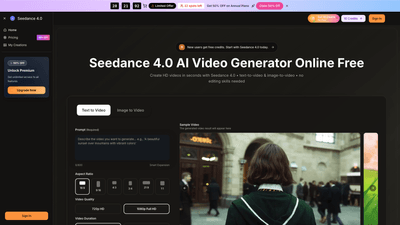
Seedance 4.0 is an online AI video generator that turns text prompts and images into HD and 4K-ready videos in seconds. Designed for creators, marketers, and production teams, Seedance 4.0 supports both text-to-video and image-to-video workflows within a browser, so you can produce launch-ready videos without traditional studios or lengthy editing cycles. Key advantages include fast, consistent generation, a creator-friendly workflow, built-in audio, and a commercial use license, making it ideal for ads, social content, explainers, and client pitches. It’s available as Seedance 4.0 along with complementary models (Seedance V4, Seedream 4.0, Seedance 4.0 Model) to handle diverse scenes while maintaining a cohesive brand look.
What makes Seedance 4.0 unique:
- Quick, high-quality outputs with 1080p Full HD and 720p HD options, plus 4K-ready results for premium use.
- Text-to-video and image-to-video capabilities that let you start from a sentence, a still image, or both.
- A broad suite of models and motion styles to preserve brand consistency across scenes.
- Built-in audio (dialogue and ambience) synchronized with visuals, reducing the need for external audio tools.
- No watermark and a commercial use license, enabling paid ads, client work, and monetized channels.
- A streamlined 4-step workflow, batch options, and collaboration features that accelerate delivery from idea to published video.
Practical use cases include lean marketing videos without a studio, quick previews and final renders for pitches, social-ready clips, explainers, product demos, and campaign assets that stay on-brand across iterations.
Features
- Text-to-video and image-to-video generation: Create clips from prompts or still images, with motion, composition, and timing handled by Seedance 4.0.
- HD to 4K-ready output: Deliver crisp, professional video suitable for ads, social feeds, and client presentations.
- Aspect ratios and video quality: Supports multiple aspect ratios (including common social formats) and various quality settings (720p, 1080p, and higher where supported).
- Built-in audio: Generate synchronized dialogue and ambient sound to accompany visuals, reducing separate audio work.
- No watermark and commercial license: Use Seedance 4.0 videos in paid ads, client work, and monetized channels with confidence.
- Model variety for consistent results: Access Seedance 4.0 models alongside Seedance V4, Seedream 4.0, and other seed models to fit each scene without breaking the flow.
- Preview and rapid renders: Get quick previews in seconds; render higher-quality outputs only when you’re satisfied.
- Copy-ready outputs for campaigns: Produces clean, on-brand videos suitable for campaigns, pitches, and social content.
- Workflow tools for real-world production: Batch jobs, scene splitting, prompt helpers, and share pages streamline collaboration and delivery.
- Flexible collaboration: Share pages and export-ready assets to speed up team reviews and approvals.
- Desktop and mobile access: Runs in your browser on both desktop and mobile devices for on-the-go editing and generation.
- Free credits for new users: Begin with free credits to test Seedance 4.0 before upgrading.
- Four-tier pricing with annual savings: Clear plans designed for individuals, teams, and enterprises, with up to 40% off on annual plans.
How to Use
Seedance 4.0 is built for a simple, creator-friendly workflow. You can start with free credits, sign in on the Seedance site, and begin generating right away.
- Choose the generator
- Pick Seedance 4.0 AI Video Generator or the Seedance4.0 App, then select your preferred style and motion. You can swap between models per scene to maintain flow without interrupting your workflow.
- Upload or type your prompt
- Enter a text prompt or upload an image. Describe what you want to see, set key details (tone, pacing, camera moves), and choose aspect ratio and video length.
- Generate and download
- Click Generate and wait for the render. When ready, download the MP4 in the desired resolution. Seedance 4.0 streams output quickly, and you can render a higher-quality version once you’re happy with the draft.
- Refine
- Tweak motion, color, timing, and scene order. Export final cuts with consistent branding for ads, social, or client decks.
Pricing is tiered, with options designed to fit solo creators, small teams, and large organizations. Start with free credits and upgrade as needed. All plans support annual billing with substantial savings, and there is a monthly option if you prefer flexibility.
Pricing
- Limited-time offer: Save 40% on annual plans.
- Basic (starter/individual users): Typically around $29.9 per month, discounted to $17.9/month with annual billing.
- Yearly credits: about 12,000 credits/year (roughly 1,000 credits per month)
- Up to 100 videos per month
- Video generation: unlimited within plan constraints
- 6,000+ annual credits for video downloads (subject to plan)
- Commercial Use License
- Access to Seedance 4.0 models and essential features
- No watermark, priority support
- Professional (creators and professionals): Regularly $49.9 per month, discounted to $29.9/month with annual billing.
- 24,000 credits/year
- Up to 200 videos per month
- Everything in Basic plus expanded usage and priority support
- Enterprise (teams and businesses): Regularly $99.9 per month, discounted to $59.9/month with annual billing.
- 72,000 credits/year
- Up to 600 videos per month
- All Professional features plus enterprise-grade capabilities and priority queue
- All plans include: Yearly-only access to Seedance models, built-in AI video enhancement and background removal, continuity across scenes, and professional output suitable for client work.
Note: Prices and plans are subject to change. Check the Seedance 4.0 official pricing page for the latest options, exact credit allocations, and current discounts. New users can start with free credits and cancel anytime.
Tips
- Start with prompts that are precise and filmable: specify scene direction, motion style, lighting, color palette, and tempo to keep outputs consistent.
- Use image prompts to anchor visuals: upload key frames to guide motion and character consistency across scenes.
- Leverage the model selection: alternate between Seedance 4.0, Seedance V4, and other models per scene to maintain flow while achieving the desired look.
- Plan for ads and social: render for 1080p or 4K with codecs and framing optimized for the platform (short-form verticals, square, or cinematic wides).
- Utilize built-in audio: generate dialogue and ambience to save time on audio post-production, then adjust timing to fit the cut.
- Preview early, render later: use fast previews to iterate quickly; run higher-quality renders only after you approve the cut.
- Maintain brand consistency: keep a shared color, typography, and lighting profile across scenes; Seedance’s asset library and scene presets help with this.
- Save workflows: reuse prompt flows and scene splits to accelerate future projects and reduce revision time.
- Exploit commercial rights: confidently use Seedance 4.0 outputs in paid campaigns, client decks, and monetized channels.
Frequently Asked Questions
- How do I access Seedance 4.0?
- Access it on the official Seedance 4.0 website, sign in to obtain credits, or use the Seedance4.0 App on desktop or mobile for online trials.
- How does Seedance 4.0 work?
- Enter a prompt or upload an image, select settings, then generate. Download the result when ready.
- What is Seedance 4.0?
- A seedance 4.0 AI video generator for text-to-video and image-to-video, aligning with Seedance V4, Seedream 4.0, and related models to support everyday video creation with HD/4K-ready results.
- Can I use Seedance 4.0 on desktop and mobile?
- Yes. It runs in your browser on both desktop and mobile devices.
- How does Seedance 4.0 compare to other tools?
- It emphasizes fast, consistent generation with strong prompt adherence, built for reliable, on-brand outputs across scenes.
- What formats can I download?
- MP4 videos optimized for web and social. Higher-quality exports depend on your plan.
- Is there a limit to how many videos I can generate?
- Generation is credit-based. You start with free credits and upgrade as needed.
- How long does a video take to generate?
- Most videos render in seconds to under a minute, depending on settings and server load.
- Why should I use Seedance 4.0?
- It speeds up video production with consistent style, simple prompts, and a workflow that fits ads, social, and prototypes.
- Is there a free online AI video generator?
- Seedance 4.0 offers online access with starter credits to try before subscribing.
- Is there a mobile app?
- Seedance 4.0 runs in a mobile browser; app availability may vary by platform.
- How do I cancel or adjust my plan?
- You can cancel anytime through the account settings or contact support at [email protected].
Ready to unlock faster video production with Seedance 4.0? Join 100K+ creators who start with free credits and ship 4K-ready videos in minutes.