What is it
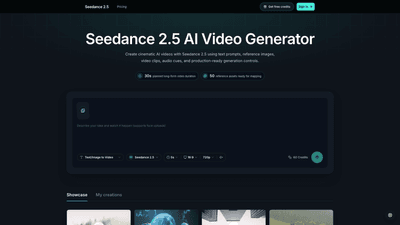
Seedance 2.5 AI Video Generator is a cinematic AI video production platform designed to turn ideas into production-ready videos using text prompts paired with rich reference assets. Built for professional workflows, Seedance 2.5 combines prompt-first direction with reference-aware creation, enabling you to anchor your visuals to specific images, video clips, and audio cues while maintaining full control over frame, timing, and render settings. Key capabilities include structured scene briefs, reference mentions inside prompts, and render-ready controls that ensure each generation carries the necessary context for a clean, cinematic result. The tool is designed to support long-form planning (up to 30-second cinematic previews) with a library of reference assets ready for mapping, making it suitable for brand visuals, product demos, marketing videos, creator content, fashion lookbooks, and training explainers. It’s positioned as a focused, end-to-end workspace that guides you from concept to a production-ready AI video.
Features
- Prompt-first direction: Start with a cinematic concept and describe scene, subject, motion, lighting, lens style, and pacing in one focused prompt to guide the entire generation.
- Reference-aware creation: Attach images, video clips, and audio cues as anchors so the output aligns with identity, mood, motion, and style.
- Reference @ mentions: Use @Image, @Video, and @Audio in prompts to tell Seedance 2.5 exactly how each asset should influence the output.
- Shot and frame planning: Shape opening and closing frames, choose aspect ratio, duration, and output resolution to fit the intended delivery format.
- Render-ready controls: Set generation options up front so each request includes the necessary context for a cleaner, higher-quality result.
- History and iteration: Review past jobs, monitor render progress, and iterate within a single organismized Seedance 2.5 workflow.
- Step-by-step generation flow: Build each generation request in stages—define the scene, attach references, tune output, and submit a production-ready brief.
- Built for real use cases: Structured terrain for brand work, product motion, creator content, cinematic scenes, and fast prompt iteration.
- Comprehensive workflow comparison: Seedance 2.5 workspace vs a basic AI video tool, highlighting the differences in references, duration, output controls, task history, and end-to-end workflow.
- 50 reference assets ready for mapping and 30-second planned long-form video capabilities: Enhanced structure for cinematic production.
- Practical use cases: Marketing videos, creator drafts, narrative concepts, brand visuals, product demos, fashion lookbooks, music visuals, and training explainers.
How to Use
- Start with the scene
- Turn your idea into a usable video brief by detailing the subject, environment, motion, lighting, and pacing. Build a cinematic premise that seeds the generation.
- Guide it with references
- Attach visuals and audio cues as anchors and define how each asset should influence character, product, style, mood, or movement. Use explicit cues via @Image, @Video, and @Audio to guide the model.
- Send it to render
- Choose output settings (aspect ratio, duration, resolution), create the Seedance 2.5 task, and monitor progress as the generation runs in the queue. The workflow emphasizes render-ready inputs to produce cleaner results.
- Review and iterate
- Access your history to revisit completed videos or ongoing renders, adjust prompts or references, and re-submit for refinement. The system is built to support an organized, production-facing iteration process.
- Pricing and credits
- Access free credits upon signing in to begin experiments. Additional credits and plans are available, with pricing details published on the Seedance site. Credits are tied to render tasks and project throughput, helping you scale cinematic workflows as needed.
Practical use scenarios you can pursue with Seedance 2.5
- Marketing videos: Create campaign hooks, product reveals, feature shots, and launch content with branded visuals and motion.
- Creator drafts: Turn quick ideas into social-ready clips using a fast prompt-to-video path with media references.
- Narrative concepts: Sketch cinematic scenes with subject, setting, action, emotion, camera language, and pacing before rendering.
- Brand visuals: Maintain product identity through reference images, clips, audio cues, and precise frame guidance.
- Product demos: Convert UI flows or physical details into clear motion concepts for landing pages or ads.
- Fashion lookbooks: Plan outfits, model movement, fabric texture, and campaign mood prior to production.
- Music visuals: Design short loops or mood-driven scenes around a soundtrack or lyric moments.
- Training explainers: Build structured explainer scenes for onboarding, education, or step-by-step tutorials.
Pricing
Seedance 2.5 offers access through a free credits model to get you started. After exhausting introductory credits, you can choose paid credit options to continue generating high-quality cinematic AI video content. Sign in to claim free credits and explore paid plans or credit bundles. Detailed pricing and billing options are available on the Seedance 2.5 pricing page.
Tips
- Plan with a cinematic brief: Start with a clear scene description including subject, environment, motion, lighting, and pacing to reduce back-and-forth during iteration.
- Be precise with references: Upload high-quality images, clips, and audio cues, and specify exactly how each asset should influence mood, movement, and style using @ mentions.
- Use frame guidance strategically: Define opening/closing frames, aspect ratio, duration, and resolution early to keep renders aligned with your delivery needs.
- Iterate in stages: Build the generation request step by step (scene → references → output controls) to ensure your final video matches the intended concept.
- Leverage history: Revisit past renders to refine prompts, adjust assets, or reuse successful settings for new videos.
- Align with brand standards: Use consistent reference assets and frame guidance to preserve identity across campaigns and formats.
- Optimize prompt clarity: Combine scene detail with precise technical cues (lighting, lens style, pacing) to reduce ambiguity in output.
Frequently Asked Questions
-
What is Seedance 2.5?
- A cinematic AI video generator that uses text prompts, reference images, video clips, and audio cues to create production-ready videos with structured workflows and render controls.
-
How to use Seedance 2.5 AI Video Generator?
- Start with a scene prompt, attach references, specify frame and render settings, and submit a production-ready generation task. Review progress in history and iterate as needed.
-
Is Seedance 2.5 free to use?
- Yes, you can start with free credits upon signing in. Additional credits are available via paid plans.
-
Where can I try Seedance 2.5?
- Access is via Seedance’s platform, where you can sign in to claim free credits and explore paid options.
-
Seedance 2.5 vs Seedance 2.0: what is different?
- Seedance 2.5 introduces a more structured workspace, reference-aware creation, enhanced frame and render controls, and an improved workflow designed for cinematic AI video production versus earlier versions.
-
Does Seedance 2.5 support image to video?
- Yes. Seedance 2.5 supports image-to-video workflows by using reference images to steer the output in combination with prompts.
-
Does Seedance 2.5 support reference images, video, and audio?
- Yes. You can attach reference images, video clips, and audio cues and drive output with @ Image, @ Video, and @ Audio prompts.
-
Can Seedance 2.5 generate 30-second or 4K videos?
- Seedance 2.5 supports cinematic outputs with controllable duration and high-resolution options, including 4K-ready renders where supported by your plan.
-
Does Seedance 2.5 have an API?
- Availability of an API is not specified here; check the official Seedance documentation or pricing page for API options and access.
-
What are the best prompts for Seedance 2.5?
- Best prompts clearly describe the scene, subject, environment, motion, lighting, and pacing, then incorporate references via @Image, @Video, and @Audio to anchor style and mood.
-
How do I build my first Seedance 2.5 video?
- Build a focused workspace: define the scene with a clear brief, attach relevant references, choose render settings, and submit a production-ready AI video request. Then review, iterate, and render.
This comprehensive guide provides a detailed overview of Seedance 2.5 AI Video Generator, highlighting how it enables cinematic AI video creation through a structured, reference-rich workflow. By combining prompt-driven direction with asset anchoring and render-ready controls, Seedance 2.5 offers a unique, professional-grade solution for brands, creators, and educators seeking to produce high-quality AI-generated video content efficiently.