What is it
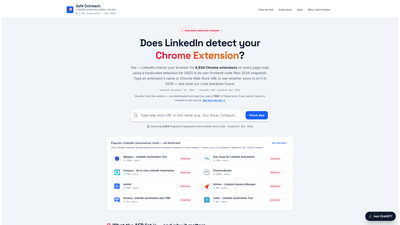
Safe Outreach is a LinkedIn extension safety checker designed to help users evaluate the security and safety of LinkedIn automation tools and browser extensions. It centers on LinkedIn’s Active Extension Detection (AED) mechanism, a hardcoded list of 4,934 extension IDs embedded in LinkedIn’s frontend code. On every page load, LinkedIn checks whether any of these extensions are installed in your browser. Safe Outreach uses the November 2026 AED snapshot (4,934 entries) to tell you whether a given extension is on LinkedIn’s detection list and to reveal what the underlying code teardown shows about how the extension operates. The tool also analyzes data flow to distinguish how a session is handled—whether it stays entirely in your browser or is uploaded to a vendor’s cloud—providing a clear picture of exposure risk. It includes comprehensive teardowns of 100+ extensions, with evidence traced back to LinkedIn’s own source, and visualizes data flows to help users understand risk at a glance. Note: Safe Outreach is not endorsed by LinkedIn.
Features
- AED-based detection checks: Verifies whether an extension is on LinkedIn’s hardcoded list of 4,934 entries (as of Nov 2026) and flags potential exposure risk.
- Code teardown verification: Each verdict is supported by a teardown derived from reading the extension’s code, showing how LinkedIn’s detection would respond in practice.
- Session data-flow analysis: Clear diagrams and narratives about where your session data goes—whether it stays local in your browser or is uploaded to a vendor’s cloud.
- Local vs. cloud architectures identified: Distinguishes between session stays local (preferred for privacy) and cloud-based sessions (higher risk, with data leaving the browser).
- Risk categorization: Highlights high-risk tools that upload sessions or expose sensitive data, even if they aren’t on the AED list.
- Extensive tool teardowns: Access full teardowns for 127 LinkedIn tools and 192 extension checks, including Waalaxy, Dux-Soup, PhantomBuster, Expandi, HeyReach, and more.
- Browser compatibility: Operates with Chromium-based browsers (Chrome, Edge, Brave, Arc, Opera) via a userAgent check in LinkedIn’s bundle.
- Transparency and evidence: Data-flow maps and diagrams are reconstructive based on tool code, allowing users to pause or click for the full audit.
- Market insights: Provides context on how users search for LinkedIn account safety and restrictions, illustrating demand for safer automation tools.
How to Use
- Enter extension name or Chrome Web Store URL: Start by typing the extension’s name or paste its Web Store URL to check its safety posture as of the Nov 2026 snapshot.
- Review the AED verdict: See whether the extension is on the AED list and understand what that implies for your LinkedIn account.
- Inspect the teardowns: If available, open the full teardown to review line-by-line evidence from the extension’s code, linked to LinkedIn’s detection logic.
- Examine the data-flow diagram: Hover or click to view the data-flow map showing whether the session stays local or is uploaded to a cloud backend, and identify any high-risk components.
- Interpret the risk: Remember that “Not on the AED list” does not guarantee safety. The tool emphasizes the importance of the overall architecture and data flow, not just AED list membership.
- Apply findings to decision-making: Use these insights to assess whether to deploy, update, or replace a LinkedIn automation extension, prioritizing tools with local data handling and minimized cookie or session exposure.
Pricing
- Pricing details are not publicly listed in the provided content. Safe Outreach presents the AED-based checker, code teardowns, and data-flow analyses, but there is no explicit disclosure of free versus paid tiers in the material. For current pricing or access to full teardowns, refer to Safe Outreach’s official site or contact their team directly. Note: The service is described as independent research and testing, not an official LinkedIn offering.
Tips
- Prioritize local-session designs: Extensions that keep your LinkedIn session entirely in your browser (local processing) reduce exposure compared to those that upload sessions to cloud backends.
- Use teardowns as evidence: When evaluating tools, rely on the published code teardowns to understand how data flows and where risks may lie.
- Do not rely solely on AED status: Being on or off the AED list is only one piece of the safety puzzle. Examine the architecture, cookie usage, and data exchange with external servers.
- Cross-check across tools: Compare several tools’ teardowns to identify patterns in safe vs. risky architectures.
- Keep browser privacy in mind: Ensure extensions you use comply with best practices for cookie handling, CSRF protection, and minimal data access.
- Update awareness: AED list and detection logic can change over time; re-check tools periodically to stay informed about new or updated extensions.
Frequently Asked Questions
-
What is the AED list? The AED (Active Extension Detection) is a hardcoded roster of 4,934 extension IDs embedded in LinkedIn’s frontend code. LinkedIn checks for these extensions on every page load, and finding a match can flag an account before you interact with the page.
-
Is Safe Outreach affiliated with LinkedIn? Safe Outreach is not endorsed by LinkedIn. The checker is an independent research tool designed to reveal how extensions interact with LinkedIn’s detection mechanisms and what that means for account safety.
-
How does Safe Outreach determine safety? Safety is determined by combining two analyses: (1) whether an extension appears on LinkedIn’s AED list (4,934 entries as of Nov 2026) and (2) how the extension handles session data—whether data remains in the local browser or is uploaded to a vendor’s cloud. Both factors influence risk.
-
What does it mean if an extension is not on the AED list? Not being on the AED list does not guarantee safety. Some extensions may still present risk if they inject into LinkedIn pages or mishandle cookies, sessions, or other sensitive data.
-
What is the difference between “session stays local” and “session uploaded to cloud”? “Session stays local” means the extension processes data within your browser without sending your LinkedIn session to external servers. “Session uploaded to cloud” means the extension transmits session data to a vendor’s backend, potentially exposing your login and profile data to a third party.
-
How often is the AED list updated? The AED list changes over time as LinkedIn rotates entries. The Nov 2026 snapshot shows 4,934 entries, reflecting updates since earlier years. Regular updates can alter safety verdicts for extensions.
-
Can I rely on Safe Outreach to guarantee safety? Safe Outreach provides evidence-based teardowns and risk insights, but no tool can guarantee absolute safety. Use Safe Outreach results as part of a holistic risk assessment that includes architecture review and privacy considerations.
-
Are there recommended best practices I should follow when using automation tools? Favor extensions with local data handling, minimize cookie access, avoid cloud-based session provisioning, review code teardowns for data-flow patterns, and stay informed about changes to AED lists and detection logic.
-
How can I get more information or pricing details? For up-to-date pricing and access to full teardowns, visit Safe Outreach’s official site or contact their team. The core value proposition is the AED-based safety checks and the transparency of code-level analyses.