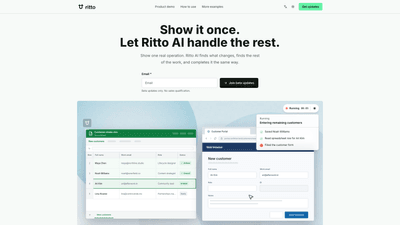
What is it
Ritto AI is an intelligent workflow automation tool designed to turn one real example of your work into a repeatable, reusable process. By watching how you complete a task, it records your steps, identifies what changes every time, fills in missing details, and asks for confirmation before starting. Once you approve, Ritto AI completes the rest in the same way and can apply the same steps to every similar task or data batch. The product emphasizes learning from a single demonstration to automate repetitive work—no rigid scripts, just adaptable, error-checked automation that scales across your routines.
Key value: transform manual, time-consuming tasks into predictable, repeatable workflows that you can run again and again with minimal effort. Ritto AI also integrates with practical work artifacts like customer intake spreadsheets and a dedicated customer portal to streamline data capture and record keeping.
Features
- Learn from one real example and generalize to similar tasks
- Ritto AI records your steps, detects changes that occur in other rows or batches, and builds a repeatable workflow.
- Fill in gaps with human-in-the-loop control
- If any part of the work is unclear, the system prompts you with what the work needs, ensuring accuracy before proceeding.
- Confirm before it starts
- Review the scope and key actions, then approve to kick off automation.
- Reuse and reuse again
- Open the same work later, confirm what changed, and finish—consistently applying the same steps.
- Per-row awareness in spreadsheets
- Works with spreadsheet rows that change per entry (e.g., name, email, role) while keeping the same form and save actions.
- Batch processing across multiple profiles
- After one row is entered, Ritto AI recognizes the remaining rows as part of the same customer-entry job and completes them in the same sequence.
- Forms and portals for continuous data capture
- Uses a customer intake workflow that feeds into a customer portal for saving records and updating status.
- Applicable to a variety of repeat work
- Examples include recruiting and resume review, direct customer outreach, commerce order checks, and file/spreadsheet batch processing.
- Clear visibility of batch progress
- Provides ongoing status like “Shown once,” “Complete,” or “In progress” to track automation across multiple rows.
Core capabilities include learning from a single example, handling per-row changes, maintaining consistent forms, and accelerating repetitive tasks without sacrificing accuracy or control.
How to Use
- Start with a task you perform repeatedly
- Choose work that has fairly fixed, repeatable steps.
- Demonstrate once and let Ritto AI learn
- Do the work as you normally would, while Ritto AI records the steps.
- Let it fill the gaps
- If some details vary or are unclear, the system asks what the work needs, then fills in the rest once confirmed.
- Review and approve
- Before automation starts, review the scope and key actions. Approve to begin the automated run.
- Run it again with the same workflow
- Open the work again, confirm what changed, and finish the task using the same steps.
- Apply to all matching rows
- After entering one spreadsheet row (e.g., a new customer), Ritto AI identifies the remaining rows as part of the same job and completes them in the same manner.
- Practical data flows
- Customer intake.xlsx → Customer Portal: The same form and Save action are reused across all rows; changes occur row-by-row (Full name, Work email, Role, etc.).
- The system shows how many matching rows exist (e.g., “3 matching rows found”) and completes all rows with the same steps.
- Real-world use cases
- Recruiting and resume review: read candidate files and organize review tasks.
- Direct customer outreach: prepare content for confirmation before sending.
- Commerce order checks: apply consistent rules and flag exceptions.
- File and spreadsheet batches: process batches one by one and summarize results.
- Pricing (Beta)
- Ritto AI is currently offered through a beta program with updates. Beta access is available, with “beta updates only” messaging and no sales qualification. Public pricing details are not disclosed yet; interested users should join the beta to access early progress and product updates.
Tips for success
- Start with stable, repetitive workflows
- Pick tasks with predictable steps to maximize learning accuracy.
- Ensure data consistency
- Use consistent field names and form structures to enable reliable per-row automation.
- Validate upfront
- Use the “Confirm before it starts” step to verify scope and actions before running at scale.
- Leverage batch transparency
- Monitor batch status to catch any anomalies early and adjust rules or prompts accordingly.
- Expand gradually
- After successful replication of a single workflow, apply the same approach to other repeatable tasks to maximize impact.
Pricing
- Beta program status: Beta updates only; no sales qualification.
- Public pricing: Not disclosed yet.
- Access: Join the beta to receive early product updates and participate in the ongoing development and refinement of Ritto AI’s automation capabilities.
Tips
- Focus on high-frequency, low-variance tasks first to maximize ROI.
- Maintain clean data inputs; the quality of your initial example influences automation accuracy.
- Use the confirmation step to maintain human oversight where needed.
- Plan for governance and permissions if multiple users will operate the same automations.
- Track outcomes and iterate on the workflow to improve speed and reliability over time.
Frequently Asked Questions
-
What is Ritto AI?
- A workflow automation AI that learns from one real example of your work, then reproduces the steps to complete similar tasks automatically, with human-in-the-loop confirmation.
-
How does it learn a workflow?
- You perform the task once while Ritto AI records your steps. It then identifies changes that occur in subsequent rows or batches and creates a repeatable sequence.
-
Can it handle per-row changes in spreadsheets?
- Yes. It recognizes row-by-row variations (e.g., Full name, Email, Role) while keeping the same form and save actions.
-
What kinds of tasks is Ritto AI suited for?
- Repetitive, semi-structured tasks such as recruiting and resume review, direct customer outreach, commerce order checks, and processing file/spreadsheet batches.
-
Is there a public pricing model?
- Pricing is not publicly disclosed at this time. The product is in beta with updates available to beta participants.
-
How do I start using Ritto AI?
- Begin with a task you perform often, demonstrate it to the system, review the scope, confirm, and let Ritto AI automate the rest. You can then reuse the workflow for similar tasks and across multiple rows or batches.
-
Is human oversight required?
- Yes. The system prompts for confirmation before starting and allows you to review changes and scope at key points to ensure accuracy.
-
How secure is my data?
- Data handling and security details are typically provided in the product’s legal and privacy sections; beta users should review these materials to understand protections and compliance.
-
Can multiple team members use Ritto AI?
- The platform is designed for collaboration, but specific multi-user capabilities and permissions should be confirmed in the product’s current beta documentation.
-
How do I learn more or join the beta?
- Subscribe to beta updates or contact the team via the provided beta channels to gain access and receive early product progress and updates.
This product overview emphasizes Ritto AI’s core value: turning a single, real-world example into a scalable, repeatable workflow that saves time, reduces manual errors, and accelerates productivity across repetitive administrative and data-entry tasks. By focusing on customer intake processes, batch spreadsheet work, and a range of repeatable routines, Ritto AI aims to become a versatile assistant for teams seeking efficient, AI-powered automation.