What is it
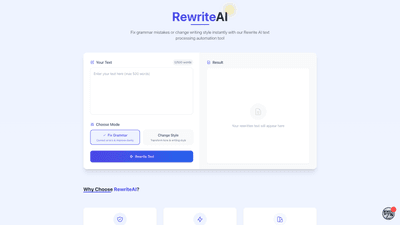
RewriteAI is an intelligent text processing and rewriting tool designed to fix grammar, improve clarity, and transform writing style in seconds. Powered by advanced language models, it helps you refine your text with precise grammar corrections and seamless style changes, all within a single, intuitive interface. Users can paste up to 500 words, choose a mode, and watch as their original text is rewritten to meet the desired tone and level of polish. The platform features two core modes: Fix Grammar (to correct errors and enhance readability) and Change Style (to transform tone and writing style). Beyond core rewriting, RewriteAI also offers access to the AI Agent Store—a marketplace of hundreds of ready-to-deploy AI agents and frameworks that can be browsed by industry, use-case, or tech stack. No coding is required to explore or deploy these agents, making it a versatile solution for solo founders, enterprises, and AI developers alike.
Features
- Advanced AI technology: Built on cutting-edge language models to deliver high-quality rewriting that preserves meaning while improving fluency.
- Instant results: Rewrites are produced in seconds, enabling rapid iteration and faster editing workflows.
- 30+ writing styles: A wide library of tones and styles to choose from, with the option to define a custom tone for tailored results.
- Dual modes:
- Fix Grammar: Correct errors, fix punctuation, and improve clarity.
- Change Style: Transform tone and overall writing style to suit different audiences or formats.
- Text rewrite output: A dedicated area shows the rewritten text, ready for copy, feedback, or further editing.
- AI Agent Store access: Discover and explore hundreds of AI agents and frameworks, filter by industry or use-case, read reviews, compare features, and connect with verified AI providers—no code required.
- No code required: The AI Agent Store and agent deployments are designed for ease of use, even for non-developers.
- Real-world applicability: Suitable for professional communication, marketing copy, academic writing, product docs, and more.
How to Use
- Input your text: Paste up to 500 words into the Text box.
- Choose a mode: Select Fix Grammar to correct errors and improve clarity, or Change Style to transform tone and writing style.
- Pick a style or set a custom tone: Browse 30+ writing styles or define a specific tone to match your target audience.
- Review the rewrite: The tool presents your rewritten text in the output area. Compare with the original, copy, or further edit as needed.
- Optional: Explore AI Agents: If you need broader automation or specialized capabilities, browse the AI Agent Store to find agents that fit your industry or use-case. No coding is required to deploy or connect with these agents.
- Save or share: Copy the final version, export it, or integrate it into your workflow as needed.
Pricing
- Specific pricing details are not provided in the source content. For up-to-date information on available plans, tiers, and whether free or paid options exist, please consult the official RewriteAI site. Expectedly, tools of this nature commonly offer a free tier with basic rewriting capabilities and paid plans that unlock additional styles, higher word limits, and access to premium AI agents through the AI Agent Store. Always verify current pricing directly from the provider to ensure accuracy.
Tips
- Start with a clear objective: Decide early whether you need grammar fixes, a tone shift, or a complete stylistic overhaul. This guides your style selection and yields more relevant results.
- Test multiple styles: If you’re unsure of the exact tone, try several styles to see which one best aligns with your audience and purpose.
- Maintain your voice: When changing style, consider preserving key phrases or terminology to keep your unique voice intact.
- Use for drafts and iterations: Use RewriteAI to generate several variants quickly, then select the best elements for a final draft.
- Leverage AI Agents for automation: If you’re scaling content workflows, explore the AI Agent Store to connect rewriting tasks with automation agents—no code required.
- Review for nuance: While AI rewriting improves clarity and tone, always review for domain-specific accuracy, data sensitivity, and brand guidelines.
Frequently Asked Questions
-
What is RewriteAI designed to do? RewriteAI is a text processing and rewriting tool that fixes grammar, improves clarity, and transforms writing style, with optional access to a marketplace of AI agents for broader automation.
-
How many words can I process at once? The standard input limit is 500 words per rewrite session, making it suitable for short-form content, emails, and short articles. For longer documents, consider editing in sections or using multiple rewrites.
-
What writing styles are available? The tool offers 30+ writing styles and tones. Users can also define a custom tone to tailor the output to their audience.
-
Do I need coding skills to use the AI Agent Store? No. The AI Agent Store is designed to be used without coding. You can browse, compare, and deploy AI agents and frameworks through a no-code experience.
-
Can RewriteAI handle technical or domain-specific language? While the core capability is general language rewriting, you can use targeted tones and styles to accommodate technical content. For highly specialized terminology, a human review is still recommended to ensure accuracy.
-
Is there a free version or trial available? Pricing details are not specified in the provided information. Check the official RewriteAI site for current pricing, including any free tiers, trials, or promotional offers.
-
How secure is my text? The source content does not specify data security or privacy policies. If handling sensitive information, review the provider’s privacy and data handling terms before use.
-
Can I use RewriteAI for long-form content? Yes, but you may need to split longer documents into smaller sections (up to 500 words each) and rewrite them sequentially to maintain consistency throughout the text.
-
How do I integrate AI Agents into my workflow? Visit the AI Agent Store to browse agents by industry and use-case, read reviews, compare features, and connect with providers. Most agents are designed for no-code deployment to streamline automation.
-
Where can I learn more or get support? For detailed product information, pricing, and support options, refer to the official RewriteAI website and the AI Agent Store hub.
This product overview highlights RewriteAI as a comprehensive AI-powered rewriting solution, combining grammar correction, style transformation, and an expansive ecosystem of AI agents to boost writing quality and workflow efficiency.