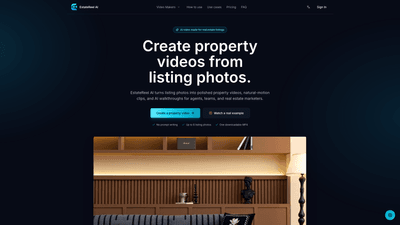
What is it
EstateReel AI is an AI-powered video creation platform designed specifically for real estate professionals. It automatically converts listing photos into polished property videos, natural-motion clips, and AI-driven walkthroughs. Built for agents, teams, and real estate marketers, EstateReel AI provides a repeatable, fast workflow to produce compelling listing assets without writing prompts or learning a complex timeline. With up to six listing photos, you get a ready-to-publish MP4 video that can be used on listing pages, agent websites, social reels, and buyer follow-up channels.
The platform offers three focused video makers that guide you from input to finished asset:
- Real estate video maker: creates a polished listing video with ordered scenes and optional listing details.
- Real estate photo to video: turns selected photos into natural-motion video scenes suitable for hero images or focused photo sets.
- AI real estate walkthrough: arranges a buyer route and delivers a continuous walkthrough-style video for remote buyers and guided follow-ups.
EstateReel AI emphasizes a clean, repeatable workflow: upload photos, choose a video type, review one finished property video, and publish.
Features
- Three purpose-built video makers
- Real estate video maker: one polished listing video with ordered scenes; ideal for listing pages, agent websites, social reels, and buyer follow-up.
- Real estate photo to video: convert selected photos into natural-motion scenes without a prompt canvas; great for hero images or focused photo sets.
- AI real estate walkthrough: creates a continuous walkthrough-style video following a buyer route; perfect for remote buyers, listing pages, and guided follow-up.
- Input requirements
- Up to 6 listing photos per video; no need for long prompts or complex timelines.
- Upload exterior, rooms, and amenities in the order you want buyers to discover them.
- Output and format
- Each video yields one publishable MP4, ready to download and publish.
- Outputs are designed for common real estate channels: property listings, agent sites, social media Reels, and outreach materials.
- Natural-motion visuals
- AI-generated camera movement adds depth to stills, transforming photos into a cohesive, story-driven property video.
- Structured, repeatable workflow
- Preset paths by use case ensure consistency across agents and listings.
- While AI handles most of the production, on-site videography is still recommended when required (talent or bespoke direction).
- Asset repurposing
- Reuse the same listing photography across multiple moments where buyers need more context than a static gallery.
- Supports launches, social media reels, remote tours, and broad marketing campaigns.
- Accessibility and collaboration
- A dedicated workspace to review and download perfected videos before publishing.
- Designed for real estate teams to scale video production across multiple listings.
How to Use
- Add the views that sell the home
- Upload exterior shots, room visuals, and amenities, ordered to reflect the buyer’s journey.
- Include up to six photos and arrange them in the sequence that best tells the property story.
- We bring each listing view to life
- The AI generates natural camera movement for each still, creating a cohesive property storyline.
- Outputs are produced at 1280 x 720 resolution for clear viewing across devices.
- Download and put it to work
- Review the finished property video in your workspace.
- Download the MP4 file and publish it to listing pages, your agent site, social channels, or follow-up campaigns.
Video Makers in detail
- Real estate video maker
- Steps: Add listing context → Upload and arrange photos → Create the video.
- Use cases: Listing pages, agent websites, Reels, and buyer follow-up.
- Real estate photo to video
- Steps: Upload and arrange photos → Create the video.
- Use cases: Hero images or focused photo sets for campaigns.
- AI real estate walkthrough
- Steps: Upload and arrange photos → Confirm the walkthrough route → Create the video.
- Use cases: Remote buyer engagement, listing pages, and guided property follow-up.
Pricing
- The provided materials reference a Pricing section but do not include specific figures or tier details. For current and detailed pricing, plans, and any available free trials or enterprise options, please consult EstateReel AI’s official pricing page or contact their sales team. Pricing typically varies by tier, feature access, and team size, and may include a free or trial option alongside paid plans to support real estate teams of different scales.
Tips
- Plan the sequence ahead
- Start with exterior shots, then move through key living areas, highlighting features that buyers care about (views, kitchens, primary bedrooms, baths, and unique amenities).
- Choose high-quality photos
- Use bright, well-composed images to maximize the AI’s ability to generate compelling motion and depth.
- Tell a buyer story
- Arrange views to guide the viewer through the property in a natural progression, ending with amenities or outdoor spaces.
- Leverage all three video makers
- Use Real estate video maker for comprehensive listing videos, Photo to video for focal social assets, and Walkthrough for remote or international buyers.
- Maintain consistency
- Use the same visual style and pacing across listings to reinforce brand identity on listing pages and social channels.
- Optimize for channels
- Export MP4s in appropriate aspect ratios and durations for listing sites, agent websites, and social platforms like Instagram Reels or Facebook.
- Review before publishing
- Take advantage of the in-workspace review step to ensure the sequence and motion align with your marketing goals.
- Consider on-site shoots when needed
- EstateReel AI is designed to optimize speed and repeatability, but professional on-site videography remains valuable for bespoke direction or talent needs.
Frequently Asked Questions
- How many listing photos do I need?
- Up to six listing photos can be used to generate a single property video.
- How is the final video assembled?
- The platform arranges the uploaded photos in a sequence you specify and applies natural-motion camera moves to create a cohesive property storytelling video.
- Can I add voiceover and captions?
- Specific support for voiceovers and captions isn’t detailed in the provided materials. Check the product docs or pricing/feature pages for capabilities.
- Which login and payment options are available?
- The available information does not specify login methods or payment options; refer to the official site for current authentication and billing details.
- Who owns the generated video?
- Ownership terms are not stated in the provided content; review EstateReel AI’s terms of service or licensing policy for rights and usage.
- Can I use EstateReel AI for on-site shoots?
- On-site production is still valuable when a property requires professional talent or bespoke direction; EstateReel AI specializes in rapid, repeatable AI-driven videos but complements, rather than replaces, traditional shoots.
- What channels can I publish to?
- Videos are designed for listing pages, agent websites, Reels, and buyer follow-up communications.
- Is there a free plan or trial?
- Pricing details are not included in the provided information; check the official pricing page for current trial options and plan availability.
Conclusion
EstateReel AI presents a modern, scalable solution for real estate teams seeking fast, repeatable video production directly from listing photos. By offering three specialized video makers and a streamlined workflow, it enables agents to quickly generate high-quality listing videos, social-ready reels, and remote walkthroughs that engage buyers across channels. While AI handles the heavy lifting, on-site shoots remain an option for more bespoke productions. For real estate professionals aiming to elevate their property marketing with consistent, purchasable video assets, EstateReel AI delivers a compelling combination of speed, simplicity, and creative storytelling.