What is it
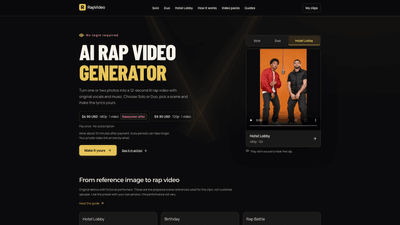
RapVideo AI Rap Video Generator is a one-of-a-kind tool that turns your photos into a 12-second AI-generated rap video with original vocals and music. You can choose Solo (one photo) or Duo (two photos) and select a scene to create a personalized performance. By entering your own lyrics, you can tailor the rap to birthdays, jokes, or inside moments, making it uniquely yours. No login is required, and you receive a private, emailed MP4 link after payment.
Features
- Solo or Duo performance: Solo uses one photo; Duo uses two separate photos to determine the performers.
- Scene options: Hotel Lobby, Recording Booth, Street Cypher, Concert Stage, Luxury Lobby, Birthday, and more. Scenes provide ready-made references that influence the visuals, while your own photos drive the performance.
- 12-second videos with original vocals and music: Short, catchy clips designed for easy sharing on social platforms.
- High-quality options: 480p or 720p video resolutions; 9:16 vertical format available for mobile viewing.
- Private delivery and privacy: Your photos and edited lyrics stay private; you receive a private link by email to view and download the MP4.
- One-time payment, no subscription: Pay once to generate your video; there are newcomer and standard offers.
- Language and lyric customization: Choose the language and edit lyrics to fit your idea—e.g., a birthday shout-out, friendly banter, or a quick rap exchange.
- No login required: Complete the process quickly without creating an account.
How to Use
- Choose Solo or Duo: Decide whether you want one performer (Solo) or a two-person rap exchange (Duo).
- Pick a Scene: Browse scenes such as Hotel Lobby, Recording Booth, Street Cypher, Concert Stage, or Birthday.
- Upload Photos: For Solo, upload one photo; for Duo, upload two photos (one per performer). Ensure you have consent from anyone pictured.
- Input Lyrics: Enter the opening line (and any inside jokes or names) to tailor the lyrics. You can translate or keep English depending on preference.
- Set Language and Quality: Select the language and video quality (480p or 720p; 9:16 option available).
- Purchase and Delivery: Choose a pack (see pricing), complete payment (no ongoing subscription). Delivery begins after payment; typical processing is about 15 minutes, longer during busy periods.
- Access Your Video: You’ll receive a private email link to view and download the MP4. Keep the order link for any additional videos in the same pack.
Pricing
- Newcomer offer: $4.90 USD for 480p, 12-second video (1 video per pack). No subscription required.
- Standard offer: $9.90 USD for 720p, 12-second video (1 video per pack). No subscription required.
- All purchases are one-time payments; your private video link arrives by email, and you can download the MP4 from there.
- Note: Previous 10-second demos exist, with newer videos delivering 12 seconds at the selected quality (480p or 720p). Video packs and guides are available to help you maximize results.
Tips
- Prepare clear photos: Use high-contrast, well-lit images where the subject’s face is easily recognizable. Portrait or close-up shots work best for the AI-led performance.
- Be mindful of consent: The tool requires consenting adults for human subjects. Ensure you have permission to use all submitted images.
- Craft concise lyrics: Since videos are 12 seconds, keep lyrics short and punchy to fit the cadence. Include names or inside jokes to boost personalization.
- Leverage the scene: Choose a scene that matches your idea (Birthday for a celebratory rap, Hotel Lobby for a party vibe, etc.) to reinforce the context of the lyrics.
- Language options: If you want the rap in English or another language, select the appropriate language setting before generation.
- Privacy first: Remember that photos and edited lyrics stay private. You’ll receive a private link via email for safe access.
- Use the vertical format: For social media sharing, opt for the 9:16 (vertical) format to optimize mobile viewing.
- Manage expectations: The scripts are AI-generated and vary with each input; use the provided AI-generated example to gauge how your content might translate to lyrics and visuals.
Frequently Asked Questions
- What is an AI rap video generator? It turns your photos into a 12-second rap video with original vocals and music. You can perform solo or with a duo, choose a scene, and customize the lyrics.
- How many photos do I need? Solo uses one photo; Duo uses two separate photos.
- Can I upload my own photos? Yes, you upload your photos, and the performances are generated based on those images.
- Do I need an account or subscription? No. It’s a one-time payment per video pack with no ongoing subscription.
- What languages are supported? You can select the language for the lyrics and vocals; the example mentions English.
- How long does generation take? Delivery typically occurs after payment with processing times around 15 minutes, longer during busy periods.
- How do I receive the video? You’ll get a private email link to view and download the MP4. You should keep the order link for future downloads if offered.
- Is my content private? Yes. Photos and edited lyrics stay private, and only you access the final MP4 via the private link.
- What if the video doesn’t meet expectations? You can refer to guides and the “See it in action” examples to understand expectations; if issues persist, review the input settings and try again with updated photos or lyrics.
- Can I use this for birthdays or social media? Absolutely. The tool is well-suited for birthday shout-outs, friend tributes, or quick social media rap clips, with easy sharing through the 12-second format.
This RapVideo AI Rap Video Generator provides a streamlined, privacy-conscious way to produce personalized, share-worthy rap videos from just photos. It combines AI-generated vocals and music with user-provided lyrics, offering flexible Solo and Duo options, scene variety, and easy, one-time purchases for modern, social-ready content.