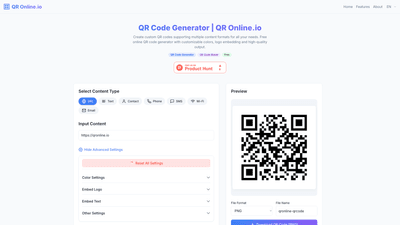
What is it
QR Online.io is a powerful, free online QR code generator that lets you create custom QR codes tailored to diverse needs. It supports multiple content formats—URL, text, contact information, phone, SMS, Wi-Fi, email, and more—and delivers high-quality output suitable for both digital use and print. Key strengths include smart encoding with Reed-Solomon error correction, extensive customization options (colors, size, logos, and text overlays), and high compatibility with all smartphone QR scanners. Importantly, QR Online.io processes data locally with no user data storage, ensuring privacy and security. Outputs are available in high-resolution PNG, JPG, SVG, and PDF formats.
Features
- Smart Encoding: Utilizes Reed-Solomon error correction and automatic data optimization to enhance scan reliability.
- Multi-format Support: Create QR codes for URLs, text, contact information (e.g., vCard), phone numbers, SMS, Wi-Fi configurations, emails, and other content types.
- Custom Design: Freely adjust colors, size, embed logos, and add text overlays to align with branding or event themes.
- High Compatibility: Generated codes are designed to scan reliably across a wide range of smartphone hardware and QR scanning apps.
- Secure & Private: No user data storage; content is processed locally to protect privacy.
- HD Output: Export QR codes in high-resolution formats suitable for printing and digital use (PNG, JPG, SVG, PDF).
- Free and Unlimited: All features are free to use with no watermarks, hidden fees, or usage limits on the generated codes.
- Permanence: Generated QR codes remain valid indefinitely and can be used in any scenario without a scan limit.
How to Use
- Choose the content type you want to encode (URL, text, contact, phone, SMS, Wi-Fi, email, etc.).
- Enter the content that will be embedded in the QR code.
- Customize the design: select colors, adjust size, and optionally embed a logo or add text overlays.
- Use advanced settings if needed (privacy-focused options and other tweaks).
- Preview the QR code to ensure it looks and reads correctly.
- Select the preferred file format for export (PNG, JPG, SVG, PDF) and specify a file name.
- Download the QR code. No account or payment is required; all features are freely available.
- Test the code with multiple devices and scanners to confirm reliable scanning in real-world scenarios.
Pricing
- Completely Free: All features are free to use with no hidden fees, no watermarks, and no trials or upsell pressure.
- No Registration Required: Create and export QR codes instantly without signing in.
- Unlimited Usage: Generate as many codes as you need, for any project or campaign.
- High-Quality Output: Export in PNG, JPG, SVG, or PDF formats suitable for print and digital distribution.
- Privacy Assured: No data storage on the server; QR content is processed locally for privacy protection.
Tips
- Ensure Strong Contrast: For reliable scanning, use high contrast between foreground and background colors (e.g., dark code on a light background).
- Mind the Quiet Zone: Leave a clear border around the QR pattern to improve scan reliability.
- Balance Logo Size: If embedding a logo, keep it small enough not to obscure critical QR modules; test across devices.
- Use Adequate Error Correction: For codes with logos or small sizes, select a higher error correction level to compensate for potential data loss.
- Prefer Vector Outputs for Printing: Export SVG (or PDF) when printing large formats to maintain sharp edges and scalability.
- Test Thoroughly: Always test the generated QR codes with multiple devices and scanning apps before launching a campaign.
- Brand Consistency: Use consistent color palettes and logo placements to reinforce brand recognition across all QR codes.
- Accessibility Considerations: Provide alternative access methods when possible for users with vision impairments or device limitations.
Frequently Asked Questions
-
What is QR Online.io?
A free online QR code generator that supports multiple content types, provides customization options, and outputs high-quality codes without storing user data. -
Do you store my data?
No. All QR code data is processed locally on your device; the service does not save your content. -
Are there any limits or watermarks?
No limits on usage, and there are no watermarks on generated codes. All features are free. -
What content types can I encode?
URLs, text, contact information (e.g., vCard), phone numbers, SMS messages, Wi-Fi configuration details, email, and more. -
What formats can I export?
PNG, JPG, SVG, and PDF. You can choose the file name during download. -
Can I embed a logo in the QR code?
Yes. You can embed logos and even add text overlays to customize the design. -
Is the QR code permanently valid?
Yes. Generated QR codes have no scan limit and remain usable indefinitely. -
Do you offer any paid plans or tiers?
No. All features are freely available; there are no paid tiers or hidden costs. -
How should I optimize QR codes for printing?
Use high-resolution exports (SVG or PDF when possible), ensure adequate contrast, and keep the logo size modest to maintain scan reliability. -
How do I test a newly generated QR code?
After downloading, scan the code with multiple devices and QR scanning apps to verify readability in various conditions (lighting, distance, camera quality). -
Who is the target audience for QR Online.io?
This tool is ideal for marketers, event organizers, businesses, educators, product teams, and individuals who need fast, reliable, and customizable QR codes for campaigns, onboarding materials, packaging, and digital-to-physical experiences.
If you’d like, I can tailor this product introduction to a specific audience or use case (e.g., event management, retail packaging, or digital marketing campaigns) and adjust emphasis on features accordingly.