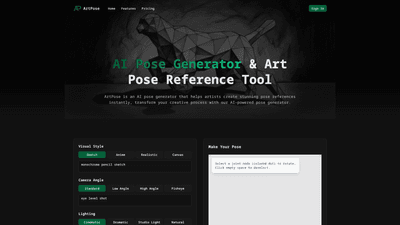
What is ArtPose
ArtPose is an AI-powered pose generator and reference tool designed for artists, illustrators, character designers, and animators. It enables users to quickly create realistic or stylized pose references by describing the pose they need and then refining it in a 3D pose editor. With support for multiple visual styles (Realistic, Anime, Sketch), a range of camera angles, lighting setups, body types, and clothing options, ArtPose transforms the workflow from conceptualization to final reference image generation. It’s a comprehensive solution for generating dynamic poses, matching exact creative visions, and accelerating the art creation process.
Primary Features
- AI Pose Generator: Generate pose references instantly by describing the desired pose, angles, lighting, and character attributes. The AI translates text input into usable pose references that you can refine.
- Multi-Style Support: Switch between realistic, anime, and stylized poses with a single click to match your project’s aesthetic.
- Customizable Visual Styles: Choose camera angles, lighting setups (cinematic, dramatic, studio, natural), and mood to align with your artwork.
- Body Type and Clothing Options: Select from slender, muscular, plus-size, ballet, armor, skin-tight, casual, or loose fits to tailor references to your characters.
- 3D Pose Editor: A intuitive tool to rotate joints, adjust angles, and reposition limbs for precise, workable poses.
- Aspect Ratios: Generate references in multiple aspect ratios to suit various illustration formats and panels (e.g., 1:1, 16:9, 4:3, etc.).
- Pose Customization Workflow: Three-step process—customize style, create pose, generate and download high-quality reference images.
- Downloadable Outputs: Generate reference images that can be downloaded instantly for use in your projects.
- User-Friendly Interface: A streamlined experience designed for quick iteration without requiring extensive drawing skills.
How to Use
- Customize Your Style
- Select a visual style (Realistic, Anime, Sketch).
- Choose camera angle (e.g., front, 3/4 view, low/high angle, fisheye options).
- Pick lighting (cinematic, dramatic, studio, natural).
- Set body type (slender, muscular, plus-size, etc.) and clothing (casual, skin-tight, armor, etc.).
- Choose an aspect ratio to fit your layout.
- Make Your Pose
- Use the 3D pose editor to rotate joints and adjust positions.
- Click and drag joints (colored dots) to refine angles and balance.
- Deselect by clicking empty space to reset selection as needed.
- Generate & Download
- Let the AI transform your configured pose into a high-quality reference image.
- Review generated pose, make final adjustments if necessary, and download for use in your artwork.
- Access multiple styles and angles in one session to compare options and pick the best fit.
Pricing
- ArtPose operates on a credit-based system. Each generated pose costs a certain number of credits.
- Remaining credits are displayed in the interface; once credits are exhausted, you can purchase more to continue generating poses.
- Free access may include a limited number of previews or a trial period; ongoing use typically requires purchasing credits or subscribing to a plan.
Note: Specific pricing tiers, credit amounts, and subscription names may vary over time. Check the official ArtPose pricing page for the latest details.
Use Cases and Practical Benefits
- Character Design and Illustration
- Rapidly produce pose references for characters across genres (realistic, anime, stylized) to accelerate concept art.
- Animation and Storyboarding
- Generate dynamic action poses and dramatic gestures to plan scenes, frames, and camera angles.
- Concept Development
- Explore multiple body types and clothing options to refine character silhouettes and storytelling.
- Educational and Practice Tools
- Students and hobbyists can practice drawing different poses without needing complex reference setups.
- Commercial Projects
- Create consistent pose references for client work, ensuring accuracy and efficiency in production pipelines.
Key benefits include time savings from instant pose generation, flexibility to tailor poses to specific art styles, and a controllable workflow that blends AI-generated references with precise 3D adjustments.
Target Audience
- Digital artists and illustrators seeking fast, reliable pose references.
- Character designers creating diverse figures, outfits, and personalities.
- Animators building pose libraries for scenes and sequences.
- Studio workflows that require repeatable, high-quality references with controlled aesthetics.
- Students and educators looking for hands-on practice with pose construction and visual storytelling.
Tips for Best Results
- Start with a clear style and mood: Realistic for detailed anatomy, Anime for stylized proportions, or Sketch for loose, expressive lines.
- Use body types and clothing options to reflect your character’s design, ensuring consistent silhouettes.
- Iteratively refine poses in the 3D editor: small joint adjustments can dramatically alter the gesture and readability.
- Compare multiple camera angles and lighting setups to determine which best communicates the action or emotion.
- Save and organize generated poses for easy retrieval and cohesive reference libraries.
Frequently Asked Questions
-
What is ArtPose and how does it help artists? ArtPose is an AI-powered pose generator and reference tool that creates perfect character pose references instantly, accelerating your creative workflow.
-
Do I need drawing skills to use ArtPose? No drawing skills are required to generate poses. The tool provides reference poses that you can use as a guide for your artwork, and you can refine them with the 3D editor.
-
What types of poses can I generate? You can generate a wide range of poses, from dynamic action and gesture to subtle, expressive poses. Styles include realistic, anime, and stylized.
-
Can I use the generated poses for commercial projects? Yes, generated poses can be used for commercial projects, subject to the platform’s licensing terms. Review the Terms of Service for specifics.
-
How is ArtPose different from photo references? ArtPose offers AI-driven generation and customization of poses with adjustable style, camera angle, lighting, and body type, plus an interactive 3D editor, providing a tailored, repeatable reference workflow beyond static photos.
-
Can I save and organize my generated poses? Yes, you can save poses within your account and organize them for easy access and reuse.
-
What happens if I run out of credits? You can purchase additional credits or switch to a plan (if available) to continue generating poses. Check the pricing page for current options.
-
Is there a free trial or free tier? ArtPose may offer limited previews or trials; check the current pricing and credits policy on the official site for exact details.
-
How do I contact support? If you have further questions, you can reach ArtPose support via email through their contact options provided on the site.
Summary ArtPose provides a robust, AI-powered solution for artists seeking precise, versatile pose references. Its combination of multi-style generation, extensive customization (style, angle, lighting, body type, clothing), and an intuitive 3D pose editor makes it a valuable tool for accelerating creativity, improving accuracy, and supporting diverse art workflows. Whether you’re designing characters, storyboarding, or practicing anatomy, ArtPose offers a scalable reference system that adapts to your unique artistic vision.