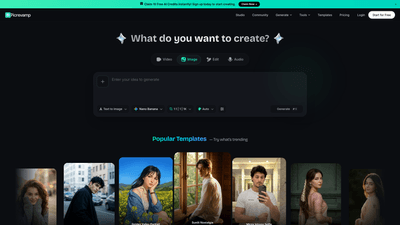
What is it
PicRevamp Studio is an AI-powered image generation and editing platform designed for creators, marketers, and photographers who want fast, high-quality visuals across images, videos, and audio. It offers a comprehensive ecosystem of AI models, templates, and advanced image and video tools—all accessible from a single dashboard. New users can claim 10 free AI credits instantly upon signup to start creating right away. The platform supports a wide range of capabilities, including AI image generation, video generation, text-to-speech, and an extensive suite of image editing tools, all optimized to deliver cinematic-quality results with prompt-driven precision.
Key strengths include access to top-tier AI models such as Nano Banana Pro, Veo 3.1, Imagen 4, and Gemini 2.5 Pro Audio, as well as practical image tools like upscaling, denoising, background removal, colorization, and more. With image templates and a variety of templates for videos and collages, PicRevamp Studio is designed to accelerate creative workflows while maintaining professional, publication-ready outputs.
Features
- AI Image Generation with Best Image Models
- Generate high-quality images from prompts using leading image generation models.
- Pixel-perfect detail, prompt alignment, and intent-driven outputs.
- AI Video Generator
- Create videos using a state-of-the-art video model for cinematic quality content, including audio generation integration.
- Text to Speech (TTS)
- Convert written content into natural-sounding speech using advanced TTS models.
- Image Templates
- A library of ready-to-use templates to jump-start photography, portraits, social assets, and more.
- Image Tools
- Image Upscaler: enlarge images up to 4K/8K resolution without losing quality.
- AI Image Unblur: sharpen and restore blurry photos.
- AI Clothes Changer: professional wardrobe edits for character visuals.
- AI Background Blur: blur backgrounds for depth and focus.
- AI Image Expander: expand images to desired aspect ratios and framing.
- Background Remover: extract subjects from backgrounds cleanly.
- Magic Eraser: remove objects seamlessly from images.
- AI Background Changer: replace image backgrounds with new scenes.
- AI Sketch to Photo: convert sketches into photorealistic images.
- AI Photo Colorizer: colorize black-and-white or muted images.
- AI Face Swap: swap faces in portraits safely and convincingly.
- Headshot Generator: generate professional headshots ready for business use.
- AI Image Models and Video Models
- Nano Banana Pro, Nano Banana 2, Nano Banana 2 Lite for fast, high-fidelity image expansion and restoration.
- Veo 3.1 for advanced video generation.
- Imagen 4 for pixel-perfect image generation.
- Gemini 2.5 Pro Audio for multimodal audio generation.
- All-in-One Studio Experience
- Integrated workflow for creating, editing, and exporting media with templates, models, and tools in one place.
- Access and Plans
- Start for Free with 10 AI credits upon signup.
- Various paid tiers with additional credits and model access (pricing page details).
How to Use
- Sign up and claim 10 free AI credits
- Begin your journey by creating an account and receiving 10 free AI credits to explore the platform’s capabilities.
- Decide what you want to create
- Choose between image generation, video creation, or text-to-speech assets, or start with a template to accelerate your project.
- Pick a model or template
- Select from top AI models (e.g., Nano Banana Pro for image tasks, Veo 3.1 for video, Gemini 2.5 Pro Audio for audio) or leverage pre-made templates for quick results.
- Upload assets or input prompts
- For images and video, upload source media or craft prompts to guide generation. Use templates to define style, composition, and aspect ratio.
- Apply image tools and edits
- Enhance results with upscaling, sharpening, background removal, colorization, and other tools to refine the final output.
- Generate, review, and export
- Produce the final visuals, review for accuracy, and export in your preferred resolution and format (including 4K/8K outputs when supported by the toolset).
Pricing
- Free Starter Access: Start for Free with 10 AI credits to explore core capabilities and templates.
- Paid Plans: Access additional AI credits and premium models. Pricing details,Bundles, and advanced features are available on the Pricing page. The platform uses a credits-based model, so plan accordingly based on your production needs (image, video, and audio projects).
Tips
- Start with clear prompts and reference style notes to nudge outputs toward your desired aesthetic.
- Leverage templates to ensure consistent branding across assets.
- Combine tools for composite work (e.g., generate an image, then upscale, remove the background, and replace it with a new scene).
- Use the Background Remover and Background Changer to place subjects in multiple contexts without re-shooting.
- Optimize aspect ratios with AI Image Expander to fit social media formats (square, vertical, cinematic).
- Protect rights and usage terms by exporting assets with appropriate licensing notes and watermark considerations.
- Save workflows and presets to speed up future projects and maintain consistency.
- Experiment with the latest models (Nano Banana Pro, Veo 3.1, Imagen 4, Gemini audio) to compare quality and turnaround times.
- Regularly check for new models and templates to stay ahead in content creation.
Frequently Asked Questions
-
What exactly is PicRevamp Studio?
- An AI-powered platform that enables generating and editing images, videos, and audio using advanced AI models, with a library of templates and image editing tools.
-
Do I get a free plan?
- Yes. New users receive 10 free AI credits to start creating. Additional credits and access to advanced models are available via paid plans.
-
Which models are available?
- Image models include Nano Banana Pro, Nano Banana 2, Nano Banana 2 Lite, and Imagen 4. Video models include Veo 3.1, and audio models include Gemini 2.5 Pro Audio. Templates and tools complement these models.
-
Can I upscale or restore images?
- Yes. Features like Image Upscaler (up to 4K/8K) and AI Image Unblur are designed for high-quality restoration and enlargement.
-
Can I remove or replace backgrounds?
- Yes. Background Remover and AI Background Changer enable precise background removal and replacement.
-
How can I use these assets commercially?
- Assets generated with PicRevamp Studio are intended for commercial projects, but you should review the platform’s licensing terms and usage rights on the Pricing/Terms pages to confirm specific rights.
-
Can I export outputs in different formats and resolutions?
- Yes. The platform supports exporting in multiple formats and high resolutions, with 4K/8K options where applicable.
-
Is there a mobile or browser-based workflow?
- PicRevamp Studio is designed to be accessible via browser, with templates and tools organized for efficient online workflows.
-
How do I get support or more information?
- Access the Help Center and Pricing pages for guidance, and contact support through the platform’s assistance channels.
-
How often are new models added?
- The platform highlights “Latest AI Models” and regularly updates with new capabilities to improve generation quality and speed.
This comprehensive overview positions PicRevamp Studio as a versatile, AI-driven solution for producing and refining visual content across images, videos, and audio, with a clear entry path via free credits and scalable paid plans. It emphasizes core keywords such as AI image generator, AI video generator, AI audio generator, image templates, 4K/8K upscaling, background removal, face swap, colorizer, and the suite of tools that differentiate the product in a competitive market.