What is it
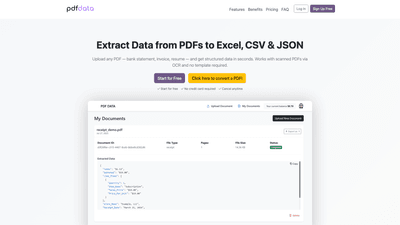
PDFData is an AI-powered data extraction tool designed to convert information from PDF documents into structured, machine-readable formats such as Excel (XLSX), CSV, and JSON. It works with both native and scanned PDFs (via OCR) and does not require predefined templates or fixed layouts. Users can upload multiple PDFs at once and obtain accurate data extraction quickly, enabling seamless integration with spreadsheets, automation tools, or APIs. The platform emphasizes security and privacy, with data encrypted at rest and automatically deleted after processing, aligning with GDPR compliance.
Features
- AI-Powered PDF Data Extraction
- Smart algorithms detect tables, fields, and data structures across complex or non-standard PDF layouts.
- OCR Support for Scanned PDFs
- Optical Character Recognition enables data extraction from image-based or scanned documents automatically.
- No Templates Required
- Works out-of-the-box regardless of document layout; flexible extraction adapts to diverse PDFs.
- Multiple Export Formats
- Export extracted data as Excel (.xlsx), CSV, or JSON for easy integration with spreadsheets, automation tools, or APIs.
- Batch PDF Uploads
- Upload and process multiple PDFs in bulk for high-volume use cases such as accounting or HR intake.
- Secure and Private
- Data encrypted at rest and automatically deleted after processing; GDPR-compliant with minimal data retention.
- Simple 3-Step Workflow
- Upload documents → Automatic processing by AI engine → Export in preferred format
- Quick Start and Free Tier
- Start for free with $1 credit; no credit card required; immediate document processing available.
How to Use
- Start Free
- Create an account and begin processing with a free credit (no credit card required). No hidden charges or monthly commitments.
- Upload Documents
- Drag and drop or select PDFs through an intuitive interface. Suitable for bank statements, invoices, resumes, receipts, and more.
- Automatic Processing
- The AI engine analyzes text, identifies data fields and tables, and extracts data into structured formats. OCR handles scanned documents seamlessly.
- Export Data
- Choose your preferred format: Excel (.xlsx), CSV, or JSON. Data is ready for spreadsheets, automation workflows, or API integrations.
- Pricing Model
- Pay-per-use: $0.06 per page, with typical document types ranging from 1-5+ pages. No monthly fees or minimum usage requirements. Examples include:
- Invoice (1-2 pages): $0.06 - $0.12
- Bank Statement (3-5 pages): $0.18 - $0.30
- Resume / CV (1-3 pages): $0.06 - $0.18
- Insurance Claim (2-4 pages): $0.12 - $0.24
- Pay-per-use: $0.06 per page, with typical document types ranging from 1-5+ pages. No monthly fees or minimum usage requirements. Examples include:
Use Cases
- Accounting and Finance
- Convert bank statements, invoices, and receipts into structured data for reconciliation, bookkeeping, and ERP integrations.
- Human Resources
- Parse resumes and CVs to extract key candidate information, improving applicant tracking and shortlisting processes.
- Operations and Compliance
- Extract terms, claims, and policy details from insurance documents or regulatory reports for auditing and compliance.
- Data Migration and Automation
- Transform legacy PDFs into machine-readable data for integration with BI tools, dashboards, and automation pipelines.
Benefits and Competitive Advantages
- Speed and Efficiency
- AI-driven extraction dramatically reduces manual data entry time, enabling teams to reclaim hours weekly.
- Accuracy Across Diverse Documents
- Capable of handling non-standard layouts and complex documents, including bank statements and multi-page invoices.
- Flexible Output
- Supports multiple export formats, facilitating seamless use in spreadsheets, APIs, or automation platforms.
- Scalable for Bulk Processing
- Batch uploads enable high-volume operations without templates, making it suitable for large teams and enterprises.
- Transparent Pricing
- Clear pay-per-page pricing with no subscriptions, minimums, or hidden fees; scalable according to usage.
- Strong Security and Privacy
- Encryption at rest, automatic deletion after processing, and GDPR compliance provide trust for sensitive data.
Who It's For
- Finance teams needing to automate invoice processing and reconciliation.
- HR departments processing large volumes of resumes and candidate data.
- Small businesses seeking affordable, scalable PDF data extraction without complex setups.
- IT and operations teams integrating PDF-derived data into dashboards, databases, or APIs.
- Any organization requiring fast, accurate extraction of data from diverse PDF documents.
Frequently Asked Questions
- How secure is my data?
- Data is encrypted at rest and automatically deleted after processing. The platform complies with GDPR and maintains strict data handling standards.
- Can I extract data from scanned PDFs?
- Yes. OCR is supported to convert image-based or scanned documents into structured data.
- What types of documents are supported?
- Bank statements, invoices, receipts, resumes/CVs, insurance claims, and other common business documents. The system adapts to various layouts.
- In what formats can I export the extracted data?
- Excel (.xlsx), CSV, and JSON.
- Do I need to create a template before uploading a PDF?
- No templates are required. The tool uses AI to detect data structures and extract data automatically.
- How much does it cost to extract data?
- Pricing is pay-per-use: $0.06 per page, with typical page ranges per document guiding the final cost. No monthly fees or minimum usage.
- Is there an API available for integration?
- API access is available for integrating extracted data into other systems; check the provider’s API documentation for specifics.
- How long does extraction take?
- Processing is fast, delivering results within seconds for most documents, with batch processing available for high-volume needs.
- Is there a free tier?
- Yes, you can start free with a credit to process documents; no credit card required and no long-term commitment.
- Can I try it before paying?
- The free credit allows you to test processing on your PDFs before incurring charges.
If you’re seeking a robust, scalable solution to transform PDF data into ready-to-use formats without templates, PDFData offers fast, accurate extraction, flexible exports, and a cost-efficient pay-per-use model designed for modern document workflows. Ready to streamline your PDF data extraction? Start for free and convert your PDFs to structured data in seconds.