What is it
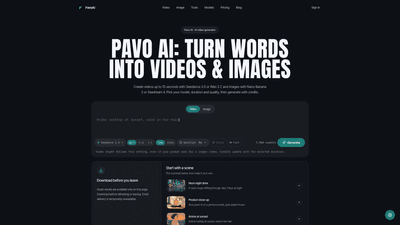
Pavo AI is an AI-powered video and image generator designed to turn text prompts into short, ready-to-edit media. It offers four connected models that cover both video and image creation: Seedance 2.0 and Wan 2.7 for text-to-video, Nano Banana 2 and Seedream 4 for text-to-image. With a single credit balance, users can generate videos up to 15 seconds at 720p or 1080p, and images at 1K, 2K, or 4K with multiple aspect ratio options. The platform focuses on a streamlined, browser-based workflow—two generation modes (Video Studio and Image Studio) within one workspace—making it easy for marketers and creators to plan, generate, and download results for immediate use in editing or publishing pipelines.
Features
- Four connected models in one workspace
- Video: Seedance 2.0 and Wan 2.7
- Image: Nano Banana 2 and Seedream 4
- Text-to-video and text-to-image generation
- Video durations from 5 to 15 seconds
- Video quality options: 720p or 1080p (Fast mode available at 720p)
- Image quality options: 1K, 2K, 4K
- Flexible output controls
- Aspect ratio presets for video and image
- Clear prompts detailing subject, surroundings, movement or style
- Credit-based system with a single balance
- Credits are consumed based on model, duration, and quality
- Image and video counts draw from the same balance
- In-browser workflow
- Two generation modes: Video Studio and Image Studio
- One browser workspace for both media types
- “My Creations” saves results for registered users
- Download and distribution
- Results can be downloaded directly from the page
- Guests can receive a download link by email; registered users access results in My Creations
- Inspiration and planning aids
- Reference clips and prompts help guide composition, mood and camera movement
- Practice-oriented prompts
- Start with one scene to plan a short clip or image and iterate quickly
How to Use
- Start by choosing a mode
- Video Studio: text-to-video from 5 to 15 seconds using Seedance 2.0 or Wan 2.7
- Image Studio: text-to-image using Nano Banana 2 or Seedream 4
- Pick your model, quality, and aspect ratio
- Video: Seedance 2.0 or Wan 2.7; 720p or 1080p; select a duration (5–15s)
- Image: Nano Banana 2 or Seedream 4; select 1K/2K/4K and aspect ratio
- Write a precise prompt
- Describe the subject, setting, movement, lighting, and desired mood or style
- Generate with credits
- Review the credit cost before generating
- If the result isn’t what you want, refine the prompt and generate again
- Download and manage results
- Download from the page or via My Creations if you’re registered
- Guests can receive an emailed download link
- Practical workflows
- Start with one scene to test a concept (product shot, opening, character portrait)
- Create vertical 9:16 clips for mobile formats or square/landscape as needed
- Save assets to My Creations for batch editing in your preferred tools
Pricing (credit packs and one-time options)
- Starter – $9.90 (one-time)
- 9,900 credits
- Up to 55 Seedream 4 images or up to 3 Wan 2.7 clips (5s, 720p)
- Access to all four connected models
- Pro – $29.90 (one-time)
- 29,900 credits
- Up to 166 Seedream 4 images or up to 9 Wan 2.7 clips (5s, 720p)
- Access to all four connected models
- Enterprise – $79.90 (one-time)
- 79,900 credits
- Up to 443 Seedream 4 images or up to 24 Wan 2.7 clips (5s, 720p)
- Access to all four connected models
- Additional notes
- Credits never expire
- Annual upfront credits are granted
- Monthly and yearly plan options are available (as extensions or renewals)
- Image and video counts use the same credits balance
Tips
- Plan your result with a single clear prompt
- A concise subject, a specific setting, and a defined camera move yield stronger results
- Choose the right model for the task
- Seedance 2.0 or Wan 2.7 for dynamic, short videos; Nano Banana 2 or Seedream 4 for stylized or product imagery
- Optimize quality vs. cost
- If you’re experimenting, start with 720p to minimize credits; switch to 1080p for final assets
- Use aspect-ratio presets to fit your distribution channel
- 9:16 for vertical mobile formats; 1:1 for social feeds; 16:9 for widescreen presentations
- Leverage inspiration prompts
- Use the provided reference clips to guide composition, movement and mood, then tailor prompts to your brand voice
- Manage results efficiently
- Save useful results to My Creations for reuse, editing, or batch production
- Handling failures
- If a generation fails or deviates, adjust the prompt details (subject, lighting, motion) and retry
Frequently Asked Questions
- What is Pavo AI?
- Pavo AI is a browser-based platform that converts text prompts into short videos (up to 15 seconds) and images (up to 4K) using four connected AI models.
- How much does Pavo AI cost?
- Pricing is based on one-time credit packs: Starter $9.90, Pro $29.90, Enterprise $79.90, with credits never expiring. Annual upfront credits are available, and monthly/yearly plans exist as options.
- How do I generate a video?
- Choose Video Studio, select a model (Seedance 2.0 or Wan 2.7), set duration (5–15s) and quality (720p or 1080p), write a prompt, review credits, and generate.
- Where are my creations saved?
- Registered users have results saved in My Creations; guests can download via email or directly from the page before leaving.
- Can I generate without registering?
- Yes, you can generate and receive a download link by email as a guest, though registered accounts provide ongoing access to My Creations.
- Do I need a subscription? Do credits expire?
- Pavo AI uses credit packs (one-time payments) rather than mandatory subscriptions; credits never expire.
- What happens if generation fails?
- If a generation doesn’t meet expectations, refine your prompt (subject, setting, movement, lighting) and generate again.
- Which AI model should I choose?
- For video, Seedance 2.0 or Wan 2.7 are optimal; for images, Nano Banana 2 or Seedream 4. Consider your target output, required style, and resolution when selecting a model.
This content highlights Pavo AI as a versatile, credit-based AI solution for fast text-to-video and text-to-image generation, emphasizing its unique combination of four connected models, flexible output options, and a practical workflow tailored for marketers and creators.