What is it
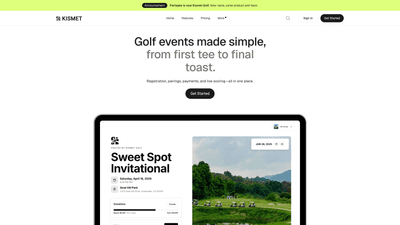
Kismet Golf, formerly Partaake, is an all-in-one golf tournament software platform designed to simplify every phase of organizing a golf event. Built by golfers and engineers, it consolidates registration, payments, communications, sponsor management, and live scoring into a single, streamlined platform. The goal is to eliminate the chaos of juggling spreadsheets and multiple tools by providing one link for registration, scheduling, sponsorships, and results. With Kismet Golf, organizers can deliver a professional, polished experience for players and sponsors while saving significant time—claims include 10+ hours saved per event. The product blends a branded event website, flexible payment options, AI-powered email communication, smart drag-and-drop pairings, live leaderboards, and mobile scoring, all accessible from desktop or mobile devices.
Features
- All-in-one platform for golf events: one place to manage registration, sponsorships, schedule, pairings, payments, and results.
- Branded event website: create a custom, shareable event page in minutes with your logo, photos, and branding consistent across registration, schedule, and sponsor sections.
- Flexible payments: accept credit cards via Stripe, bank transfers, or offline payments (e.g., Venmo, Zelle). Customize your own cancellation policy and easily track who paid, when, and for what.
- AI-powered emails: draft emails quickly with AI and schedule blasts, reminders, and day-of communications from a centralized dashboard.
- Smart groups and pairings: drag-and-drop tools to build fair, efficient pairings and groups, with real-time updates.
- Donations and fundraising: built-in donation pages and fundraising tools to track and maximize contributions without using external software.
- Sponsor management: showcase sponsors on the event website, improving sponsor visibility and renewal potential.
- Live leaderboards and mobile scoring: real-time results update as play unfolds; players know where to be, when to tee off, and when scores update.
- Day-of communication: manage updates, reminders, and essential event-day information from one dashboard—minimizing chaotic email threads and BCC mishaps.
- Check-in on the go: mobile-friendly check-in and attendee tracking from any device.
- Data and control: visibility into registrations, payments, and communications with centralized reporting.
How to Use
- Plan and set up your event
- Create a new event and apply your branding (logo, colors, and imagery).
- Build a dedicated event website page that contains registration, schedule, sponsors, and news all in one place.
- Configure registrations and payments
- Set up registration types, pricing, and any eligibility rules.
- Connect Stripe to enable online payments; you can also choose to accept manual/offline payments (with clear tracking of who paid and when).
- Manage participants and pairings
- Import or add players, and create teams or groups as needed.
- Use the drag-and-drop pairing tool to assemble groups and tee times; updates reflect in real time for players and staff.
- Automate communications
- Draft AI-generated emails for confirmations, reminders, and day-of updates.
- Schedule blasts from the dashboard to ensure timely reminders and important notices reach all participants.
- Go live and manage day-of logistics
- Publish the event page and share the registration link.
- Monitor live scoring and leaderboards from mobile or desktop; mark attendees as checked-in from any device.
- Communicate day-of information and updates directly to players from the same dashboard.
- Post-event insights and follow-up
- Review real-time and post-event results, sponsorships, and donations.
- Export data for reporting, renewals, and future event planning. Pricing: Kismet emphasizes flexible, tailor-made pricing. Public pricing details are not listed on the site; prospective users are encouraged to book a demo to receive a quote based on event size and needs. You can start by creating an event without connecting Stripe, and you have the option to enable online payments later. To explore exact pricing, book a demo to discuss packages, tiers, and any trial options.
Pricing
Kismet Golf offers pricing that is tailored to the scale and requirements of each event. Public pricing isn’t listed openly, reflecting a consultative sales approach. Key points:
- You can start by creating an event without connecting Stripe.
- Online payments require a Stripe account (linking Stripe is quick and straightforward).
- For precise pricing, features included, and any available trial or demo options, book a demo to receive a customized quote.
- The platform emphasizes value through time savings (notably claimed 10+ hours saved per event) and the consolidation of multiple fundraising and event-management activities into one tool.
Tips
- Start with a branded, single-source event page: A cohesive page reduces confusion and boosts registrations by giving attendees a single, polished destination for all event details.
- Use AI emails to minimize manual drafting: Create templates for registration confirmations, payment receipts, reminder notices, and day-of updates to ensure consistent communication.
- Leverage flexible payments to maximize registrations: Offer a mix of online (Stripe) and offline payments to accommodate different participant preferences, and implement a clear cancellation policy.
- Build smart pairings early: Use drag-and-drop to organize groups efficiently; early planning reduces on-course delays and improves the player experience.
- Promote sponsors effectively: Highlight sponsors on the event site and in communications to improve sponsor renewals and attract new sponsors.
- Activate live scoring and mobile access: Enable real-time results and mobile check-in to streamline operations and enhance the attendee experience.
- Test before launch: Run a dry run with a small group to verify registrations, payments, communications, and live scoring workflows.
- Use data to improve future events: Export registration, payment, and donation data after each event to identify revenue opportunities and optimize next-year planning.
- Keep branding consistent: Upload logos and imagery that align with your corporate or charity branding to build trust and recognition.
- Encourage early registrations: Use AI-generated reminders and early-bird prompts to boost sign-ups and ensure event momentum.
Frequently Asked Questions
- What kinds of events can I run with Kismet Golf? Kismet is built for group golf events of all kinds, including tournaments, corporate outings, charity fundraisers, member events, and more.
- Can I collect payments through Kismet? Yes. Kismet supports credit card payments via Stripe, as well as manual/offline payments. You’ll be able to see who paid, when, and for what.
- Do I need a Stripe account to get started? No. You can create an event without connecting Stripe, but to collect online payments, you’ll need to connect Stripe (a quick setup).
- Is Kismet mobile-friendly? Yes. Organizers and attendees can access registration, check-in, and live scoring from mobile devices.
- Can I use my own branding? Yes. You can upload your logo, images, and customize your event website with your own look and feel.
- Can I track who’s checked in on event day? Yes. Attendees can be marked as checked-in from any device, making on-course management easier for volunteers and staff.
- How do I get started with Kismet Golf? Book a demo to discuss your event needs, see the platform in action, and receive a tailored pricing quote.
- Is there a free trial or free tier? Pricing details aren’t publicly listed; the recommended path is to book a demo to explore available plans, trial options (if any), and exact costs for your event.
If you’d like, I can tailor this content further to emphasize specific use cases (e.g., charity fundraisers, corporate outings, member events) or incorporate any additional details you want highlighted.