What is it
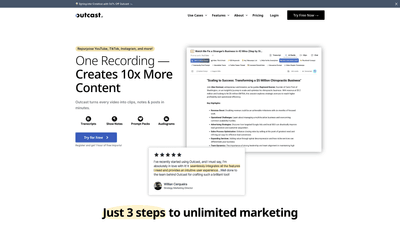
Outcast is an AI-powered content repurposing and marketing platform designed for creators who publish video content. Built to streamline the workflow from a single recording to a library of ready-to-share assets, Outcast turns YouTube, TikTok, Instagram, Facebook, Twitter, Reddit and more into clips, notes, social posts, and show materials in minutes. With features like transcription with speakers and timestamps, an internal AI writer, clip generation, and collaborative editing, Outcast helps podcasters, YouTubers, coaches, and communicators produce a full spectrum of content from one recording. Aimed at saving time and expanding reach, Outcast enables you to publish faster, maintain consistency, and reuse content across multiple platforms.
Key selling points include: one recording that yields endless content, a podcast-aware AI writer inside the workflow, clip and audiogram creation, automated show notes, and a built-in ecosystem for teams to collaborate in real time. The platform also emphasizes audience feedback to continually refine content and offers direct support from the founders, underscoring a hands-on approach to helping creators scale their message.
Features
- Transcriptions with speakers and timestamps
- AI Studio: podcast-aware writer to draft blogs, emails, and images inside your episode
- Clip Studio and Clip Editor: spin clips and audiograms, trim, caption, and export in a few clicks
- Episode Transcript: studio-grade transcripts with speaker attribution and timestamps
- Episode Chatbot: ask questions about a single episode or your entire library
- Prompt Packs: ready-made AI prompts per episode to accelerate publishing
- Long-Form Writer: enhanced writing tools for in-depth articles or outreach
- Prompt Packs: kick off content creation without starting from a blank page
- For Teams: live, collaborative editing to keep assets organized and in sync
- Import Coverage: paste URLs from YouTube, TikTok, Instagram, Facebook, Twitter, or Reddit
- Auto-Replication: from one recording to social posts, clips, show notes, and more
- Listener Feedback Loop: built-in signals to guide content strategy
- Founder Support: direct access to the founders for assistance
- All-in-One Export: publish or export clips, captions, and episodes in a unified workflow
This feature set is designed to help creators turn a single recording into a comprehensive, cross-platform content ecosystem with minimal friction.
How to Use
-
Step 1: Import and prepare
- Copy and paste URLs from YouTube, TikTok, Instagram, Facebook, Twitter, or Reddit into Outcast.
- The tool identifies speakers within the video and lets you choose the type of content you want to generate (clips, notes, posts, transcripts, etc.).
-
Step 2: Generate content
- Outcast drafts social posts, viral clip snippets, show notes, and more, based on your episode.
- Use AI Prompt Packs to accelerate the writing process or customize your own prompts.
-
Step 3: Edit and export
- Open Clip Editor to trim, caption, and export clips or audiograms.
- Access Episode Transcript with precise timestamps and speaker attribution.
- Use Episode Chatbot for quick ideas, quotes, and summaries from a single episode or your full library.
-
Step 4: Collaborate and publish
- Team members can join projects in real time to co-edit and keep assets tidy.
- Share clips, transcripts, and show notes publicly or privately as needed.
Pricing and trial:
- Free trial available: Try Free Now with an offering that includes 1 hour of free imports.
- Pricing structure: Outcast provides paid plans beyond the free trial; exact tiers and details are typically listed on the pricing page. Promotions such as 50% off may be available for a limited time.
Practical tips for use:
- Start with a clear publishing goal for each episode (clip length, platform distribution, or article format) and tailor Prompt Packs accordingly.
- Use Clip Studio to capture multiple moment types (highlights, quotes, reactions) for maximum cross-platform impact.
- Leverage Episode Transcript and Episode Chatbot to generate show notes and social-ready quotes quickly.
- Activate team collaboration to keep assets organized and ensure consistent voice across posts, emails, and blogs.
- Monitor listener feedback and performance signals to refine future prompts and clip selection.
Pricing
Outcast offers a free trial with 1 hour of free imports to get you started. After the trial, access to extended features and unlimited content typically requires a paid plan, with pricing details available on Outcast’s pricing page. The platform also highlights limited-time promotions, such as a 50% discount during seasonal campaigns. For organizations such as non-profits, there may be discount options—reference the FAQ or contact sales for specifics.
Key pricing considerations:
- Free trial: 1 hour of free imports
- Paid tiers: available beyond the trial (exact tiers and prices are listed on the official pricing page)
- Promotions: limited-time offers (e.g., 50% off) may apply
- Discounts: potential for nonprofit discounts; verify via pricing or sales contact
Tips
- Leverage AI Prompt Packs to banish blank-page anxiety and keep production momentum.
- Use Clip Editor to consistently produce high-quality clips and audiograms suitable for social media.
- Rely on Episode Transcript and Show Notes to create SEO-friendly blog posts and email newsletters.
- Utilize Episode Chatbot to extract quotes, summaries, and ideas from individual episodes or your entire library.
- Collaborate in real time with your team to maintain a streamlined asset library and clear ownership.
- Align content formats with platform requirements (short clips for TikTok, longer clips or quotes for YouTube, tweetable quotes for Twitter, etc.).
- Incorporate listener feedback into your content engine to improve future episodes and clips.
Frequently Asked Questions
-
Do you have a free trial?
- Yes. Outcast offers a free trial with 1 hour of free imports to explore the platform.
-
What types of imports does Outcast support?
- You can import from YouTube, TikTok, Instagram, Facebook, Twitter, and Reddit by pasting their URLs into the tool.
-
What languages does Outcast support?
- The FAQ references language support as a question, but the exact list of languages is not specified here. Check the official FAQ or product page for the current language options.
-
Do you have any limits for Clip exports?
- The FAQ mentions clip export limits as a topic; refer to the FAQ page for current export limits or quotas.
-
Can I collaborate on projects with team members?
- Yes. Outcast supports team collaboration with live editing to keep assets organized.
-
Do you offer discounts for non-profit organizations?
- The FAQ asks this question, suggesting such discounts may be available; confirm details with sales or the pricing page.
-
Are there other notable benefits?
- Outcast emphasizes “One Recording → Endless Content,” built-in publisher-ready assets, and direct founder support, which together streamline content creation and distribution.
If you’re looking for a comprehensive, AI-powered workflow to transform long-form recordings into a full suite of publish-ready content, Outcast provides an integrated solution that covers transcription, writing, clipping, transcription-based notes, and collaborative editing—all aimed at helping creators publish faster, repurpose more efficiently, and grow their audience across platforms. For detailed pricing, current promotions, and exact language support, visiting the official pricing and FAQ pages is recommended.