What is it
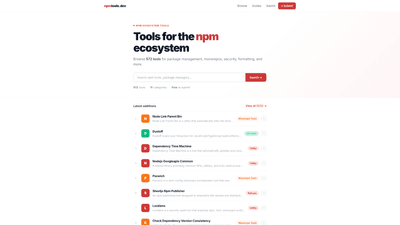
npmtools.dev is a comprehensive, publicly accessible directory of tools built for the npm ecosystem. It curates and showcases 572 tools across 11 categories, covering essential areas such as package management, monorepo tooling, security, formatting, build processes, linting, and more. The platform serves as a centralized discovery hub for developers, DevOps teams, and organizations seeking to optimize their JavaScript/TypeScript projects with reliable, well-supported tooling. Key value propositions include easy discovery, category-aware navigation, up-to-date additions, and a straightforward submission flow for tool authors. With free submission and a focus on practical utility, npmtools.dev helps teams identify the right tools to streamline workflows, improve reliability, and accelerate development.
Features
- Rich directory of npm ecosystem tools: Browse 572 tools spanning package management, monorepo tooling, security, formatting, CLI utilities, build tools, linters, and more.
- Category-based navigation: 11 predefined categories to quickly locate tools that address specific needs (e.g., Monorepo Tools, CLI Tools, Security, Formatters).
- Robust search and discovery: A search feature to locate tools by name, capability, or related keywords, enabling rapid comparison and exploration.
- Latest additions: Access to recently added tools to stay current with the evolving npm ecosystem.
- Submit your tool: A free-to-submit submission flow invites tool authors to feature their project on the directory.
- Tool detail pages: Each entry includes key metadata, category associations, and direct pathways to related tooling, enabling informed decision-making.
- Promotional potential: The platform’s structure supports visibility within a trusted directory of npm-related tooling.
Core keywords and capabilities the directory emphasizes include: npm ecosystem tools, package management, monorepo tooling, security auditing, lockfile analysis, artifact scanning, dependency management, publishing workflows, and CLI utilities.
How to Use
- Explore by category: Start with the category that matches your current need—whether it’s package management, monorepos, security, or formatters—to quickly narrow the field.
- Search for specific capabilities: Use the search bar to find tools by keywords like “lockfile,” “artifact," “NPM Publisher,” or “linting” to identify candidates that fit your workflow.
- Review tool entries: Open individual tool pages to read summaries, capabilities, supported environments, and how they integrate with npm, Yarn, or pnpm.
- Compare and shortlist: Build a shortlist based on criteria such as compatibility with your stack, maintenance activity, community adoption, and feature sets.
- Submit your tool (free): If you or your organization maintain a tool, use the free submission flow to get listed, increasing visibility to potential users.
- Implement and monitor: After selecting a tool, assess its impact on your development process—speed, reliability, and security—and adjust as needed.
- Pricing awareness: The directory currently emphasizes free submission; there is no explicit paid tier required to access listings. Pricing details for individual tools vary by the tool itself, not by the directory.
Pricing
- Free to submit: npmtools.dev offers a free submission process for tool authors wanting to list their project.
- Directory access: Listing and browsing within the catalog is provided as part of the platform; no general subscription price is stated for users to access the directory.
- No explicit paid tiers listed: As of the latest information, there are no publicly documented paid plans for listing or browsing the catalog. Tool authors should verify any promotional opportunities or sponsored placements through the platform.
Tips
- Optimize tool discovery with precise categorization: When you submit a tool, select the most accurate category(s) and add relevant tags to improve discoverability by teams searching for specific capabilities.
- Highlight unique value propositions: In tool descriptions, emphasize what sets your tool apart (e.g., monorepo orchestration, automatic dependency updates, or security auditing across lockfiles).
- Include practical use cases: Add real-world scenarios (e.g., “secure publishing workflow for npm packages,” “monorepo consistency across npm, Yarn, and pnpm”) to help potential users understand applicability.
- Keep information current: Regularly update your tool entry with latest release notes, supported environments, and integration details to maintain credibility and relevance.
- Leverage category breadth: If your tool spans multiple domains (e.g., linting and build tooling), consider listing it under multiple relevant categories to maximize visibility.
- Use the platform as a discovery routine: For teams adopting npm-based tooling, periodically review new additions to capture emerging best practices and newer solutions.
Frequently Asked Questions
- What is npmtools.dev? A targeted directory that catalogs tools built for the npm ecosystem, organized into categories like package management, monorepo tooling, security, and more, to help developers discover and compare options.
- How many tools are listed? The directory features 572 tools, continuously updated with new additions.
- Is submission free? Yes, submitting a tool to npmtools.dev is free.
- How do I submit a tool? Use the site’s submit flow to provide essential details about your tool, including name, description, category, and key features. The submission process is designed to be straightforward for tool authors.
- Can I search by category or keywords? Yes. You can browse by category or use the search function to find tools by capability, name, or related keywords such as “lockfile,” “publishing,” or “monorepo.”
- Do you offer API access or data exports? The publicly available information focuses on browsing and submitting tools. API access or data export details are not specified in the current documentation.
- Is there a paid plan for listings or featured placements? The current information indicates free submission, with no explicit paid tiers for listing in the catalog. For promotional opportunities, refer to the platform’s guidelines or contact the maintainers.
- Who is the target audience? Developers, DevOps engineers, and organizations working with the npm ecosystem who want to discover, compare, and adopt tools for package management, monorepos, security, formatting, build processes, and related workflows.
Note: The content above reflects the npmtools.dev directory’s structure, offerings, and publicly stated policies as described. For the most up-to-date details, always check the live site and their submission guidelines.