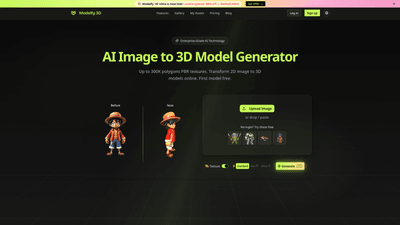
What is Modelfy 3D Ultra
Modelfy 3D Ultra is an enterprise-grade AI image-to-3D model generator that converts any 2D image into high-fidelity 3D assets. Built on self-developed AI algorithms and octree-based reconstruction, Modelfy 3D Ultra delivers ultra-precise models with up to 300,000 polygons, professional texture maps, and an end-to-end asset management system. The platform supports rapid production workflows for 3D printing, game development, visualization, virtual reality, and product prototyping. With a credit-based pricing model, multiple quality tiers, and cloud-based infrastructure, Modelfy 3D Ultra promises fast, reliable, and scalable 3D generation suitable for individuals and teams across industries.
Core features and capabilities
- Ultra-high polygon models: Generate 3D models from 2D images with up to 300K polygons, using four precision levels (Fast 15K, Standard 30K, Pro 60K, Ultra 300K) to match project needs and performance requirements.
- Texture generation and PBR support: Advanced texture maps and full PBR workflows enable photorealistic rendering. Toggle texture generation on or off to balance fidelity and file size.
- Multi-format export: Export assets in GLB (web/games), OBJ (3D software), and STL (3D printing), with textures and preview images included for seamless integration.
- Professional asset management: An enterprise-grade asset management system to organize conversions by status, favorites, archives, and custom metadata (titles, descriptions, tags) for efficient collaboration.
- Real-time status and audit trails: Cloudflare-powered delivery with status monitoring, download tracking, audit logs, and reliable uptime suitable for business environments.
- Self-developed AI pipeline: Proprietary image processing, depth analysis, and octree resolution optimization deliver consistent results with minimal human intervention.
- Quick and scalable workflow: One-click image to 3D conversion, unlimited concurrent conversions, and predefined quality tiers to speed up production cycles.
- Flexible deployment for teams: Private assets, CDN hosting, and enterprise-grade access controls to support teams, agencies, and studios.
- All-in-one delivery package: Complete 3D asset package including geometry (GLB/OBJ/STL), textures, and preview images for immediate use in pipelines.
How to use (including pricing and tiers)
- Getting started: Upload a 2D image (JPG, PNG, or WEBP) and choose a quality tier. The system handles intelligent preprocessing (background padding, size optimization, format conversion) and auto-selects the optimal octree resolution and inference steps based on the selected tier.
- Quality tiers and results:
- Fast (15K polygons): Quick prototypes and low-poly needs.
- Standard (30K): Balanced fidelity for general use.
- Pro (60K): Higher detail for professional workflows.
- Ultra (300K): Maximum detail for production-ready assets.
- Output formats: GLB, OBJ, and STL with textures. Real-time status tracking ensures you know when your 3D conversion completes.
- Pricing (monthly plans):
- Free: Limited access with basic features, welcome credits, and CC BY 4.0 license on assets.
- Pro: $15/month (discounted to $9.9/month in current offers) for professional creators; includes 1,000 credits monthly, all models support (Standard/Pro/Ultra), private assets, 4K textures, and email support.
- Standard: Higher capacity with more downloads and priority than Free; price varies with region and promotions.
- FLASH SALE/Most Popular: Up to 50% off, with bundles like 4,000 credits monthly, unlimited downloads, 4K PBR textures, private assets, and SLA-based support.
- Credits-based system: Credits power conversions; additional credits can be purchased to scale usage. All major outputs (Standard/Pro/Ultra) are supported under each paid tier.
- Free trial and “Try Now” options: New users can experience basic features and limited conversions to evaluate suitability before upgrading.
Practical use cases and benefits
- 3D printing and rapid prototyping: Convert product photos or concept art into printable 3D models with accurate topology and textures, cutting weeks of manual sculpting and retopology work.
- Game development and virtual environments: Generate low- to high-poly assets quickly for prototypes, scene assemblies, and VR/AR experiences. Export GLB for Unity/Unreal workflows with ready-to-use textures.
- E-commerce and product visualization: Create interactive 3D models from product images to boost customer engagement, enable 360-degree views, and improve conversion rates.
- Marketing and product design reviews: Produce photorealistic assets for presentations and client showcases—rapid iteration of concepts with consistent quality.
- Architecture and visualization: Convert product and material imagery into accurate 3D assets for interior and exterior visualizations, enabling faster client approvals.
- Education and training: Build realistic 3D models from reference images for instructional content, simulations, and interactive learning modules.
Key advantages:
- Speed and efficiency: AI-driven conversion reduces typical timelines from days to minutes, enabling fast iteration and faster go-to-market.
- Cost efficiency: A credit-based model minimizes expensive manual labor and reduces the need for high-priced modelers for early-stage concepts.
- Consistency and reliability: Proprietary octree optimization and neural networks produce stable results across projects and maintain quality across batches.
- Enterprise-grade workflow: Centralized asset management, private hosting, and audit-friendly processes align with team collaboration and compliance needs.
- High-quality rendering: PBR texture support ensures assets look realistic in real-time engines and rendering pipelines.
Target audience and requirements
- Who benefits most:
- 3D artists and studios seeking faster asset creation for concepts, prototyping, or production pipelines.
- Game developers and VR/AR teams needing rapid 3D content with reliable outputs.
- Product designers and marketing teams requiring photorealistic visuals for presentations and storefronts.
- 3D printing enthusiasts and educators looking for accessible, high-quality models from images.
- Technical requirements:
- Image input formats: JPG, PNG, WEBP.
- Output formats: GLB, OBJ, STL, with textures.
- Cloud-based processing with enterprise-grade infrastructure, suitable for collaboration and multi-user environments.
- Access to subscription plans or credits-based purchases to scale usage.
Tips for getting the best results
- Start with clear, high-resolution 2D images to maximize depth cues and texture accuracy.
- Choose the appropriate quality tier based on the intended use; use Ultra for production or hero assets and Fast/Standard for rapid prototyping.
- Utilize texture generation when realism is essential; disable textures for lightweight assets or when you plan to customize textures later.
- Leverage the asset management system to organize conversions by project, status, and metadata for efficient workflows.
- Take advantage of private assets and CDN hosting when working on client projects or confidential designs.
- Review export formats to ensure compatibility with your target pipeline (GLB for web, OBJ for modeling software, STL for printing).
Frequently Asked Questions
- What makes the AI image-to-3D generator unique?
- It uses self-developed AI algorithms and octree resolution optimization to deliver enterprise-grade 3D models from 2D images, with up to 300K polygons and professional texture support, all within minutes rather than days.
- What quality levels are available for image-to-3D conversion?
- Four levels: Fast (15K), Standard (30K), Pro (60K), and Ultra (300K) polygons, enabling tailored fidelity and performance.
- How do I manage and organize my AI-generated 3D models?
- An integrated asset management system lets you filter by status, favorites, and archive completed work, plus add custom titles, descriptions, and tags for organized workflows.
- What file formats are supported?
- GLB for web/games, OBJ for 3D software, STL for 3D printing, with comprehensive texture maps and preview images.
- How reliable is the AI conversion process?
- Enterprise-grade infrastructure with real-time status, audit logs, and high success rates (with a strong emphasis on consistency and predictability across batches).
- Is there a free tier or trial?
- Yes, a Free plan with limited features and welcome credits is available to try basic capabilities before upgrading.
- Can I export private assets?
- Yes, paid plans include private assets and CDN hosting to secure client projects and sensitive work.
- How quickly can I expect results?
- The platform emphasizes fast conversions, with results delivered in minutes, not days, depending on the chosen quality tier and asset complexity.
If you’re seeking a streamlined, scalable solution to convert 2D imagery into production-ready 3D assets, Modelfy 3D Ultra offers a robust set of features, enterprise-ready tooling, and a flexible pricing model designed to support individuals, teams, and organizations across sectors. Ready to transform your images into professional 3D models? Start with the Free tier or explore discounted pro/standard packages to suit your project needs.