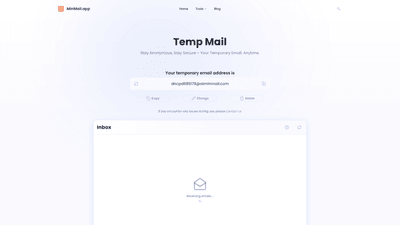
What is it
MinMail.app offers Temp Mail, a 24-hour auto-destruct temporary email service designed to keep your primary inbox private and clean from spam, phishing, and privacy leaks. You can generate a random disposable email in seconds, with no registration or personal information required. The service is 100% web-based and accessible from any browser on desktop or mobile, so there is zero software to install and zero commitments. Temp Mail is built to help you stay anonymous and secure online by creating a short-lived identity for quick sign-ups, social logins, and confidential communications. All emails and data associated with a temporary address are automatically deleted after the chosen validity period, ensuring zero digital footprints once the inbox expires.
Features
- Temp Email Generator: Create 24-hour temporary emails in about 3 seconds, with no registration or personal data needed. Generate disposable addresses on demand to protect your real identity during sign-ups or verifications.
- Anonymous Identity On Demand: Use a new, anonymous email whenever you need it. The service emphasizes privacy and minimizes traces left behind after use.
- Flexible, Expiring Addresses: By default, a temporary address lasts 24 hours, but you can adjust the lifespan to suit your needs. Available durations include 5 minutes, 10 minutes, 1 hour, 1 week, or 1 month. You can extend or shorten the validity at any time.
- End-to-End Security: Each Temp Mail address is independently generated and privatized, with end-to-end encryption to safeguard the content. The system is designed to handle billions of temporary emails securely.
- No Downloads Required: Temp Mail is fully web-based; no software installation is needed. Create disposable emails instantly and start receiving messages right away.
- Unlimited Addresses, Free Core Features: There are no limits on how many temporary addresses you can generate, and the core features are completely free. Optional premium features are available via subscription to access the latest enhancements.
How to Use
- Access MinMail.app in your web browser. No account creation or installation is required.
- Generate a disposable email in seconds. Use it for quick sign-ups, one-time verifications, or accessing restricted content without exposing your real email.
- Use the temporary inbox to receive messages. You can read, reply, or perform actions using the temporary address without revealing your true identity.
- Manage expiry as needed. If your use case requires, extend or shorten the validity period (5 minutes, 10 minutes, 1 hour, 1 week, or 1 month) at any time.
- When you’re done, let the address expire or delete it. All data linked to the temporary address is automatically purged after the designated lifespan.
- Optional: explore premium features. MinMail.app offers free core functionality with unlimited disposable addresses; paid tiers provide access to additional features and the latest updates.
- Use cases include social media logins, time-limited offers, account verifications, and confidential communications while keeping your primary email free from clutter and risk.
Use cases and benefits:
- Quick sign-ups: Create a temporary address for websites or services that require an email verification.
- Privacy protection: Avoid exposing your real email to unknown platforms to reduce spam and data leakage.
- Safe testing: Test email-based workflows or registrations without compromising your primary inbox.
- Confidential communications: Exchange information securely using a disposable address for sensitive topics.
Pricing
- Free core features: Generate an unlimited number of temporary email addresses with no registration and no upfront costs. The basic service provides full access to the primary disposable email capabilities.
- Premium features: MinMail.app offers additional features via subscription, delivering early access to new tools and enhancements beyond the core offering. Pricing details and plan specifics are subject to change; visit the site for the latest information.
- Accessibility: All features described above are accessible through a web browser, with no downloads required, making the service convenient across devices.
Tips
- Choose the right expiry: If you only need a quick verification, a 5–10 minute window may suffice. For longer experimentation or data collection, use 1 hour, 1 week, or 1 month.
- Separate identities: For higher privacy, generate a new disposable address for each separate task or site rather than reusing the same address.
- Avoid sensitive content: Do not rely on temporary emails for storing personal or highly sensitive information since the account is ephemeral.
- Integrate with logins wisely: Temp Mail integrates with social logins for streamlined sign-ups, but consider whether you want to expose any social account to a temporary address.
- Monitor for responses: Some services may delay responses or block temporary domains; if you don’t receive expected emails, try a different disposable address and/or adjust expiry.
Frequently Asked Questions
- What is Temp Mail? Temp Mail is a 24-hour auto-destruct disposable email service. It lets you generate a random address instantly without registration, keeping your real inbox private and reducing spam.
- Is Temp Mail secure? Yes. Each Temp Mail address is independently generated and privatized. The system uses end-to-end encryption to help ensure your messages and activity remain confidential.
- Can others access my emails? No. The disposable inbox is private to you; accounts and data are designed to be inaccessible to others once created.
- Can I extend the 24-hour lifespan of my Temp Mail? Yes. While 24 hours is the default, you can set shorter or longer durations (5 minutes, 10 minutes, 1 hour, 1 week, 1 month) and adjust the expiry as needed.
- Do I need to install software to use Temp Mail? No. Temp Mail is fully web-based and accessible via any browser on desktop or mobile.
- Is Temp Mail free? Yes. The core features are completely free with no limits on the number of temporary addresses you can generate.
- Are there usage limits? The service emphasizes unlimited temporary addresses for free; however, premium features may require a subscription for access to additional capabilities and latest features.
- What are common use cases? Quick sign-ups, one-time verifications, accessing content with privacy, protecting your primary inbox from spam and phishing, and testing email-based processes.
By focusing on the core benefits—privacy, security, rapid disposable addresses, and flexible expiry—MinMail.app’s Temp Mail provides a practical, SEO-friendly solution for users seeking a trustworthy temporary email experience.