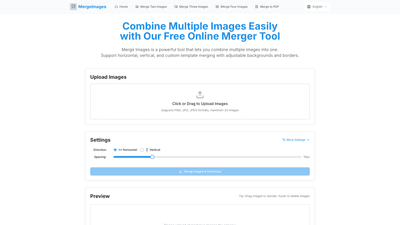
What is it
Merge Images is a free online tool designed to simplify the creation of composite images by combining multiple pictures into a single file. It supports horizontal joining, vertical stacking, grid arrangements, and the option to use custom templates, giving you flexibility to craft layouts that fit your specific needs. The tool emphasizes ease of use: simply upload your images, choose a layout, adjust given settings, and download the final merged image—no design skills required.
Key strengths include in-browser processing (no data leaves your device), a diverse range of merge modes, and customization options that help you present your visuals in a polished, professional way. Whether you’re creating a photo collage for social media, a product comparison image, or a portfolio overview, Merge Images provides a streamlined workflow to produce high-quality results quickly.
What makes Merge Images stand out is its commitment to privacy and simplicity. All image processing happens in your browser, so your files aren’t uploaded to a server. There are no watermarks, no registration requirements, and no hidden fees. The tool is designed to be accessible to users of all skill levels while delivering robust features that cover common merging scenarios.
Features
- Multiple merge options: horizontal joining, vertical stacking, grid layouts, and custom templates to suit a wide range of use cases.
- Customization control: freely adjust background colors, border width, and border colors to achieve a professional, cohesive look.
- High-quality output: preserves original image quality with minimal or no compression, ensuring clear and vibrant merged results.
- Free & instant download: download merged images immediately after preview, with no watermarks or limitations.
- Broad format support: upload and process JPG, PNG, WebP, GIF, BMP, and other common formats without compatibility issues.
- In-browser processing: all processing happens locally in your browser, keeping your images private and secure.
- User-friendly workflow: drag-and-drop image upload, reorder by dragging, and easy deletion with hover-to-delete interactions.
- No signup or account required: use the tool without creating an account, and no registration is needed to download your merged image.
How to Use
- Upload Images
- Click the upload button or drag and drop images into the designated area. The tool supports common formats such as JPG, PNG, WebP, GIF, BMP, and more, making it easy to combine a variety of sources.
- Choose Merge Method
- Select your preferred layout: horizontal, vertical, grid, or a custom template. This choice determines how images will be arranged in the final merged result.
- Adjust Settings
- Customize the merge with background color, image spacing (gap), and border options to create the exact look you want. You can reorder images by dragging them into a new position and hover to delete any image from the sequence before finalizing.
- Download Result
- Preview the merged image and, when satisfied, download the high-quality output. The result is delivered as a single image file with no watermark and without any quality loss.
Core workflow highlights include the ability to reorder images through drag-and-drop, and the option to delete unwanted images by hovering, which makes quick adjustments easy during the preview phase. This four-step process is designed to be intuitive for users who have no design background but need professional-looking composites fast.
Pricing
- Free to use: Merge Images is 100% free with no hidden charges and no required sign-ups or account creation.
- No watermarks or limitations: downloaded composites come clean, without branding or restrictions.
- In-browser and private: all processing occurs within your browser, so your images are not uploaded or stored on servers, preserving privacy and security.
- No registration necessary: you can start merging instantly by just uploading images and configuring settings.
This pricing approach makes Merge Images an attractive option for individuals, educators, marketers, and small teams who need quick results without investing in software or subscriptions. If your use case requires frequent merges or longer sessions, you’ll still benefit from the no-cost, no-commitment model that lets you test layouts and styles freely.
Tips
- Use high-resolution images for best results: starting with clear source files minimizes quality loss in the final merge.
- Plan your layout before uploading: decide if horizontal, vertical, or grid better communicates your message, and choose background colors accordingly.
- Match image dimensions for grid layouts: if possible, use images with similar aspect ratios to achieve a more balanced collage.
- Leverage spacing and borders: small gaps (e.g., 10px) and subtle borders can help distinguish individual images within a composite.
- Preview before downloading: take advantage of the live preview to fine-tune alignment and ensure the final image looks as intended.
- Maintain consistency in formatting: if you’re producing multiple merged images, use the same background color and border styles for a cohesive visual identity.
- Keep file sizes reasonable: while quality is preserved, merging many large images can result in large output files; balance resolution with intended use.
- Protect privacy: remember that the tool processes in your browser, so you can confidently merge private or sensitive images without uploading them to a server.
Frequently Asked Questions
-
Is Merge Images completely free to use? Yes. Merge Images is entirely free to use with no hidden charges or paid tiers. You can merge as many images as you need at no cost.
-
Do I need to create an account to use Merge Images? No. You don’t need to sign up or create an account. Upload your images, customize the merger settings, and download your result directly.
-
What image formats does Merge Images support? The tool supports common formats including JPG, PNG, WebP, GIF, BMP, and more. You can upload images in different formats and still merge them into a single output.
-
How many images can I merge at once? You can merge multiple images at once. While there isn’t a strict cap stated, it is recommended to merge up to 20 images at a time for optimal performance and handling.
-
Will Merge Images reduce the quality of my images? No. The tool is designed to preserve the original quality of your images, delivering a high-resolution merged output without noticeable compression artifacts.
-
Are my uploaded images stored on your server? No. All processing happens in your browser, and your images are not uploaded to or stored on our servers, ensuring privacy and security.
-
Can I customize the background colors and borders? Yes. The tool provides options to adjust background color, border width, and border color to achieve a polished, professional look.
-
Can I export the merged result in different formats? The primary output is a single merged image file. The platform emphasizes image-to-image merging for immediate use; there is no mention of built-in export to PDF or other formats within the tool’s workflow. If you need a PDF, you can convert the merged image using external tools after download.