What is it
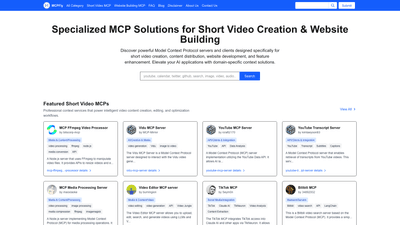
MCPFly offers a comprehensive ecosystem of Model Context Protocol (MCP) servers and clients designed specifically for short video creation and website building. Built around the open-source MCP framework, these specialized servers provide domain-specific context, tools, and prompts that empower AI assistants to generate, edit, optimize, and distribute short video content while accelerating intelligent website development. By connecting video-focused MCPs (such as FFmpeg video processing, video editing, transcript retrieval, and platform-specific optimizers) with website-building MCPs (content generation, SEO guidance, performance improvements, and dynamic content generation), MCPFly enables seamless, standardized integration with popular AI assistants and development workflows.
MCPs operate in a client–server model, enabling secure access to domain knowledge bases, media processing tools, and web-optimization capabilities through standardized interfaces. This makes it easier for content creators, video editors, and web developers to leverage specialized context without reinventing the wheel, while keeping up with rapid trends and platform requirements across short video platforms (TikTok, YouTube Shorts, Instagram Reels, etc.) and modern website frameworks.
Features
- Core MCP ecosystem for short video and website workflows
- Short Video MCPs focused on ideation, scripting, editing, optimization, and distribution
- Website Building MCPs offering intelligent content generation, layout suggestions, and performance guidance
- Media processing and generation tools
- FFmpeg Video Processor for video resizing, conversion, and processing via API
- Video generation and editing MCP servers that support uploading, editing, searching, and generation with AI assistance
- Image-to-video and text-to-video generation capabilities through specialized MCPs
- Transcript, captions, and language features
- YouTube Transcript Server for transcript retrieval and captioning
- YouTube MCP Server for YouTube API integration and data access
- Transcript-related MCPs enabling subtitle extraction and language processing
- Platform-specific optimization and analytics
- PageSpeed MCP Server for web performance, SEO, accessibility, and AI-assisted optimization
- Umami Analytics MCP Server for web analytics integration with Claude and other AI assistants
- Firecrawl MCP Server and Webscan MCP Server for web scraping, content extraction, and site analysis
- Web-driven content and CMS integration
- Dynamic content generation for websites, powered by MCPs that understand web copy, SEO, and UX best practices
- Smart CMS-ready MCPs that integrate with common frameworks and CMS platforms
- Specialized platform and framework coverage
- TikTok MCP, YouTube MCP, Bilibili MCP, and other platform-focused MCPs for tailored optimization
- React + TypeScript + Vite templates and other developer-focused MCPs to accelerate project setup
- Developer ecosystem and collaboration
- Active community and developer ecosystem for sharing MCP solutions, best practices, and integration examples
- Clear submission pathway for new MCPs, with documentation on naming, features, and connection details
How to Use
- Explore and select MCPs by your workflow
- For short video creation: combine MCPs such as Video Editor MCP Server, FFmpeg Video Processor, YouTube Transcript Server, and platform-specific optimizers to streamline script generation, editing decisions, and distribution.
- For website building: pair Website Building MCPs with PageSpeed, Umami Analytics, and Firecrawl/Webscan MCPs to generate content, optimize performance, and analyze website data.
- Connect via MCP Clients
- Use standard MCP client interfaces (APIs or plugins) to connect your AI assistant or editing workflow with the chosen MCP servers. Popular integrations include Claude-based workflows and LangChain connectors, enabling context-aware prompts and tool calls.
- Implement a typical workflow
- Short video path: start with a script or concept, leverage Script/Idea MCPs, generate a video outline, have the Video Editor MCP suggest cuts and transitions, use FFmpeg MCP for processing, and publish to target platforms with platform-specific optimization MCPs.
- Website path: generate landing page content and blog posts with content-generation MCPs, optimize pages with PageSpeed and SEO-focused MCPs, fetch analytics from Umami, and continuously refine content based on insights from the analytics MCPs.
- Pricing and access
- Pricing for MCPs varies by server and plan. Some MCPs offer free tiers or trials; others have paid plans. Check the individual MCP page for exact pricing, quotas, and usage rules. Many users start with free or trial access and scale up as needed.
- Getting started and contributions
- To contribute your own MCP Server, use the Submit option in the MCP platform or visit the GitHub issues page, providing details about the server’s name, description, features, technical specs, and connection details. This helps the community discover and adopt new solutions for short video and website-building workflows.
Pricing
- Pricing is service-specific and varies across MCPs
- Some MCPs offer free tiers or trial periods to test capabilities
- Others are offered on paid plans with varying quotas, features, or usage limits
- For accurate pricing, review each MCP’s dedicated page on the MCP platform and consider your expected usage (video processing, API calls, data transfers, and analytics needs)
- Practical tip
- If you’re evaluating multiple MCPs, start with free tiers to validate fit with your workflow, then scale to paid plans as your production demands increase
Tips
- Align MCP choices with your platform goals
- Use platform-specific MCPs (TikTok, YouTube, Bilibili) to maximize format compliance and engagement
- Build a modular workflow
- Combine content-generation MCPs with editing, transcript, and analytics MCPs to create a cohesive end-to-end pipeline
- Leverage analytics early
- Integrate Umami Analytics or PageSpeed MCPs early to guide optimization and content strategy from the outset
- Prioritize accessibility and performance
- Use PageSpeed and related MCPs to optimize load times, responsiveness, and accessibility for a wide audience
- Maintain up-to-date context
- Regularly refresh prompts and context data in MCPs to capture evolving platform guidelines and trends
- Plan for cross-media consistency
- Use MCPs that support both short video and website content to maintain brand voice and cohesive storytelling across channels
- Test and iterate
- Employ A/B testing workflows aided by MCPs to compare video formats, editing choices, and website copy effectiveness
- Documentation and support
- Rely on MCP documentation for integration details, API usage, and example pipelines to reduce setup friction
Frequently Asked Questions
- What is Model Context Protocol (MCP)?
- MCP is an open-source protocol enabling AI systems to securely connect to external data sources and domain-specific tools through a standardized client–server architecture. It enhances AI capabilities with specialized knowledge and workflows for specific domains, such as short video creation and website building.
- How do MCP solutions benefit short video creation?
- They supply domain-specific context for video trends, editing techniques, platform guidelines, and audience engagement. This helps generate scripts, optimize edits, analyze performance, and ensure content aligns with platform requirements.
- How do MCP servers help with website building?
- They provide knowledge about design principles, frameworks, SEO, accessibility, and performance optimization. This enables smarter content generation, component suggestions, and dynamic, personalized website experiences.
- How can I integrate an MCP Server with my editing or AI workflow?
- Connect the MCP Server to your AI assistant or editing software via an MCP Client (APIs or plugins). The integration enables real-time context-aware prompts and tool calls for scripts, cuts, effects, and optimization.
- Are there MCPs for platform-specific optimization (TikTok, YouTube, etc.)?
- Yes. The MCP ecosystem includes platform-focused servers that tailor recommendations, templates, and optimization tactics to the target platform.
- Can I create an MCP Server for a specific framework or platform?
- Absolutely. Platform- or framework-specific MCPs offer deeper knowledge and more relevant templates, components, and optimization guidance for that environment.
- How often are new MCPs added?
- New MCPs are added regularly as developers submit solutions. You can find the latest additions in the “Latest Short Video MCPs” and “Latest Website Building MCPs” sections on the homepage or by filtering focus areas.
- How do I get pricing information?
- Pricing is listed on the individual MCP pages. If not shown upfront, it’s best to consult the specific MCP’s details to understand tiers, quotas, and limits.
- How do I submit my own MCP Server?
- Use the Submit option in the MCP platform’s navigation bar or visit the GitHub issues page, providing comprehensive details about your server (name, description, features, specs, and connection details). Emphasize the short video or website-building problems your solution addresses to aid discovery.