What is it
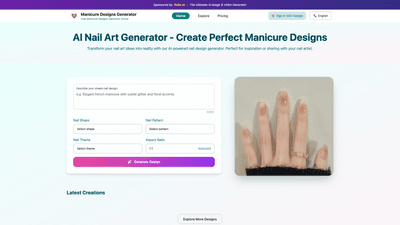
Pollo AI offers an AI Nail Art Generator — a powerful online tool designed to transform your manicure ideas into photorealistic, AI-generated manicure designs. Built as a dedicated, AI-powered nail design platform, it helps you explore, customize, and refine nail art concepts before you head to your nail technician. Users can describe their dream design, choose nail shape, patterns, and themes, and generate a unique manicure design in a chosen aspect ratio (for example, 1:1) and resolution (such as 1024x1024). Beyond generation, the tool provides an Inspiration Gallery with trending nail styles to spark new ideas, and an easy interface to mix and match colors, textures, and elements. Generated designs can be saved, shared, or downloaded for offline use with your nail artist.
Key ideas at a glance:
- AI-powered customization tailored to your preferences
- Intuitive inputs for nail shape, patterns, and themes
- Inspiration Gallery for current trends
- Save, share, and export options for easy offline reference
Features
- AI-Powered Custom Design: The core capability is to generate personalized manicure designs based on user inputs, including nail shape, patterns, themes, and descriptive prompts. The AI analyzes your specifications and creates unique designs aligned with your vision.
- Inspiration Gallery: A curated collection of trending manicure designs that users can browse to spark ideas for their next appointment.
- User-Friendly Customization: An approachable interface lets you mix and match elements like colors, patterns, and textures to craft a distinctive manicure style before saving or sharing.
- Flexible Output Options: Designs can be generated in selectable aspect ratios (e.g., 1:1) and typical image formats (JPEG/PNG), making it easy to save and use them across devices.
- Accessibility and Convenience: Accessible directly from your web browser on any device with internet access; no specialized tools are required.
- Favorites and Sharing: Save your favorite designs to your account for later use and share designs with your nail artist for accurate reference.
Core capabilities focus on delivering unique, tailored manicure concepts quickly while offering a visually rich, inspiration-driven workflow that supports both inspiration and production planning.
How to Use
- Describe your dream manicure design: Enter a concise or detailed description (0/300) of what you want to see. The more precise you are, the better the AI can tailor the output to your style.
- Choose Nail Shape: Pick the desired nail shape (e.g., oval, almond, stiletto) to guide the design’s silhouette.
- Select Nail Pattern: Choose from patterns that influence texture and motif (stripes, florals, geometric, glitter, etc.).
- Pick Nail Theme: Define the theme (minimal, chic, glam, seasonal, avant-garde) to steer overall styling.
- Set Aspect Ratio and Size: Adjust the aspect ratio (e.g., 1:1) and output resolution (e.g., 1024x1024) to suit sharing and printing needs.
- Generate Design: Click to generate a unique manicure design powered by AI.
- Review, Save, and Share: Save your favorite results to your account, or share designs with your nail technician. Exported images are typically available in JPEG or PNG formats for easy use in apps, guides, or printouts.
- Use as Reference for Offline Services: Show generated images to your nail technician to communicate your vision clearly and accurately.
Pricing
- The platform offers Free and Paid plans with various options to suit different user needs. For exact pricing and tier details, please refer to the Pricing page. The service emphasizes accessible entry with a free option, alongside additional plans that unlock more features and capabilities.
Tips
- Provide detailed prompts: The more specific your prompts (colors, finishes, motifs, inspirations), the more accurately the AI can tailor the design.
- Leverage the Inspiration Gallery: Use trending designs to spark ideas, then customize elements to fit your personal style.
- Experiment with elements: Mix and match nail shapes, patterns, and themes to discover unique combinations you wouldn’t consider without AI assistance.
- Consider practicality: If you plan a real-world manicure, keep in mind color availability, drying times, and how complex patterns translate to nail surface.
- Save early, save often: Keep a library of your favorite designs to compare variations and track evolving preferences.
- Prepare for the technician: Use generated images as visual references to communicate details like color palette, textures, and pattern placement with your nail artist.
- Check output formats: Download designs in JPEG or PNG to ensure compatibility with your device and sharing platforms.
Frequently Asked Questions
-
What are manicure designs? Manicure designs refer to the art and techniques used to create aesthetically pleasing nail aesthetics, including painting, embellishing, and applying various nail art elements to enhance nails.
-
How does your AI-powered nail design tool work? The tool generates custom manicure images by taking user inputs such as nail shape, patterns, themes, and descriptive prompts. Advanced algorithms analyze these inputs to produce unique, tailored designs.
-
Can I customize my nail design based on specific preferences? Yes. You can specify nail shape, colors, patterns, and themes to create a custom look that matches your style and preferences.
-
Are the designs generated by the AI unique? Yes. The AI generates designs tailored to your specifications, offering a diverse range of styles and innovative options.
-
Can I use the generated images for offline nail services? Absolutely. The generated designs can serve as references for offline nail appointments; you can show the images to your nail technician to convey your vision.
-
Is there a cost associated with using the AI nail design generator? Pricing details are on the Pricing page. The service offers Free and paid plans to accommodate different user needs.
-
How do I ensure my design is exactly what I want? Provide detailed descriptions of the desired design—colors, styles, and inspirations. The more precise your input, the closer the result will be to your vision.
-
What file formats are the generated nail design images available in? Images are typically available in common formats such as JPEG and PNG for easy saving and sharing.
-
Do I need any special tools to use the AI nail design generator? No. The tool is accessible directly from your website via any device with internet access—no special software needed.
-
Can I save my favorite designs for later use? Yes. You can save designs to your account to revisit and reuse them whenever you like.
This AI-powered nail design generator provides a clear, practical path from imagination to in-salon execution. By combining an AI-driven customization engine with an inspiration gallery and a streamlined workflow, it helps users discover, refine, and communicate manicure ideas with precision and ease. Whether you’re browsing for inspiration, experimenting with new styles, or preparing a precise reference for your nail technician, this tool delivers a unique and valuable solution for modern manicure design.