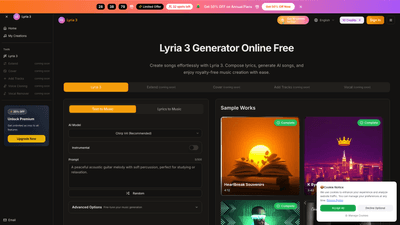
What is it
Lyria 3 is an AI-powered music platform that brings together the Lyria 3 AI Music Generator, Lyria 3 Google, and the Lyria 3 Model to enable rapid, professional-grade music creation. Designed for creators across YouTube, podcasts, films, advertising, and social media, Lyria 3 lets you turn text, lyrics, or prompts into full-length songs with realistic vocals, multiple languages, and high-fidelity instrumentals. All tracks are cleared for commercial use, with a streamlined workflow that eliminates the traditional licensing hurdles. The platform supports quick turnarounds—often under a minute for high-quality outputs—and exports to popular formats such as MP3 and WAV, plus stems for advanced mixing. Whether you’re scoring a video, producing a podcast, or crafting campaign music, Lyria 3 provides a complete, single-workspace solution for AI-assisted music production.
Features
- AI Song Creator (Text to Music)
- Describe your desired track (e.g., "upbeat electronic dance track" or "emotional piano ballad") and the AI generates a full song with vocals and instruments in seconds. No musical experience required.
- AI Lyric Singer (Lyrics to Music)
- Input your own lyrics or poems, choose a music style, and the AI composer produces a complete song with vocals singing your exact words.
- Track Extension
- Extend any music track to your desired length while preserving musical coherence—maintaining melodies, harmonies, and rhythms across longer forms.
- AI Song Cover Generator (Vocal Transformation)
- Create unique covers with AI vocal replacement, adjust voice gender or style, and reinterpretation while preserving the original melody.
- Music Enhancement (Instruments & Layers)
- Layer in new instruments, harmonies, or vocal tracks to create richer, multi-track arrangements.
- Ready-to-Export Formats
- Download finished tracks as MP3 or WAV, with stems available for mixing in your DAW.
- Commercial-Ready Output
- Tracks are cleared for commercial use, so you can publish on YouTube, Spotify, ads, podcasts, games, and more (licensing details may vary by plan—check your chosen tier).
- Fast Turnaround
- High-fidelity results in under a minute, with rapid extension or stem separation without long waits.
- All-in-One Workflow
- No app-hopping: go from text or lyrics to finished song, then extend, cover, or split stems all within the same platform.
- Multilingual Vocals
- Natural-sounding vocals across multiple languages and styles—great for original songs and covers.
- Community & Discovery
- Publish your tracks and explore what others create in a connected, creative community.
Notes: Some features appear as “coming soon” in the roadmap, such as Vocal Remover. The core capabilities above are active and widely used by creators today.
How to Use
- Choose your workspace
- Start with the Lyria 3 AI Music Generator or Lyria 3 Google tool to open your creative workspace. The Google Music Model is designed for rapid, professional output.
- Enter your prompt or lyrics
- Type a brief music prompt (style, mood, tempo) or paste your lyrics. You can also experiment with descriptive prompts to shape vocals and instrumentation.
- Generate and download
- Hit generate to create a high-fidelity track. Download options include MP3 and WAV, with optional stems for advanced mixing. The typical output time is fast (seconds) for a complete 30-second baseline and longer outputs with extension features.
Pricing integrates a credit-based system and tiered plans:
- Free: Access to basic credits and features to try the platform, with limited commercial licensing and export options.
- Lite: Monthly pricing (annual billing discount available) with a larger credit pool, more songs per year, and additional features like Extend, Cover Song, and Upload Music to Extend.
- Pro (Annual Pro or standard Pro): Higher credit limits, more songs per year, latest model access, extended upload capabilities, more concurrent generations, and broader export options.
All plans include a balance of credits and cloud storage, with the option to upgrade for more capabilities and faster outputs. Check the current plan details on the pricing page for exact inclusions and exclusions.
Pricing
Lyria 3 offers multiple plans to fit different creator needs:
- Free
- 10 credits per year
- Access to text/lyrics to music and basic generation features
- Shared generation queue, public generations, lyrics scrolling, music sharing
- 7-day cloud storage
- What’s not included: Commercial license, latest-model access, uploading music to Extend, Cover Song, AI Lyrics Generator, WAV download, priority support, and certain advanced features
- Lite (annual billing saves ~20%)
- Price: around $11.90/month (annual billing)
- 12,000 credits per year; 2,400 songs per year
- Latest model access; text/lyrics to music; AI lyrics; Extend & Cover Song; Upload music to Extend; Add tracks
- Audio uploads up to 4 minutes per track; private generations; 365-day cloud storage; MP3 download; 2 concurrent generations
- Not included: WAV download, priority support, commercial license, Vocal Remover, and some advanced capabilities
- Pro (Annual Pro / standard Pro)
- Price: around $23.90/month (annual billing)
- 36,000 credits per year; 7,200 songs per year
- Latest model access; text/lyrics to music; AI lyrics; Extend & Cover Song; Upload music to Extend; Add tracks
- Audio uploads up to 6 minutes per track; private generations; 365-day cloud storage; MP3 download; 3 concurrent generations
- Not included: WAV download, priority support, commercial license, Vocal Remover
- Annual billing benefits
- Save around 20% with annual plans
Note: Exact pricing and inclusions may vary by region and promotions. Always verify the current plan details on the official pricing page.
Tips
- Start with free credits to explore the core capabilities: test text-to-music, lyrics-to-music, and basic export options before committing to a plan.
- Use targeted prompts to shape your vibe: “upbeat electronic track,” “emotional piano ballad,” or language-specific vocal styles to guide the model.
- Leverage the Extend and Cover features to repurpose a single idea into longer formats or alternative interpretations, preserving coherence across sections.
- For content creators, generate background tracks for videos, podcasts, and ads that require cleared, royalty-free music with commercial rights.
- Experiment with the Lyria 3 Model and Google Music Model to compare outputs and choose the best fit for your project’s tone and language.
- Utilize stems and export options to customize mixes in your DAW, allowing precise control over drums, bass, vocals, and harmonies.
- Keep an eye on credits usage; manage your plan’s credits to optimize output across projects and deadlines.
- Plan your workflow for different platforms: social shorts, long-form videos, podcasts, and cinematic cues all benefit from the platform’s fast turnaround and ready-to-use outputs.
Frequently Asked Questions
- What is the best free Lyria 3 option?
- The free option (Lyria 3 AI Music Generator and Lyria 3 Google) provides 10 credits and access to basic features with no sign-up required for initial exploration.
- How does Lyria 3 work?
- The platform converts text or prompts into full songs using the Lyria 3 Model, delivering high-fidelity tracks quickly. The Lyria 3.0 Google Music Model represents the latest in the model family.
- Do I need musical experience to use Lyria 3?
- No. The tools are built for everyone; prompts or lyrics can be used to generate professional tracks without prior composition skills.
- Are Lyria 3 outputs royalty-free and commercially usable?
- Yes, tracks are designed to be cleared for commercial use, with no extra licensing required on top of the platform’s standard rights. Always verify the plan’s specific licensing terms.
- How many credits per song, and how long does generation take?
- Each song costs 10 credits. Free users receive initial credits; paid plans provide more credits with rollover on monthly plans. Generation is rapid—often seconds for a complete track.
- In what formats can I download the music?
- MP3 and WAV exports are supported; stems are available for advanced mixing in compatible DAWs.
- Can I extend or repurpose my track later?
- Yes. Use Track Extension to lengthen songs while preserving coherence, or use Extend, Cover Song, and AI-generated stems to recreate and adapt tracks.
- Is there any limitation on usage for content creators?
- The platform emphasizes commercial-ready outputs, suitable for YouTube, podcasts, ads, and other media. Licensing details can vary by plan, so review the specifics of your chosen tier.
If you’re seeking a comprehensive, fast, and user-friendly AI-based music solution, Lyria 3 provides an end-to-end workflow—from text or lyrics to finished, market-ready songs—within a single platform.