What is it
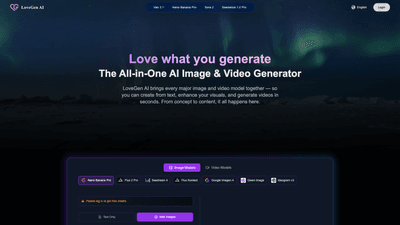
LoveGen AI is the All-in-One AI Image & Video Generator that brings together the latest image and video models in a single platform. Designed for creators who want speed, versatility, and quality, LoveGen AI enables you to generate from text, enhance visuals, and produce videos in seconds—without swapping tools or leaving the app. It supports text-to-image, text-to-video, image-to-video, and a suite of enhancements such as face swap, background removal, and upscaling, all within one intuitive interface.
What makes LoveGen AI unique is its model library, which includes a broad range of image models (Nano Banana Pro, Flux 2 Pro, Seedream 4, Flux Kontext, Google Imagen 4, Qwen Image, Ideogram v3, and more) and video models (Veo 3.1, Sora 2, Seedance 1.0 Pro, Kling 2.5 Turbo, Kling v2.1, Veo 4, Veo 3). This deep integration lets you select the best model for your style and output, from cinematic marketing clips to expressive AI-generated artwork. The platform emphasizes production-ready quality, privacy, and a no-code experience, making advanced AI capabilities accessible to beginners and seasoned professionals alike.
Core use cases include social media content creation, product demos, ads, tutorials, and storytelling visuals. The gallery showcases AI-generated clips and images across styles, while the optimized export options help you publish directly to campaigns or social channels. LoveGen AI also offers transparent usage rights and secure handling of your creations, with a flexible pricing structure that accommodates different usage needs.
Features
- All-in-One Studio: Text-to-image, text-to-video, image-to-video, enhancement, background removal, face swap, upscaling, and more — all in a single platform.
- Extensive Model Library: Access a wide range of image models (Nano Banana Pro, Flux 2 Pro, Seedream 4, Flux Kontext, Google Imagen 4, Qwen Image, Ideogram v3, and others) and video models (Veo 3.1, Sora 2, Seedance 1.0 Pro, Kling 2.5 Turbo, Kling v2.1, Veo 4, Veo 3).
- Simple, No-Code Workflow: No design or coding background required. Choose a model, add your prompt or upload media, then generate and refine with a few clicks.
- High-Quality Outputs: Production-ready visuals and cinematic videos optimized for social media, marketing, and storytelling.
- Image & Video Tools: Background remover, face swap, image enhancer, image-to-cartoon, photo-to-sticker, and more for versatile content transformations.
- Output Controls: Prompt-driven generation with adjustable resolution (1K, 2K, 4K) and aspect ratios (1:1, 2:3, 3:2, 3:4, 4:3, 4:5, 9:16, 16:9, 21:9).
- 100% AI-Generated Gallery: Explore and export AI-generated clips and images directly from the LoveGen AI gallery.
- Safe & Private: Clear usage rights and data privacy protections to safeguard your creativity.
- Flexible Pricing & Credits: Pay-as-you-go credits or subscriptions, with transparent pricing and no hidden fees.
- Try It Free: Access free credits on login to kickstart your projects.
How to Use
- Choose your model: Browse the extensive library and select the image or video model that best matches your style, output, or creative goal. Each model is optimized for different aesthetics and results.
- Add your prompt or image: Write a detailed description of what you want to see, or upload an image/clip to transform, enhance, or animate. Note that certain content types (e.g., sexual content) are restricted to maintain platform safety.
- Generate and refine: Click Generate to produce high-quality results in seconds. Refine prompts, adjust resolution, and tweak aspect ratios until you’re satisfied.
- Export and publish: Export your final image or video in HD, ready for social, marketing, or storytelling use. All outputs come with clear usage rights and privacy protections.
- Pricing and credits: LoveGen AI operates on a credits system and subscription plans. You can pay-as-you-go or choose a plan that unlocks all tools, with no hidden fees.
Pricing (Plans & Credits)
- Basic: Approximately 20.9/year or 14.9/month, with 1200 credits per year, all tools accessible, email support, community support.
- Standard: Approximately 34.9/year or 27.9/month, with 2400 credits per year, all tools accessible, email support, community support.
- Premium: Approximately 53.9/year or 43.9/month, with 4800 credits per year, all tools accessible, email support, community support.
- Plus over 50 payment options for secure transactions. LoveGen also supports pay-as-you-go credits for flexible usage.
- Free credits and the Try It Free option are available to help new users explore the platform.
Tips
- Start with a strong prompt: Include style cues, lighting, and mood. For example, “a cinematic product shot of a tech gadget in neon lighting, high detail, 4K.”
- Match model to goal: Use image models for art styles, photo realism, or illustration; switch to video models for motion, animation, or product demos.
- Leverage prompts with media: Upload an image or clip to guide the generation or transformation, then refine with iterative prompts.
- Use aspect ratios and resolutions purposefully: Choose 1:1 for social feeds, 16:9 for videos, or 9:16 for vertical mobile content; select 4K when ultra-high detail is needed.
- Combine tools for complex scenes: Use background removal and face swap to composite characters into new scenes, then upscale for crisp finishes.
- Maintain content safety: Avoid restricted content; respect platform guidelines to keep projects compliant.
- Save and organize: Use templates and project saves to quickly reproduce consistent branding across posts and campaigns.
- Monitor credits: Plan usage around the credit system; consider a subscription for steady access if you publish frequently.
- Collaboration: While the platform emphasizes ease of use, team collaboration details are not explicitly stated in the provided materials; for enterprise features, contact support to confirm capabilities.
Frequently Asked Questions
-
What can I create with LoveGen AI? LoveGen AI enables text-to-image, text-to-video, image-to-video, and a suite of enhancements (background removal, face swap, upscaling, image enhancer, etc.) across multiple models for diverse styles and outputs.
-
Do I need any design experience? No. LoveGen AI is designed for everyone, with a user-friendly, no-code interface and templates that make AI-generated content accessible to beginners and pros alike.
-
Are the generated images and videos commercial-use ready? Outputs are produced with transparent usage rights, and LoveGen AI emphasizes production-ready quality. Review model-specific licensing and terms to ensure alignment with your commercial use case.
-
Is my data secure? Safe and private handling of your creations is a stated focus, with privacy protections and secure processing of your inputs and outputs.
-
What pricing plans are available? Plans include Basic, Standard, and Premium, with pay-as-you-go credits and yearly/monthly options. A free trial/credits option is available to explore the platform before committing.
-
Which AI models are included? The platform integrates a broad set of image models (e.g., Nano Banana Pro, Flux 2 Pro, Seedream 4, Ideogram v3, Google Imagen 4, Qwen Image) and video models (e.g., Veo 3.1, Sora 2, Kling 2.5 Turbo, Kling v2.1, Veo 4, Seedance 1.0 Pro). The exact model availability may vary by plan and updates.
-
Can I collaborate with my team? The provided information does not explicitly confirm team collaboration features. For enterprise or team capabilities, please contact LoveGen AI support to confirm options and workflows.
-
Is there a free trial or free credits? Yes, users can log in to receive free credits to try the platform, and LoveGen AI offers a Try It Free option to get started without immediate commitment.
-
How do I access new features and models? LoveGen AI continuously updates its model library; feature and model access is typically tied to your plan and credits, with updates available within the platform.
This comprehensive overview highlights LoveGen AI as a powerful, all-in-one AI image and video generator that consolidates multiple cutting-edge models into a single, accessible platform. By combining text-to-image, text-to-video, image-to-video capabilities with advanced editing tools, it enables creators to produce professional, publish-ready content efficiently while maintaining control over style, output quality, and licensing. If you want a single source of truth for fast, high-quality AI content across campaigns, LoveGen AI is designed to deliver.