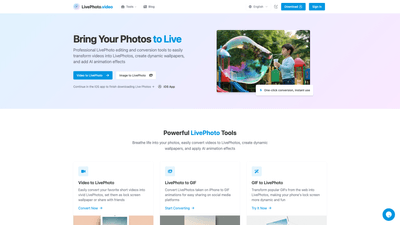
What is LivePhoto.video
LivePhoto.video is a professional online toolkit designed to create, convert, and customize Live Photos with ease. It empowers users to transform videos into Live Photos, convert Live Photos to GIFs, and apply AI-powered animation effects to still images. The platform also enables dynamic wallpaper creation for iPhone lock screens, multi-format exports, and simple social sharing. Built for both casual users and content creators, LivePhoto.video delivers a seamless, one-click experience that brings photos to life, enhances memories, and streamlines sharing across platforms.
Core features
- Video to Live Photo: Convert short videos into vivid Live Photos that can be used as dynamic wallpapers or shared with friends. Supports automatic display optimization and cropping/size adjustments to ensure quality fits.
- Live Photo to GIF: Turn Live Photos into high-quality GIF animations suitable for social media and messaging.
- GIF to Live Photo: Transform popular GIFs into Live Photos to add interactive motion to wallpapers and moments.
- Image to Live Photo: Apply AI animation effects to static photos, bringing portraits, landscapes, and memories to life with natural motion.
- AI Animation Studio: Use intelligent subject recognition and multiple animation effects to create smooth, realistic motion from still images. Includes old photo restoration plus animation enhancements.
- Dynamic Dynamic Lock Screen Wallpapers: Create custom Live Photo wallpapers that animate when you press on the iPhone lock screen.
- Social Media Ready: One-click optimization for various social platforms with multiple output formats and sizes; direct sharing to social networks.
- Cropping and Resize Tools: Precise cropping and size adjustments to ensure optimal wallpaper and export results.
- iOS App Integration: Continue work in the iOS app to finish downloading Live Photos or managing assets on-device.
How to use
- Getting started: Choose the desired tool (Video to Live Photo, Live Photo to GIF, GIF to Live Photo, or Image to Live Photo). Upload the source file (video, Live Photo, or GIF/photo) and select your preferred output format and quality.
- Settings and adjustments: Use automatic display optimization, crop, and resize controls to tailor the result for your device or platform. For AI animation, pick a style or effect and let the AI apply natural motion to your image.
- Output and export: Download the final Live Photo, GIF, or video to your device. If you’re on iOS, you can continue in the iOS app to finish downloading and use the Live Photo directly as a wallpaper or share it.
- Pricing: The platform offers free and paid tiers (exact names and pricing may vary). Free tiers typically provide basic conversions with limited quality options, while paid plans unlock higher resolutions, more output formats, faster processing, and access to AI animation features. Check the pricing page for current tiers, limits, and any trial options.
- Practical workflow example:
- Convert a family video to a Live Photo for a dynamic wallpaper.
- Use AI animation on a portrait to add subtle motion.
- Convert the resulting Live Photo to a GIF for social media sharing.
- Transfer to iOS and set as lock screen wallpaper for a touch-responsive experience.
Use cases and benefits
- Dynamic Lock Screen Wallpapers: Turn favorite video clips into Live Photos to enjoy animated lock screens every time you unlock your iPhone, with precise cropping to fit the display.
- AI-Powered Photo Animation: Breathe life into still images with advanced AI animation that looks natural, especially for portraits and scenic shots, preserving emotion and context.
- Easy Sharing Across Platforms: Convert Live Photos to GIFs or videos to maximize compatibility and reach on social networks, blogs, and messengers.
- Content Creator Benefits: Bloggers, travel photographers, and digital artists can quickly create engaging, animated assets (Live Photos, GIFs, or short videos) from a single source file, reducing production time.
- Archive and Restoration: Use AI features to restore old photos and reanimate memories, creating modern, shareable content from vintage images.
Advantages and distinguishing features
- One-click conversion and smooth workflow: Intuitive tools designed for fast conversions between video, Live Photo, GIF, and back, reducing the complexity of creating dynamic content.
- AI-driven animation with intelligent subject recognition: Advanced AI technology identifies subjects and applies natural motion, delivering higher-quality results than basic edits.
- Dynamic wallpaper optimization: Built-in cropping and size adjustments ensure Live Photos look optimal on iPhone lock screens and across various devices.
- Broad format support: Tools support multiple video formats and offer alternative outputs (GIF, videos, Live Photos) for versatile sharing and usage.
- iOS-friendly integration: Ability to continue processing in the iOS app ensures a seamless, device-native workflow for final edits and usage.
Target audience
- iPhone users seeking enhanced lock screen experiences with dynamic Live Photos
- Social media creators who want eye-catching media ready for GIFs and short videos
- Photographers and digital artists looking to animate still images with AI and restore vintage photos
- Bloggers and content marketers needing quick, shareable, high-quality animated assets
- Anyone wanting an accessible, professional solution for converting and enhancing Live Photos without technical hurdles
Frequently Asked Questions
- What exactly is a Live Photo and how does it work? A Live Photo captures about 1.5 seconds of video and audio before and after a still photo. It comes to life when viewed on compatible Apple devices, with movement and sound playing upon pressing and holding the image.
- Can I use Live Photos on non-Apple devices? Live Photos are native to Apple devices, but transformations to universally compatible formats like GIFs and regular videos enable viewing on any device or platform.
- How do I set a Live Photo as my iPhone wallpaper? Save the Live Photo, go to Settings > Wallpaper > Choose a New Wallpaper > Live Photos album, select the Live Photo, adjust, and set as lock screen wallpaper. Press firmly on the lock screen to see the animation (on compatible iPhones).
- What’s the difference between a Live Photo and a GIF? Live Photos include audio and motion that activates when pressed, while GIFs are silent, looping animations that play without user interaction. Live Photos typically offer higher quality but require Apple devices to experience the full effect.
- How do I turn a regular video into a Live Photo? Use Video to Live Photo tool, upload your video, adjust duration/quality if needed, and convert. The final Live Photo can be saved to your iPhone’s camera roll.
- Can I disable Live Photos on my iPhone? Yes. In the Camera app, toggle off Live Photos (the concentric circles icon). You can also disable it in Settings > Camera > Preserve Settings or related options to keep it off by default.
If you’re seeking an efficient, feature-rich solution to animate memories, create dynamic wallpapers, and share engaging content, LivePhoto.video provides a comprehensive suite of tools tailored for high-quality, AI-assisted Live Photo workflows.