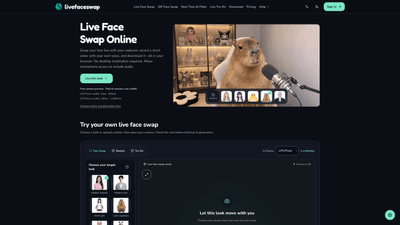
What is it
Live Face Swap Online is a browser-based AI tool that lets you swap your live webcam feed with a reference look or character in real time. No desktop installation is required—just open the site, choose a look (preset or upload your own photo), and start your camera. The system records locally in your browser, lets you replay and download your footage, and supports voice by requesting microphone access. It offers two AI engines (LFS Prism and LFS Mirror) to balance speed, quality, and credits, and includes features like AI-based filters and live try-on.
Key points:
- Real-time face swap during live webcam sessions
- Choose a target look or upload a reference photo
- Record, replay, and download directly in your browser
- Two AI engines with distinct credit models: Prism and Mirror
- No privacy-compromising cloud uploads for your recorded video (processing happens in-browser)
- Works with common streaming and video apps (Google Meet, OBS Studio, Zoom, Discord)
Features
- Real-Time Face Swap and AI Studio
- Continuously transforms your live camera feed using a selected AI model and a reference appearance
- Two engines available:
- LFS Prism: lower cost per second, suitable for longer or more playful performances
- LFS Mirror: higher fidelity per second, suited for more demanding visuals
- Credits-based usage: Prism consumes 1 credit per second (roughly 60 credits per minute); Mirror consumes 20 credits per second (roughly 1,200 credits per minute)
- Presets and Custom Looks
- Pick a preset look (e.g., Modern Woman, Modern Man, Anime Girl, Mecha Heroine, Gentle Panda, etc.)
- Upload your own authorized reference photo to drive the look
- Preview your camera and validate rate and permissions before starting generation
- Live AI Filter and Try-On
- Real-time AI filters apply stylized effects across the entire camera scene
- Live Try-On lets you virtually test garments with your live feed and record a look you want to keep
- Recording, Replay, and Download
- Recording starts automatically when the live result appears
- Optional microphone access to include your voice in the clip
- Replays available within the browser; download as MP4 or other browser-supported formats
- Privacy, Compliance, and Control
- Preview is free; AI processing uses credits
- Recording and playback stay local in your browser
- Clear session controls: end session, review the result, and export
- Compatibility and Workflow
- Camera checks and session diagnostics ensure you’re ready before generating
- Works with video conferencing tools (Google Meet), streaming software (OBS Studio), and browser captures
- Easily switch reference looks or AI engines while planning a performance
- Practical use cases
- On-camera character performances and rehearsals
- Short-form clips for social media or entertainment
- Visual storytelling with character or likeness transformations
- Practice expressions, timing, and delivery with a consistent look
How to Use
- Prepare your reference look
- Choose a preset look or upload an authorized reference photo. Decide which AI engine you’ll use (Prism or Mirror) before opening the camera.
- Preview and start
- Open camera to preview framing, confirm rate and permissions, then click Face Swap to begin AI generation. Note that the camera preview alone does not start the transformation.
- Record, review, and save
- Recording begins automatically when the live result is ready. If desired, enable your microphone to include voice. End the session when the clip finishes processing, then replay and download. Keep the tab open until the file is fully saved.
Tips for best results:
- Use an authorized reference photo that clearly represents the intended look
- Ensure good lighting to minimize artifacts and drift
- Avoid heavy occlusion (hats, large glasses) that can confuse the AI
- Check lighting and movement to minimize drift over longer takes
- If needed, switch between Prism and Mirror to compare results and pick the best balance of speed and fidelity
- For long projects, you can assemble shorter takes into a single sequence while preserving audio
Pricing
- Free preview: You can preview your look and camera setup for free
- Credits-based AI sessions: Real-time generation uses credits
- LFS Prism: 1 credit per second (approximately 60 credits per minute)
- LFS Mirror: 20 credits per second (approximately 1,200 credits per minute)
- Sign-in required to generate with credits; recording and playback stay in your browser
- Plans and exact credit bundles are available on the pricing page, allowing you to compare Prism vs. Mirror performance and cost
- Note: You can use the tool without paying initially to test the workflow, then purchase credits to generate longer or higher-fidelity results
Tips:
- The right engine choice depends on your priority: speed and cost (Prism) vs. higher fidelity (Mirror)
- Review a few takes with different reference looks to select the best match
- Record multiple shorter takes and keep the best one for editing or storytelling
Frequently Asked Questions
- What can I do with live face swap online?
- Transform your webcam feed to a chosen reference look, sign in to start a session, and record/replay/download the result in-browser.
- Can I try live face swap before buying credits?
- Yes, you can preview and test the workflow before purchasing credits.
- Is live face swap free, and how much does a minute cost?
- Preview is free; AI generation uses credits. Prism costs 1 credit per second (about 60 credits per minute); Mirror costs 20 credits per second (about 1,200 credits per minute).
- How does real-time AI webcam face swap work?
- The tool uses AI models to map your facial features to a reference look and continuously updates the output as you move, with results influenced by lighting, occlusion, and movement.
- Which AI engine should I choose?
- Prism is cost-effective and fast; Mirror offers higher fidelity per second. Try both to see which suits your needs.
- Does live face swap change only my face, or my whole appearance?
- It can transform the face and, depending on the engine and reference, may alter hair, clothing, and other visible aspects to match the target look.
- Do I need a GPU or a live face swap app?
- Processing happens in-browser; a capable browser and internet connection are sufficient. Higher-end hardware can help with smoother results.
- Does it work on iPhone, Android, Mac, and Windows?
- It’s browser-based, so it should work across major devices and platforms with a compatible browser.
- Can I use it with OBS, Zoom, or Discord?
- Yes, it’s designed to integrate with common streaming and conferencing setups via browser capture or direct connection workflows.
- How can I improve results, and what affects delay?
- Lighting, subject movement, and reference match quality affect fidelity and latency. Engine choice and network stability also influence performance.
- Why can I see my camera but no AI face swap?
- Ensure you selected a reference look and engine, granted microphone access if needed, and started the generation after preview. Some combinations require you to start the Face Swap action explicitly.
- Can I switch faces or AI engines while generating?
- You can switch between reference looks or engines between sessions, but changing during an active generation may require stopping and restarting.
- Can I record and download a live face swap video as MP4?
- Yes, recording and downloading are supported in-browser, and you can save the result locally.
- Does live face swap change my voice?
- The system can include your microphone input for voice; it does not inherently modify your voice by default.
- Does this page access my webcam or upload face photos?
- It accesses your webcam for live processing and uses uploaded or selected reference photos locally in your browser.
- Can I use another person’s face?
- Only with faces you are authorized to use; ensure you have permission for any likeness you apply.
- How can I get help with a session or download?
- Reach out via the support channel provided on the site for assistance with sessions, downloads, or technical issues.
Empowering creative workflows Live Face Swap Online provides an accessible, browser-first path to immersive character performances, rehearsals, and short-form content. With real-time AI, flexible engines, and a straightforward recording workflow, creators can experiment with visual storytelling without software installation. Whether you’re rehearsing a skit, planning a cosplay look, or exploring new personas for video content, the platform offers a practical balance of speed, fidelity, and control—backed by transparent pricing through credit-based sessions and a clear path to download-ready outputs.