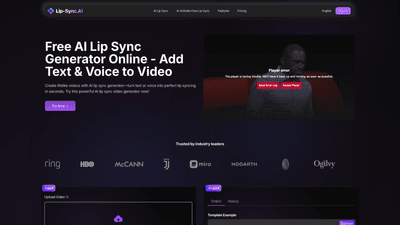
What is it
Lip-Sync.ai offers an AI Lip Sync Video Generator that lets you create lifelike lip-synced videos by merging your video input with text or audio. Powered by advanced deep learning, the tool analyzes facial movements and maps mouth shapes to the chosen voice, delivering realistic lip synchronization in seconds. It’s ideal for dubbing, translation, and content localization, as well as for avatars, virtual presenters, and social media creators. The platform emphasizes speed and simplicity—no specialized editing software is required, and you can produce professional-looking lip-synced videos in minutes. Key details from the tool’s setup include a video limit of up to 10 seconds, a maximum file size of 50 MB, and MP4 format as the primary video input. Audio inputs support MP3 and WAV formats, with multiple voice options (including Female, Male, and named voices like Oliver, Lily, John, etc.) to tailor the tone and emotion of the narration.
Join over 1 million users who have leveraged Lip-Sync.ai to accelerate video production, reduce production costs, and broaden audience reach through multilingual, accurately dubbed content. The solution is designed for rapid production cycles, allowing creators, educators, marketers, and businesses to scale video output without traditional studio resources.
Features
- Realistic, high-accuracy lip syncing: Generated mouth movements align precisely with the uploaded audio or text, capturing subtle expressions for natural results.
- Text-to-Lip Sync: Turn any script into a lip-synced video instantly by typing the text and selecting a voice.
- Voice-to-Lip Sync: Upload or input a pre-recorded voiceover and have the AI sync it to any face in your video.
- Multiple voice options and emotion controls: Choose from various voice personas (Female, Male, and multiple named voices) and tune the emotional tone to match the content.
- No editing software required: A streamlined, web-based workflow that minimizes technical barriers.
- Flexible input and output: Upload videos (various formats and resolutions) and audio (MP3/WAV); preview, download, or share the final video.
- Quick processing with scalable results: Generate lip-synced videos in minutes, enabling rapid iteration and optimization.
- Dubbing, translation, and localization support: Perfect for multilingual content, educational materials, marketing videos, and branded communications.
- Production efficiency: Create content more quickly, experiment with variations, and reduce studio costs.
How to Use
- Upload Your Video: Go to the Lip-Sync Video section and upload the video you want to enhance. Ensure the subject’s face is clearly visible and properly lit for optimal results. The platform supports a range of formats and resolutions; note that the input video should have clear facial visibility. The video length is capped at 10 seconds, with a maximum size of 50 MB and MP4 format.
- Upload Your Audio or Text: You can either type the script (text-to-lip sync) or upload an audio file (MP3 or WAV) to drive the lip movements. If you’re using voice-to-lip sync, provide the pre-recorded voiceover and let the AI align it to the face in the video. Choose from available voice options to match the desired tone and emotion.
- Generate, Preview, and Share: Click Generate Video to produce the lip-synced output. Preview the result, then download or share it directly. Processing time varies with video length, audio complexity, and quality settings. It’s designed to deliver professional results quickly with minimal effort. Pro tips: For best results, use clear, well-lit footage with good facial visibility, provide high-quality audio, and ensure the audio duration aligns with the video length. Experiment with multiple voices and slight emotional adjustments to optimize engagement.
Pricing
- Free tier available: Lip-Sync.ai provides a free AI Lip Sync Generator online, allowing you to create lip-synced videos without an upfront purchase.
- Paid plans: There are paid tiers that typically offer expanded capabilities, higher limits, and potentially faster processing. Exact pricing and tier details are not listed here; users are encouraged to sign in to view current pricing and options on the platform.
- Licensing and commercial use: Content produced with Lip-Sync.ai can be used for commercial purposes under the platform’s licensing terms. This makes it suitable for marketing videos, educational content, and branded communications, provided you comply with the licensing terms.
Tips
- Prepare high-quality input: Use clear, well-lit footage with unobstructed facial visibility to maximize lip-sync accuracy.
- Refine audio quality: Clear pronunciation and well-articulated speech improve synchronization; when possible, use clean recordings for dubbing or narration.
- Text and voice pairing: Try multiple voice options and emotional tones to find the most natural match for your character or presenter.
- Keep it concise: The 10-second input limit encourages concise, impactful clips—great for social media and quick tutorials.
- Iterate rapidly: Take advantage of the “Generate” workflow to test variations in voice, timing, and facial expression; use the output history to compare results.
- Align audio and video length: Ensure the script or audio length corresponds closely to the video duration for more natural lip movements.
- Optimize for localization: Use the tool for dubbing and translation to reach multilingual audiences without lengthy production timelines.
Frequently Asked Questions
- What is the AI Lip Sync Video Generator on Lip-Sync.ai? It’s a tool that merges video and audio inputs to produce lip-synced videos, using AI to generate realistic mouth movements that align with the uploaded audio. It’s ideal for dubbing, translation, and content localization.
- What formats are supported? Video input supports MP4 (with various formats and resolutions); audio input supports MP3 and WAV. Text input can be converted into spoken lip movements using available voices.
- How long does it take to generate a video? Processing usually takes a few minutes, depending on video length, resolution, and audio complexity.
- Are there video length limits? Yes, input videos are limited to 10 seconds to ensure optimal processing and results.
- What content can I create? Dubbing for movies and TV, translated content, educational videos, marketing materials, and other multilingual or localized video content.
- What are the best practices for lip sync? Use clear lighting and facial visibility, high-quality audio with clear speech, and match audio duration to the video. Proper pronunciation and timing improve realism.
- Is it suitable for commercial use? Yes, content produced with Lip-Sync.ai can be used commercially under the platform’s licensing terms.
- Do I need advanced editing skills? No. The workflow is designed to be accessible to content creators, educators, marketers, and businesses without specialized editing knowledge.
- How can I access pricing and licensing? Pricing and licensing details are available after signing in to Lip-Sync.ai. The platform offers a free tier and paid plans; exact features and costs vary by plan.
This comprehensive overview highlights Lip-Sync.ai as a fast, accessible AI solution for creating accurate lip-synced videos. By combining text or voice with video input, it empowers users to produce dubbing, localization, and engaging visuals for diverse applications—from educational content to social media campaigns—without complicated workflows or expensive studio setups.