What is it
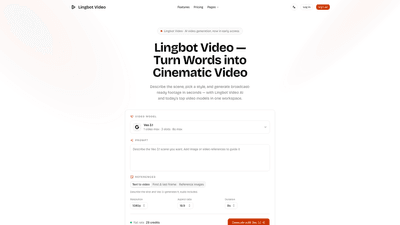
Lingbot Video is an AI-powered video generation platform currently in early access that turns words into cinematic footage in seconds. By describing a scene, choosing a style, and selecting from a suite of top video models, users can produce broadcast-ready clips without cameras, crews, or lengthy renders. Lingbot Video combines “text to video” and “image to video” workflows in one shared workspace, enabling rapid ideation, pre-visualization, and publish-ready exports. Output can be delivered in 4K 60fps (up to 4K with multiple aspect ratios) and is designed to be watermark-free and ready for posting across platforms. It’s built to support solo creators, marketing teams, agencies, educators, and filmmakers who want fast, studio-grade visuals generated from prompts or reference images.
Core keywords:
- AI video generation, text to video, image to video
- Multi-model workspace (Lingbot Video AI, Veo 3.1, Seedance, Grok Imagine, Wan, Sora, etc.)
- Publish-ready exports, 4K 60fps, 16:9 / 9:16 / 1:1
- Quick renders, no camera crews, no lengthy production
Features
- Two starting modes to generate: Text to Video and Image to Video
- Text to Video: describe a scene and watch it become cinematic footage in seconds. You can specify setting, style, mood, and camera angle in prompt form.
- Image to Video: upload a still image and direct how it moves, bringing a static frame to life.
- Everything in one workspace with multiple top video models
- Models include LingBot-Video, Omni Flash, Veo 3.1, Seedance 2.0/1.5 Pro, Sora 2, Wan 3.0/Wan 2.6, Grok Imagine, and more, switchable per generation.
- True-to-prompt output
- Focus on stability of poses, believable physics, and camera moves that stay consistent across frames.
- Speed and iteration
- Most clips render in seconds to minutes, enabling rapid idea testing without long waits.
- Publish-ready exports
- Exports support 16:9, 9:16, and 1:1 aspect ratios, up to 4K resolution and 60fps.
- Watermark-free exports sized for the platform you’re posting to.
- Reference frames and audio
- You can pin direction with a reference image and include audio in the final video.
- Flexible durations and resolutions
- Auto duration options (e.g., 4s, 6s, 8s) and multiple resolution choices (720p, 1080p, 4K).
- Accessible to various creators and teams
- From indie creators and solo YouTubers to marketing teams, agencies, educators, and filmmakers seeking rapid ideation, mood films, and pre-visuals.
How to Use
- Get Started
- Access Lingbot Video, choose the mode you want to begin with (text-to-video or image-to-video), and prepare your initial prompt or image.
- Write Your Prompt
- Describe the scene in detail: setting, style, mood, and camera angle. The more specific, the better. For example: “vintage train arriving through heavy rain, steam across the platform, cinematic haze.”
- Tune Your Settings
- Pick a model (from the available list), select an aspect ratio (16:9, 9:16, 1:1), and set the duration (4s/6s/8s or as offered). You can also add a reference image to guide direction and motion. The system supports multiple models in a single workspace, so you can test different looks quickly.
- Generate & Publish
- Generate your clip; the render finishes in seconds for fast iteration. Download locally or publish straight to your channel. Exports come watermark-free and are ready for platform-specific sizing.
Who it’s for during usage
- Solo creators building daily content, marketing teams needing on-brand assets, DTC brands creating product b‑roll, educators turning lessons into explainer clips, agencies producing mood films or client pre-vis, and filmmakers pre-visualizing scenes before a shoot.
Pricing
- Lingbot Video offers tiered plans designed for varying usage levels, with per-credit pricing and monthly/yearly commitments that unlock more credits and faster generation. All plans provide access to multiple AI video models within a single workspace.
- Basic
- Price: $0.019 per credit
- Monthly: $14.90
- Yearly: $178.80 (save 50% vs. monthly)
- Credits included: 800 credits/month, 9,600 credits/year
- Best for hobbyists and beginners just exploring AI video
- Standard
- Price: $0.016 per credit
- Monthly: $24.90
- Yearly: $298.80 (save 50% vs. monthly)
- Credits included: 1,600 credits/month, 19,200 credits/year
- Ideal for most creators needing more capacity and faster results
- Pro
- Price: $0.012 per credit
- Monthly: $49.90
- Yearly: $598.80 (save 50% vs. monthly)
- Credits included: 4,000 credits/month, 48,000 credits/year
- Designed for power users needing the highest throughput and priority support
Key pricing notes
- All plans give access to Lingbot Video’s AI video models, including text-to-video and image-to-video capabilities.
- Exports are watermark-free and come with API access and commercial licensing as appropriate for the plan.
- The yearly plan price reflects a 50% discount compared with paying monthly for the same plan.
Tips
- Be specific with prompts: the level of detail in your description directly influences the filmic quality and accuracy of camera moves.
- Use reference images to pin composition and direction, especially when working with motion or complex scenes.
- Experiment with multiple models in one session to compare how different AI “looks” handle the same prompt; switch models per generation to achieve varied moods quickly.
- Start with short bursts (4–8 seconds) to test pacing, then scale up to longer sequences if needed.
- Prepare platform-specific exports (aspect ratios and resolutions) to streamline publishing workflows.
- Leverage 16:9 for hero videos, 9:16 for social vertical formats, and 1:1 for grid-style social feeds.
- Use the image-to-video workflow to breathe life into still assets (product shots, screenshots, concept art) for more dynamic marketing assets.
- For educators and pre-visualization workflows, create multiple mood reels to align with lesson plans or client concepts quickly.
- Maintain a clear brief for clients or teammates by saving prompt templates and reference frames for recurring project types.
Frequently Asked Questions
-
What video styles does Lingbot Video support?
- Lingbot Video supports multiple styles through its integrated models (text-to-video and image-to-video) and allows you to tune the scene to match broadcast-ready standards. Styles can range from cinematic, stylized, UGC-friendly, vintage, to advanced fashion or action visuals, depending on the chosen model.
-
How long can a single clip be?
- Each generation is designed for short to medium-length clips, with durations adaptable via prompts and model settings. Typical outputs are delivered in seconds to a few minutes, suitable for social, ad, or explainer contexts.
-
Can I use the generated videos commercially?
- Yes. Lingbot Video plans include commercial-use licensing appropriate for the chosen tier. Check your plan details for API access, rights, and licensing terms to ensure alignment with your distribution needs.
-
Can I write prompts in Chinese or other languages?
- Lingbot Video accepts prompts in multiple languages, enabling a broad range of creators to describe scenes in their preferred language. English prompts are commonly used, but non-English prompts are supported where the models understand them.
-
How much does Lingbot Video cost?
- Pricing is credit-based with three main plans (Basic, Standard, Pro). Prices per credit and monthly/yearly totals vary by plan, with yearly plans offering up to 50% savings. See the pricing section for exact numbers and credit allocations.
-
Who can see the videos I generate?
- Access and visibility depend on your account settings and sharing options within Lingbot Video. Publishers can download or publish directly to channels, while collaboration features may allow sharing within teams. Review your privacy and sharing settings to control audience access.
-
Is there a free trial or free tier?
- A Basic plan is available, which provides a low-cost entry point with a monthly and yearly option. For higher usage or faster renders, upgrading to Standard or Pro offers more credits and priority features.
-
Can I integrate Lingbot Video into my existing workflow?
- Lingbot Video provides an API and multi-model integration within a single workspace, supporting a streamlined workflow for creators, agencies, and developers who want programmatic access to AI video generation.
-
What formats and resolutions are supported for exports?
- Exports support 16:9, 9:16, and 1:1 aspect ratios, up to 4K resolution and 60fps. Output is watermark-free and tailored for platform-specific publishing.
This product overview highlights Lingbot Video’s core capabilities: AI-driven, multi-model video generation from prompts or images, rapid iteration, and publish-ready outputs, all designed to empower creators and teams to produce cinematic content without traditional production constraints. Whether you’re building social content, marketing assets, or pre-visuals for filmmaking, Lingbot Video offers a scalable, flexible solution with industry-grade quality and fast turnaround.