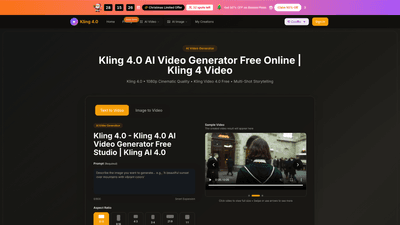
What is it
Kling 4.0 AI Video Generator Free (also referred to as Kling Video 4.0 Free) is a browser-based AI video creation tool that turns text prompts or uploaded images into professional 1080p videos. Powered by Kling 4.0 AI, it specializes in multi-shot storytelling, delivering cohesive scenes with stable characters and props across shots. Key advantages include native oral dialogue with lip-sync, multilingual speech support, and clean on-screen text rendering for ads, social content, tutorials, and e-commerce visuals. The platform emphasizes a fast, accessible workflow—no software installation is required—so creators can generate high-quality, cinema-grade videos quickly, even if they have no prior video editing skills. Kling 4.0 Free options and a free credits system allow new users to explore capabilities before upgrading to paid plans.
Features
- Multi-Shot AI Director: Produces complete cinematic scenes with automatic camera moves from a single prompt, enabling storyboard-style sequences rather than single static clips.
- Omni Native Audio: Character-driven dialogue with precise lip-sync, supporting multiple languages, dialects, and accents while keeping speakers distinct.
- Up to 15-Second Videos: Generates longer clips (roughly 3 to 15 seconds per generation) to sustain clear narrative arcs within a single video.
- Consistent Characters and Props: Maintains continuity of key characters and essential props across scenes, preventing visual drift during transitions.
- Flexible Storyboard Control: Builds videos from text prompts, reference images, or video inputs; edit scenes by adding, removing, or altering elements.
- Native-Level Text Rendering: Crisp, legible on-screen text for overlays, subtitles, and e-commerce captions without quality loss.
- 1080p Cinematic Quality: Delivers high-definition output suitable for marketing, social media, presentations, and client work.
- No Watermark: Most plans include watermark-free exports, reinforcing professional presentation for paid and commercial use.
- Download Formats: Outputs MP4 files ideal for social platforms, websites, and promotional campaigns.
- Browser-Based, No Install: Access Kling 4.0 AI Video Generator Free from any modern browser on any device.
How to Use
- Choose Kling 4.0 Video Generator: Pick between text-to-video or image-to-video workflows (Kling4 and Kling 4 supported).
- Enter Prompt or Upload Image: Provide a descriptive text prompt or upload an image to seed the video.
- Generate and Download: Hit generate, review the 1080p result, and download your video. You can iterate with new prompts to refine the narrative. Tips for best results include detailing scenes, specifying character goals, and outlining shot sequences to maximize multi-shot storytelling potential. The platform supports a quick, three-step workflow designed for rapid creation and easy sharing.
Pricing is described separately below, but note that a Christmas limited offer is referenced: 50% OFF on Annual Plans with limited availability (32 spots left). Free credits are available to sign-in users, enabling initial experimentation before subscribing to a paid plan.
Pricing
- Free credits and Sign-In: Start with Kling 4.0 AI Video Generator Free by signing in to receive complimentary credits to explore features without immediate commitment.
- Basic (Annual): $9.90 per month billed annually. Includes up to 8,000–9,600 credits per year, allowing roughly 80 videos per month, no watermark, and essential capabilities for hobbyists and beginners.
- Professional (Annual): $19.90 per month billed annually. Includes a higher credit allotment and up to ~200 videos per month, with all core features and no watermark.
- Enterprise (Annual): $49.90 per month billed annually. Best for teams and businesses, offering the largest credit pool (tens of thousands of credits per year) and priority support, with no watermark and full feature access.
- Christmas Offer: Limited-time 50% OFF on Annual Plans (32 spots remaining). This reduces the annual price for Basic, Professional, and Enterprise plans for a limited window.
Note: All plans typically emphasize no watermark on export and access to Kling 4.0’s core capabilities, including multi-shot storytelling, native audio, and 1080p output. Plans are billed annually, with credits renewed according to the chosen tier.
Tips
- Plan Your Narrative: Use a storyboard approach—outline beginning, middle, and payoff across multiple shots to maximize the 3–15 second segments.
- Leverage Native Audio: Utilize lip-sync-enabled dialogue in the target language to enhance realism and audience engagement.
- Maintain Visual Consistency: Keep key characters and props consistent across shots to preserve continuity.
- Experiment with Prompts: Start simple and gradually add details (facial expressions, camera angles, and scene transitions) to improve motion coherence.
- Optimize Text Elements: Use native text rendering for clear subtitles, overlays, or product captions; avoid overloading each frame with text.
- Choose the Right Output: For marketing and social content, 1080p exports with clean audio are typically ideal; adjust aspect ratio (16:9, 4:3, 1:1) as needed.
- Start Free: Take advantage of free credits to test workflows, then upgrade to a plan that matches your production cadence and volume.
- Browser-Based Convenience: Since no installation is required, you can create on any device with a modern browser—perfect for on-the-go ideation and quick client reviews.
Frequently Asked Questions
-
What is Kling 4.0?
Kling 4.0 is an AI video generator that creates 1080p videos from text prompts or images, featuring multi-shot storytelling, native audio with lip-sync, and storyboard-style editing. -
How do I access Kling 4.0?
Access Kling 4.0 directly in your browser. Sign in to claim free credits and begin generating immediately; no app installation is required. -
What formats can I download?
Videos are exported as MP4 files, suitable for marketing, social media, and professional use. -
Is there a limit on video generation?
Videos consume credits. Free credits are available to start, and paid plans refill credits on a monthly or annual basis according to the plan. The exact limit depends on your chosen tier. -
How long does generation take?
Generation is typically quick, often within minutes, with a high success rate. The platform emphasizes efficient turnaround for rapid iteration. -
Can I use Kling 4.0 for commercial projects?
Yes. All paid plans include a Commercial Use License, enabling business and client-facing work, with no watermark exports on eligible plans. -
Is there a mobile app?
Kling 4.0 runs in your mobile browser; there is no dedicated mobile app required to use the service. -
What makes Kling 4.0 unique?
Its combination of multi-shot cinematic capability, native audio with accurate lip-sync, consistent character/prop management across shots, flexible storyboard control, and 1080p output positions it as a strong solution for marketers, educators, creators, and teams aiming to produce professional AI-generated videos quickly. -
How do I upgrade or cancel?
Upgrades are available on annual plans via the pricing page. If you need to cancel, contact support at [email protected]. Subscription adjustments can be managed through your account settings. -
Who should use Kling 4.0?
Kling 4.0 is ideal for content creators, marketers, social media teams, educators, and businesses that want fast, high-quality 1080p AI videos without needing advanced video editing skills. The platform supports both individual creators and teams seeking scalable video production.
If you’re exploring efficient ways to produce engaging 1080p AI videos from text or imagery, Kling 4.0 AI Video Generator Free offers a compelling blend of automated storytelling, native audio options, and flexible pricing designed to accelerate your video production workflow.