What is it
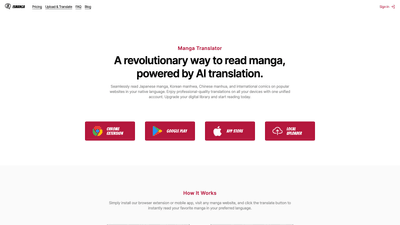
IsManga is an AI-powered manga translator that redefines how you read manga, manhwa, and manhua across Japanese, Korean, Chinese, and international comics. With a single unified account, you can read translated content on popular websites from any of your devices—desktop, mobile, or tablet. The tool works via a Chrome extension or mobile apps (Google Play and App Store), plus a local uploader option for translating your own images. Simply install IsManga, navigate to your favorite manga site, and click the translate button to experience professional-quality translations in your preferred language, all while preserving the original art and panel flow.
Features
- AI-powered multi-language translation
- Supports Japanese, Chinese, Korean, English, French, Portuguese, and more. If you don’t see your language, you can request support through the available languages page.
- Built-in browser and cross-platform reading
- The app acts as a built-in browser, letting you browse manga sites directly without switching apps. Cross-platform cloud bookmarks keep your reading list synchronized across devices.
- Download translated images
- Instantly download translated images for offline reading or sharing, powered by advanced AI translation.
- Smart Cloud Bookmarks
- Save and sync favorite manga across phone and desktop with cloud-based bookmarks.
- Privacy-first design
- North American cloud servers and strict privacy standards help protect your data. You control your data and can delete your account anytime.
- Personalization and reading control
- Change font family, customize reading mode (horizontal, vertical, right-to-left), and tailor display to your preferences.
- Real-time server status
- Live server load indicators help you anticipate response times and maintain smooth reading.
- Smart tooltips and source switching
- Tap a translated bubble to zoom, copy text, or switch between original image, OCR output, and translation with a single click.
- Jump-to-Translate and Screenshot Mode
- Jump ahead to translate any image instantly, or use Screenshot Mode to capture and translate selected images for reliable results.
- AI recommendations
- An AI-driven recommendation engine suggests manga, manhwa, and manhua based on your reading history and preferences.
- Free vs. Premium tiers
- Choose the experience that fits your needs, with additional benefits in Premium for uninterrupted access.
How to Use
- Get started
- Install the IsManga Chrome extension or download the mobile app from Google Play or the App Store. You can also use the local uploader to translate your own images.
- Begin reading
- Visit any manga website, then click the translate button to start reading in your chosen language. The translation appears on page images, enabling a natural reading flow.
- Explore features
- Use Jump-to-Translate to control pace, switch between original and translated content with the source switch, and enable Screenshot Mode for targeted translations.
- Personalize your experience
- Adjust font family, writing mode (horizontal, vertical, RTL), and reading layout to mirror your preferred manga style.
- Manage translations and bookmarks
- Save favorites with Smart Cloud Bookmarks and access them across devices. If you want offline reading, download translated images for later viewing.
- Pricing and access
- Start with the Free Tier for baseline translations, then upgrade to Premium for unlimited and faster translations, local image translation, ad-free experience, and priority support.
Pricing
- Free Tier
- Includes weekly limited premium translations to sample and evaluate IsManga’s capabilities.
- Premium Tier
- Unlimited premium translations
- High-speed translations for faster reading
- Local image translation for offline and on-device processing
- Ad-free mobile app experience
- Priority customer support
- How to upgrade
- You can upgrade within the app or via the official store listings. Premium benefits apply across all supported devices with cloud-synced bookmarks.
Tips
- Start with a language you’re comfortable with
- If you’re new to IsManga, select a familiar language (e.g., English or your native language) to validate translation quality and adjust font or layout preferences before moving to more challenging content.
- Personalize reading for comfort
- Use the font family option to choose classic manga fonts or modern typefaces. Try horizontal, vertical, or RTL layouts to match your preferred reading style.
- Optimize translation flow
- Use Jump-to-Translate to focus on the most relevant panels, and utilize the source switch to compare original text with translations when needed.
- Leverage offline reading
- When traveling or offline, download translated images to continue enjoying manga without connectivity issues.
- Discover new reads
- Rely on AI Recommendations to uncover manga, manhwa, and manhua aligned with your tastes, expanding your library with less effort.
- Maintain privacy
- Review privacy settings and understand that all cloud servers are in North America, with strong data protection standards. You can delete your account at any time if you choose.
Frequently Asked Questions
- What is IsManga and how does it work?
- IsManga is an AI-driven translator that overlays translated text on manga, manhwa, and manhua images on supported sites. It translates visuals into your chosen language, enabling a seamless reading experience while preserving artwork and layout.
- How can I use IsManga to read translated manga?
- Install the Chrome extension or mobile app, visit a manga site, and click the translate button. Choose your target language, then enjoy translated content with optional features like font customization and reading modes.
- What languages does IsManga support for translation?
- IsManga supports Japanese, Chinese, Korean, English, French, Portuguese, and additional languages. If you don’t see your language listed, you can request support via the available languages page.
- How do I access and use the IsManga service?
- Access IsManga via the Chrome extension, Google Play, or App Store apps, or use the local uploader for translating images you already have. Sign in with your unified IsManga account to sync across devices and access cloud bookmarks.
- Is IsManga safe and legal to use?
- IsManga emphasizes privacy with data protections and cloud servers located in North America. Always ensure you comply with local copyright and platform terms when reading or sharing translated content. IsManga is designed for personal use and convenience, with privacy controls you can manage.
This product overview highlights IsManga as a comprehensive AI-driven translation solution for manga lovers, offering accurate translations, a seamless reading experience across devices, robust privacy controls, and a clear path from free access to a feature-rich Premium experience.