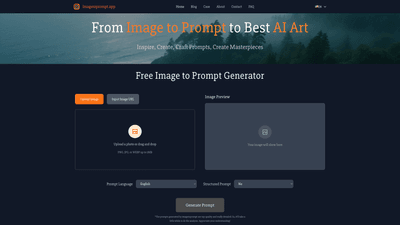
What is it
Image to Prompt Generator is a free, AI-powered tool designed for creators, artists, and AI enthusiasts who want to transform visuals into precise, high-quality prompts for AI art generators. By uploading an image (or providing an image URL), the platform’s advanced AI analyzes details such as style, composition, color, and subject to craft detailed prompts that can be used with popular AI image models like Stable Diffusion, Midjourney, and DALL-E. The service supports prompts in 11 languages, making it easy to tailor prompts to different audiences or model preferences. It also offers a straightforward workflow: upload, choose a language, generate prompt words, and use the resulting prompt with your preferred AI art generator. The tool emphasizes speed and efficiency, helping you accelerate your creative process while maintaining professional-grade quality.
Features
- AI-powered image analysis: Deep analysis of your image to extract and translate visual details into descriptive prompts.
- High-quality prompt generation: Produces detailed, ready-to-use prompts suitable for commercial and creative projects.
- Multi-language support: Generate prompts in 11 languages, including English, Español, Deutsch, Français, Português, 简体中文, 繁體中文, العربية, Русский, 日本語, and 한국어.
- Compatibility with major AI models: Works with Stable Diffusion, Midjourney, DALL-E, and other popular AI art generators.
- Input flexibility: Upload an image or provide an image URL; supported formats include PNG, JPG, and WEBP up to 2MB.
- Real-time prompt output: Generated prompts appear in the prompt area for immediate use.
- Optional structured prompts: A Structured Prompt option (Yes/No) to format prompts for different workflows.
- Preview and iteration: See your image preview as you generate prompts and refine as needed.
How to Use
- Upload an image or provide an image URL (PNG, JPG, or WEBP up to 2MB). An image preview will appear so you can confirm the upload.
- Select the language for the generated prompt words from the available options (11 languages supported).
- Click the Generate Prompt Words button. The AI will analyze your image and produce a detailed prompt.
- Wait a few seconds for the prompt to populate. Copy and paste the generated prompt into your preferred AI art generator (Stable Diffusion, Midjourney, DALL-E, etc.) and start creating. Optional: Toggle the Structured Prompt setting to shape how the prompt is formatted and organized for your workflow.
Pricing
- Free, unlimited AI image prompt generator: The service is described as free to use with unlimited prompt generation. There is no subscription or paid tier indicated in the available information. No login or registration is required to generate prompts, making it quick and accessible for everyday use. You can try the tool immediately and generate prompts for your AI art projects.
Tips
- Start with a high-contrast, well-lit image to maximize the richness of the generated prompts.
- Experiment with multiple languages to see how wording in different languages influences prompt style and model interpretation.
- Use the Structured Prompt option when you need a consistently formatted prompt for batch processing or integration into other tools.
- Pair the generated prompts with different AI models to compare how each model renders the same descriptive cues.
- Combine the prompt with variations: generate one base prompt, then tweak adjectives, styles, or lighting to create a set of variations.
- Always review the prompt for copyright or style considerations when working on commercial projects, and adapt as needed for brand alignment.
- Use the image preview to confirm the subject and composition before generating prompts, ensuring the prompt reflects the visual you want to reproduce or variant.
- Save or copy prompts promptly; since the tool emphasizes speed, keeping track of successful prompts can streamline future projects.
Frequently Asked Questions
-
What is the Image to Prompt tool? It is a free, AI-powered tool that analyzes an uploaded image (or image URL) and generates detailed prompts you can use with AI art generators like Stable Diffusion, Midjourney, and DALL-E.
-
Is Image to Prompt free to use? Yes. The service is described as free with unlimited prompt generation, enabling ongoing use without a paid plan or subscription.
-
Will my uploaded images be saved or used? The site addresses questions about image storage and usage in its FAQ. For precise privacy and data handling details, refer to the official Privacy Policy and FAQ sections on the site.
-
What role does Image to Prompt play in AI image generation? It serves as a bridge between visuals and text prompts, translating image features into descriptive keywords and instructions that guide AI art generators toward desired results.
-
What do the generated image prompts usually include? Generated prompts typically include detailed descriptors of subject, style, composition, lighting, color palette, textures, and other stylistic cues that help the AI reproduce or reinterpret the image content.
-
Why does generating image prompts take some time? Because the tool performs AI-driven analysis to extract nuanced details from the image and craft high-quality, actionable prompts. The wait time ensures more precise and useful prompts.
-
How do I use Image to Prompt? Upload an image or provide its URL, choose the desired prompt language, click Generate Prompt Words, and then copy the resulting prompt for use with your preferred AI art model.
-
Which AI image models are supported? The prompts generated are designed to work with major models such as Stable Diffusion, Midjourney, and DALL-E, among others.
-
How accurate are the generated image prompts? The prompts are described as top-quality and detailed, intended to save time and enhance your creative workflow. Individual results may vary based on the AI model and your chosen settings.
-
Is registration or login required? No registration or login is required to use the tool, aligning with its free-to-use, fast-access model.
Note: The information above reflects the features, usage, and policy highlights provided in the source content and is presented in a comprehensive, SEO-friendly format to help users understand what Image to Prompt offers and how it can fit into their AI image-generation workflow.