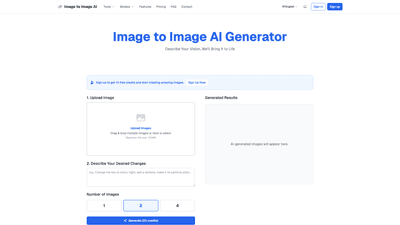
What is Image to Image AI
Image to Image AI is a powerful, AI-powered platform that enables creators to transform existing photos into brand-new visuals driven by descriptive prompts. By leveraging advanced models similar to Stable Diffusion, the tool analyzes the content and style of an input image and applies complex, context-aware edits based on user instructions. It’s more than a filter or basic edit—it’s a collaborative creative partner that can convert a simple portrait into a professional headshot, a daytime scene into a snowy landscape, or a photo into a specific artistic style. The platform emphasizes high-quality, high-resolution outputs, fast processing, and privacy, making it suitable for artists, designers, marketers, and everyday creators who want to push creative boundaries without specialized software.
Core features and capabilities
- Image-to-Image Transformation: Upload an image and apply substantial changes guided by descriptive prompts. Change style, mood, setting, and elements within the scene.
- Artistic Style Transfer: Recreate input images in the style of famous artists (e.g., Van Gogh, Picasso, Monet) or other distinctive aesthetics.
- Realistic Scene Transformation: Dramatically alter the setting, lighting, time of day, and atmosphere while preserving key subject details.
- Creative Character Design: Generate new character concepts by refining features, outfits, and fantastical elements from base sketches or photos.
- AI-Powered Photo Restoration: Restore color, sharpen details, and repair minor imperfections in aging or damaged photos.
- Architectural & Interior Design Mockups: Visualize design changes in rooms or exterior spaces with varied color schemes and furniture styles.
- Product & Ad Creative Variations: Produce multiple variations of product imagery for campaigns, e-commerce, and marketing collateral.
- High-Resolution Output: Outputs suitable for social media, marketing materials, and professional use, with options for watermark-free, high-quality renders (depending on plan).
- Flexible Pricing Tiers: A range of plans from a free trial with credits to monthly/yearly subscriptions offering thousands of credits and commercial rights (varies by tier).
- Privacy and Security: Images are processed securely and are not used for other purposes or stored beyond generation needs, ensuring creator peace of mind.
How to Use
- Upload Your Image
- Drag-and-drop or select an image file (supports common formats like JPEG, PNG, WEBP).
- Up to 100MB per file to accommodate high-quality inputs.
- Describe Your Desired Changes
- Enter a descriptive prompt that clearly communicates the intended edits or stylistic shift.
- Be specific to improve results (e.g., “transform the daytime forest into a foggy, moonlit scene with soft pastel hues,” or “render the portrait in a Studio Ghibli-inspired aesthetic with gentle textures”).
- Generate and Download
- Click Generate to produce AI-generated results.
- Review, refine prompts if needed, and re-run.
- Download the final image for use in projects, portfolios, or campaigns.
Pricing and accessibility
- Free credits at sign-up: Start with 10 free credits to explore core capabilities.
- Trial packs: Access introductory bundles (e.g., 50 credits) for quick experimentation.
- Subscription plans: Various tiers available with monthly or yearly billing, offering larger credit allotments, faster processing, watermark-free renders, and commercial use licenses (availability varies by plan).
- Commercial rights: Higher-tier plans provide commercial usage rights suitable for marketing, businesses, and resale.
Typical plan highlights (illustrative, may vary by current offers)
- Free/Trial: 10 free credits to test the tool.
- Basic: Entry-level plan with a set number of credits per month, suitable for personal use.
- Standard/Pro: Increased credits per month, faster processing, watermark-free outputs, and enhanced usage rights.
- Premium/Enterprise: Maximum credits, fastest processing speeds, extended commercial licenses, and 4K ultra-high-resolution outputs.
Note: Always verify current pricing, credits, and license terms on the official pricing page, as plans and features may update over time.
Use cases and benefits
- Creative Portraits and Professional Headshots
- Elevate standard headshots by applying studio-like stylization, clean backgrounds, and refined lighting without expensive equipment.
- Artistic Reimagining of Photos
- Transform landscapes, cityscapes, or products into iconic art styles or fantasy scenes, enabling unique portfolio pieces and social media content.
- Marketing and Ad Campaigns
- Create multiple image concepts quickly by varying settings, moods, and styling while maintaining brand consistency.
- Editorial and Storytelling
- Generate character designs or scene variants to support storytelling, game development, or visual novels.
- Memorabilia Restoration
- Restore and recolor aging photos, improving clarity while preserving nostalgic value.
- Design and Architecture Visualization
- Experiment with interior and exterior design concepts, furniture, color palettes, and lighting before committing to physical changes.
Key advantages
- Time Efficiency: Rapidly prototype multiple visual directions from a single source image, reducing manual editing time.
- Accessibility: No specialized software or steep learning curve required; intuitive interface suits a wide range of users.
- Creative Freedom: Materializes vision through descriptive prompts, enabling non-artists to achieve professional results.
- High-Quality Outputs: Produces high-resolution images suitable for social media, marketing, and print.
- Privacy and Security: Uploads are designed to be private and used solely for the generation task.
Who should consider using Image to Image AI
- Designers and artists seeking to explore new styles or quickly prototype concepts.
- Marketers needing adaptable visuals for campaigns, product launches, or branding experiments.
- Photographers looking to add stylized edits or restore memories with AI-assisted refinements.
- Content creators and game developers needing concept art, character variations, or scene mockups.
- Small businesses and freelancers requiring cost-effective, fast image generation for marketing assets.
Tips for better results
- Be specific in prompts: Clearly describe the desired style, mood, color palette, lighting, and other details.
- Use iterative prompts: Start with a broad change and progressively refine prompts based on results.
- Provide reference cues: Mention known styles or artists to guide the transformation.
- Test diverse inputs: Try different input images to see how the model interprets varying textures and compositions.
- Balance realism and style: If aiming for photorealism, emphasize lighting and depth cues; for artistic style, focus on brushwork and color treatment.
Frequently Asked Questions
-
What file formats are supported for uploads?
- JPEG, PNG, WEBP, and other common formats are supported.
-
Do I retain ownership of generated images?
- Licensing varies by plan. Higher-tier plans typically include commercial rights for business use. Check current terms for specifics.
-
Can I use generated images commercially?
- Commercial usage rights depend on the chosen plan. Personal use may be available on basic plans, while professional plans unlock broader commercial usage.
-
How private are my uploads?
- Uploads are processed securely and are used only for the generation process. They are not stored for long-term use or repurposed beyond the generation task.
-
Is there a free trial?
- Yes, the platform offers a free credits sign-up to try the tool before subscribing.
-
What if I’m not satisfied with a result?
- You can refine prompts and re-generate. Iterative prompts typically yield closer results to your vision.
-
Can I export in 4K or high resolution?
- Higher-tier plans offer high-resolution (including 4K) outputs, subject to plan terms.
-
How do credits work?
- Credits are consumed per generation, with higher-tier plans offering more credits per month and faster processing. Free credits and trial packs provide opportunities to experiment without upfront commitments.
-
Is it necessary to have design or art skills?
- No. The tool is designed for ease of use; users provide prompts, and the AI handles the creative execution. However, clear prompts help achieve better outcomes.
This comprehensive overview highlights Image to Image AI as a versatile, user-friendly platform that transforms existing images into new, stylistically rich visuals. Whether for personal projects or commercial campaigns, it offers high-quality outputs, flexible pricing, and a wide range of use cases that empower creators to unlock their full creative potential.