What is it
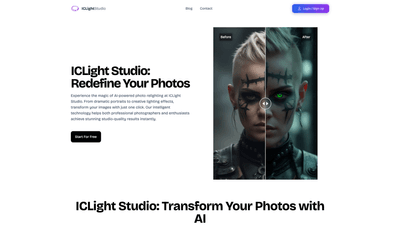
ICLight Studio is an AI-powered photo relighting and enhancement platform designed to elevate images to studio-quality lighting with ease. Built to serve both professional photographers and enthusiasts, it leverages advanced artificial intelligence to transform photos with a single click. Features include AI-driven relighting, text-to-image enhancement, and sophisticated portrait enhancements, all accessible through an intuitive, user-friendly interface. Whether you want dramatic portraits, soft cinematic looks, or creative lighting effects, ICLight Studio lets you achieve professional results quickly—often in just minutes.
Features
- AI-Powered Relighting: Generate precise, natural lighting effects that simulate studio setups, enabling dramatic or subtle lighting changes without complex edits.
- Text-to-Image Enhancement: Describe your desired effect in natural language, and the AI applies the look to your photo. From gentle portrait finishes to bold, dramatic moods, results are achievable with a few words.
- Advanced Portrait Enhancement: The AI analyzes facial features and composition to enhance details, skin tones, contrast, and dynamics while preserving a natural appearance.
- Professional Presets: Access a curated library of effects designed by expert photographers. Choose presets ranging from natural daylight to studio-style lighting to quickly set the mood for any image.
- Four-Step, User-Friendly Workflow: Upload your photo, describe your vision, optionally adjust lighting parameters, and obtain instant, professional results.
- Studio-Quality Outcomes for All Levels: The system blends powerful AI with an approachable interface, so both seasoned shooters and beginners can produce polished, professional-looking images.
- Free Access with Optional Upgrades: Core tools are available to use at no cost, with potential paid options for enhanced features or presets. Check the official site for current pricing details.
How to Use
- Upload Your Photo: Start by loading any image you want to enhance with professional lighting. The process is quick and supports a wide range of photo types.
- Describe Your Vision: Use natural language to tell the AI what lighting or mood you want—examples include “soft, flattering portrait lighting,” “dramatic studio-lit look with strong key light,” or “even, warm daylight feel.”
- Configure Settings: If you wish, adjust lighting parameters (intensity, direction, color temperature, shadows) to tailor the result to your preferences.
- Get Perfect Results: The AI instantly applies the chosen lighting effect, delivering studio-quality results that you can preview, compare (before/after), and refine as needed. Pricing cues from the platform indicate a free-to-use model with options to Try It Free or Start For Free, making professional photo enhancement accessible without an upfront investment. For exact pricing and plan details, refer to the official ICLight Studio pages.
Pricing
ICLight Studio emphasizes accessibility with a free-to-use baseline, allowing users to access core photo enhancement and lighting features at no cost. The site also highlights Try It Free and Start For Free options, suggesting that users can explore the tool and its capabilities before deciding on any paid plans. While premium presets or advanced features may exist, precise pricing tiers and feature lists are best confirmed on the official site, as they can evolve over time. In short, you can begin with a no-cost experience and upgrade if you need deeper functionality or additional presets.
Tips
- Start with a simple description: For beginners, begin with straightforward requests like “soft portrait lighting” or “natural daylight look” to establish a baseline.
- Use professional presets to accelerate workflows: If you’re short on time or need a quick mood, apply a preset and then fine-tune with sliders.
- Leverage the four-step workflow: Upload, describe, adjust, and apply. The structure is designed to deliver consistent, repeatable results.
- Experiment with different images: Portraits, lifestyle shots, fashion imagery, and product photography all benefit from AI relighting to varying degrees.
- Compare with before/after: Regularly review the original and enhanced versions to ensure the lighting looks natural and flattering.
- Save variations: Create multiple lighting variations for the same photo to choose the best look for different platforms or clients.
- Manage expectations: While AI relighting is powerful, results can vary based on image quality and lighting cues in the source photo. Use adjustments to harmonize the effect with the subject.
Frequently Asked Questions
-
What makes ICLight's AI relighting special? It combines state-of-the-art AI with a focus on natural, studio-quality lighting that can be applied with just a few clicks, delivering professional results across a wide range of photo types.
-
How does the text-guided relighting feature work? You describe the desired lighting effect in natural language, and the AI interprets the description to apply precise lighting changes to your image, from mood shifts to structural lighting.
-
Who can benefit from using ICLight Studio? Both professional photographers and enthusiasts can benefit. Professionals gain time-saving relighting and “one-click” studio quality, while hobbyists can access advanced lighting capabilities without extensive post-production skills.
-
What types of photos can ICLight enhance? The tool supports a broad spectrum, including portraits, lifestyle shots, fashion imagery, wedding photos, and general photography needing improved lighting and tonal balance.
-
Is ICLight free to use? Yes, the platform promotes a free-to-use model with additional Try It Free or Start For Free options. For precise pricing, plan availability, and any paid features, visit the official ICLight Studio pricing page.
-
How quickly can I expect results? Results are delivered in minutes, with a streamlined workflow designed to minimize post-processing time while preserving natural-looking lighting.
-
Is the service suitable for beginners? Absolutely. The intuitive interface, combined with professional presets and guided workflows, makes it accessible to newcomers while offering depth for more experienced editors.
-
Where can I get support or more information? You can typically find guidance and assistance through the platform’s help resources or by contacting support. When needed, you may reach out to support via the channels provided on the official site.
ICLight Studio positions itself as a powerful, accessible solution for AI-driven photo relighting and enhancement. By combining text-guided capabilities, portrait-focused enhancements, and a library of professional presets within a user-friendly framework, it offers a compelling option for achieving studio-quality lighting with minimal effort. Whether you’re a wedding photographer seeking faster post-processing, a lifestyle creator needing quick high-quality visuals, or a hobbyist aiming to elevate your photography, ICLight Studio provides a practical, scalable route to better images—one click at a time.