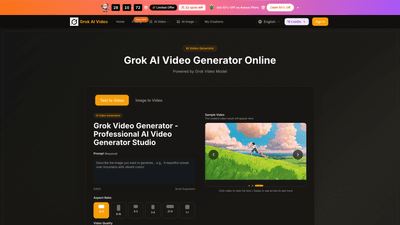
What is Grok AI Video
Grok AI Video is an online AI-powered video generator that turns text prompts and still images into cinematic videos. Built on the Grok Video Model, it enables text-to-video and image-to-video creation with multi-shot storytelling, seamless transitions, and high-end realism. It supports 4K Ultra HD outputs, fast generation, and professional-grade motion synthesis, making it suitable for creators, marketers, agencies, and teams who need quick, scalable video production without complex tools.
Features
- Text to Video and Image to Video
- Create videos from plain English prompts or transform static images into dynamic video content.
- Includes Grok Imagine free features to generate video from an image instantly.
- Professional 4K Output
- Native 4K/Ultra HD quality for cinematic visuals and presentation-ready assets.
- Smooth motion and rich detail with advanced motion synthesis.
- Multi-Shot Storytelling with Frame Continuity
- Native multi-shot storytelling that maintains character consistency, visual style, and atmosphere across scene transitions.
- Silky-smooth frame-to-frame progression with minimal artifacts.
- Quick Generation
- Lightning-fast video generation with outputs ready in seconds (typical 15–30 seconds per video concept).
- Style Freedom and Versatility
- Creative style freedom from realistic to fantasy, photorealistic to anime.
- Multi-format suitability for social media, marketing campaigns, presentations, and entertainment.
- Flexible Resolution and Aspect Ratios
- Supports 720p HD and 1080p Full HD (primary quality options) with various aspect ratios (e.g., 16:9, 9:16, 4:3, 21:9, 1:1).
- Commercial Use License and No Watermark
- Commercial use license included on eligible plans; output is watermark-free with annual plans.
- Extensive Plan Options
- Plans include Basic, Professional, and Enterprise with annual billing and generous credits.
- Includes access to Grok Video Generator and multiple included models (e.g., Nano Banana, Seedream, Veo 3, Sora 2, Seedance, Wan 2.5).
- Grok Imagine Free
- Explore image-to-video and video-from-image capabilities for quick concept creation at no upfront cost.
- Real-World Utility
- Designed for everyday video work—from quick mockups to campaign-ready assets.
- Suitable for social media, ads, marketing, presentations, and client projects.
How to Use
- Step 1: Choose Grok Video Generator
- Start with the Grok Video Generator for text-to-video or image-to-video creation, enabling 4K cinematic output with motion synthesis.
- Step 2: Upload Image or Enter Text Prompt
- Upload an image to transform or write a detailed text prompt describing the desired video.
- Grok supports both methods, enabling rapid generation of Grok AI Video in 4K with smooth transitions.
- Step 3: Generate and Download
- Click Generate to produce your video, then review the premium 4K output and save it immediately.
- Step 4: Refine and Perfect
- Use advanced editing features to tweak details, adjust settings, and finalize a professional-grade video.
Pricing (pricing model highlights)
- Simple, Transparent Pricing
- Annual plans offer substantial savings (Flash Sale: 50% off on Annual Plans; Limited availability with spots remaining).
- Basic
- About $15.9/month (billed annually) with 12,000 credits/year
- Up to 100 videos per month
- Includes: Grok AI Video Basic Yearly Plan, 12,000 credits/year, unlimited Grok AI Video downloads, commercial use license, no watermark, priority support (yearly), access to included models, and more
- Professional
- About $25.9/month (billed annually)
- 24,000 credits/year
- Up to 200 videos per month
- Everything in Basic, plus: Pro features, priority queue, no watermark on yearly plan, commercial use license, and priority support
- Enterprise
- About $49.9/month (billed annually)
- 72,000 credits/year
- Up to 600 videos per month
- Everything in Professional, plus: Enterprise-level features, priority generation queue, priority support, and more
- Credits and Usage
- Credits are consumed as you generate videos; higher plans provide more credits per year and higher monthly video caps.
- All plans include commercial use licensing and access to the Grok Video Model for professional production.
- Free/Trial Aspects
- Grok Imagine free features are available to explore image-to-video capabilities; some credits and features may be available without immediate subscription, depending on the current offer.
Note: The platform frequently runs limited-time offers (e.g., 50% off on annual plans with limited spots). Check current promotions on the pricing page.
Tips
- Plan your video concepts with prompts that are precise and descriptive to maximize quality and consistency across scenes.
- Use Grok Imagine free features to prototype concepts quickly before committing to a paid plan.
- Leverage multi-shot storytelling to preserve character continuity and visual style across scenes.
- Choose 4K output for professional presentations, client work, or marketing campaigns; switch to 720p/1080p for faster iterations if needed.
- Take advantage of aspect ratio options to tailor videos for specific platforms (e.g., 16:9 for YouTube, 9:16 for short-form social, 1:1 for feeds).
- Use the commercial license if you’re creating client work or agency assets.
- Monitor credits usage and align your plan with monthly video targets to avoid overages.
- Run quick A/B tests by generating multiple prompts or image inputs to explore concept variations rapidly.
- If you’re onboarding a team, Enterprise plans provide priority queues and enhanced support to streamline collaboration.
Frequently Asked Questions
- What is Grok AI Video?
- An online AI video generator that converts text prompts and images into 4K cinematic videos using the Grok Video Model, with features like multi-shot storytelling and motion synthesis.
- How does Grok AI Video work?
- It supports both text-to-video and image-to-video workflows, enabling rapid generation of high-quality 4K videos with cohesive transitions and consistent visuals.
- Can I export in 4K?
- Yes. Grok AI Video offers 4K Ultra HD exports for professional-grade visuals.
- Do videos have watermarks?
- Watermarks are typically removed on yearly plans; exact watermark policy may vary by plan and current promotions.
- What about licensing for commercial use?
- All supported plans include a Commercial Use License, making it suitable for agency work and client projects.
- How many credits do I get per plan?
- Basic: about 12,000 credits/year; Professional: about 24,000 credits/year; Enterprise: about 72,000 credits/year (corresponding monthly allotments apply). Credits are used for video generation and downloads.
- Can I cancel or change plans?
- Yes. Plans can be canceled, typically via account settings or by contacting support. For changes or cancellations, you may reach support at [email protected].
- What is Grok Imagine free?
- A free featureset that enables you to generate Grok video from an image without starting a paid plan, useful for quick concept exploration.
- What formats and aspect ratios are supported?
- Grok AI Video supports multiple aspect ratios (e.g., 16:9, 9:16, 4:3, 21:9, and 1:1) and common video formats suitable for social platforms, marketing, and presentations.
- How long does generation take?
- Generation is typically fast, with outputs ready in roughly 15–30 seconds per concept, depending on input complexity and plan resources.
- Who is it for?
- Creators, marketers, agencies, studios, and teams needing rapid, high-quality AI-assisted video production with professional capabilities.
If you’d like, I can tailor this product overview for a specific audience (e.g., agencies, solo creators, or enterprise teams) or optimize it further for a particular channel (website landing page, product brochure, or webinar script).